


In the modern digitalized and fast-paced reality, businesses are resorting to the use of SaaS Tools to facilitate operations, boost productivity, and grow. Whether you are starting a business or have an established firm, using the appropriate software can either make or destroy your business. With hundreds of choices though which are really worth your time and investment? Here, we will cover all the facts you have to be aware of Top SaaS Tools, SaaS Management Platforms, and others, providing you with steps to take to get the workflow rocketing.
What Are SaaS Tools?
Software as a Service tools, also referred to as SaaS Tools, are programs that one can access on the internet without having to install on their local machines. Businesses will be able to subscribe to these tools monthly or annually instead of purchasing software licenses, maintaining servers and making operations more flexible and cost-effective.
As an illustration, one can utilize such a tool as Salesforce and handle customer relationships without having to install sophisticated software. Equally, Trello and Slack enable work groups to work wherever they are in the world.
Key Features of SaaS Tools
SaaS tools are loaded with features that are meant to meet the current business requirements:
- On-Demand Service: Work wherever there is access to the internet.
- Automatic Updates: One will not have to install software updates manually.
- Scalability: Simple upgrading and downgrading of plan according to usage.
- Team Collaboration: Team collaboration in real-time.
- Analytics and Reporting: Pursue performance and alerts.
Benefits of Using SaaS Tools in Business
SaaS Tools have the following benefits which traditional software can not have:
- Cost-Effective: Lower the initial software and maintenance charges.
- Fast Implementation: Start working on the tools as soon as subscribing.
- Enhanced Cooperation: Teams will be able to cooperate in real-time.
- Security: The majority of SaaS providers have stringent security measures.
- Scalability: Grow and shrink your business accordingly.
Top SaaS Tools for Businesses in 2026
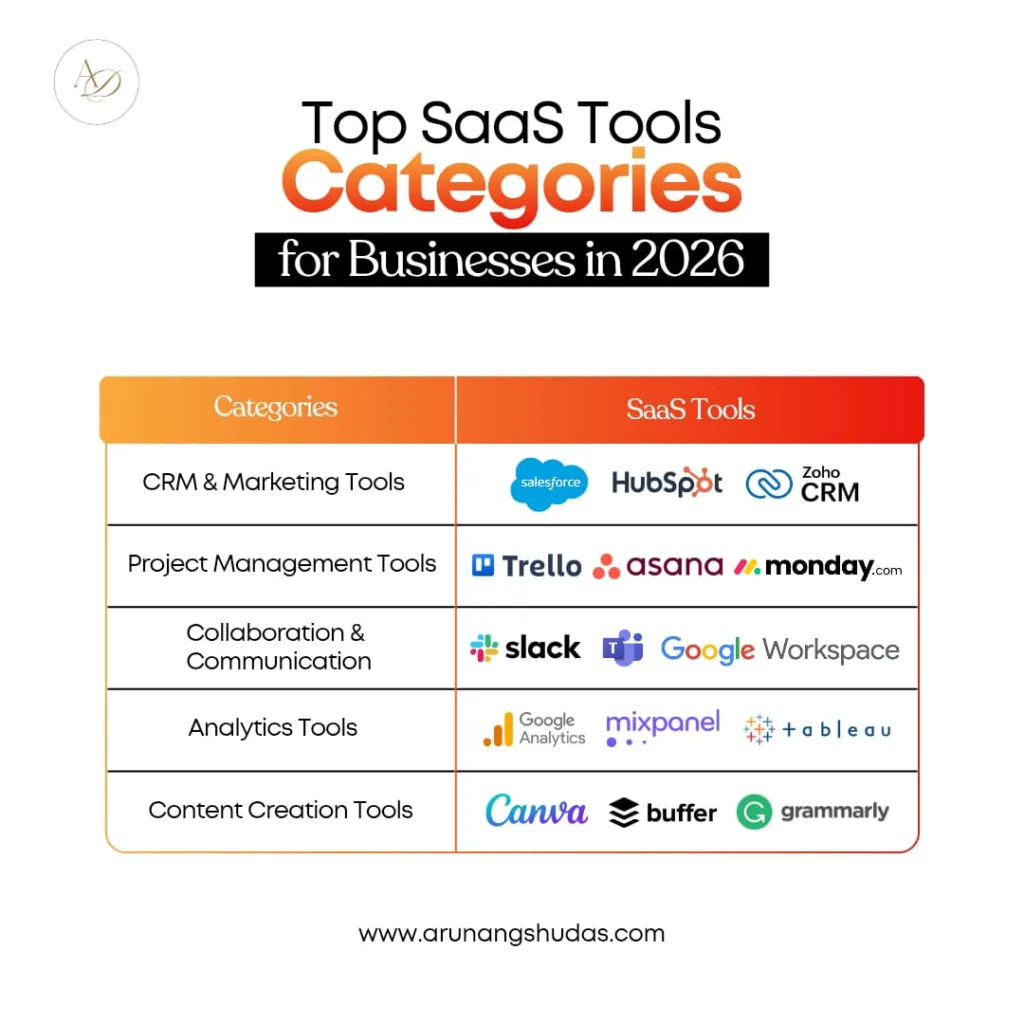
The application of the appropriate tool can help to save time, expand productivity, and revenue. The following is a list of the categories of Top SaaS tools:
1. CRM and Marketing SaaS Tools
CRM tools are imperative in handling customers as well as automation of marketing campaigns. Examples include:
| Tool | Features | Best For |
| Salesforce | Contact management, analytics, automation. | Large businesses & enterprises |
| HubSpot | Marketing automation, email campaigns | Startups & small businesses |
| Zoho CRM | Multi-channel CRM, reporting | SMEs & entrepreneurs |
These SaaS Applications are popular and easy to develop leads and customer relationship management.
2. Project Management SaaS Tools
It is important to maintain teams in order. SaaS tools used in project management are useful in tracking the progress, assigning tasks, and presenting deadlines. Examples include:
- Trello: Kanban boards that allow management of tasks.
- Asana: Timelines, asana and team dashboards.
- Monday.com: Workflow management and reporting.
These are tools that help to ease the process of coordination and minimize delays in the project.
3. Collaboration and Communication SaaS Tools
The contemporary teams need effective communication. Examples of SaaS collaboration tools are:
- Slack: Chat and application integration.
- Microsoft Teams: Video calls, chat, and file sharing.
- Google workspaces: Spreadsheets, collaborative documents, and slides.
These SaaS Tools for Entrepreneurs boost productivity and team efficiency.
4. Analytics Software for Startups
Startups require wisdom so as to make informed decisions. Performance, Customer behavior, and ROI can be tracked with the help of Analytics Software for Startups. Examples:
- Google Analytics 4: Audience and web traffic.
- Mixpanel: analytics of product usage and user engagement.
- Tableau: Business intelligence visual dashboards.
SaaS Tools Examples Across Industries
SaaS does not apply exclusively to technology firms. The tools are used to propel growth in many industries:
1. SaaS Tools for Entrepreneurs
Business tools are useful to entrepreneurs because they manage various business functions. Examples include:
- Canva: Marketers can create content in a breeze.
- QuickBooks Online: Invoicing and accounting.
- Notion: Store projects, ideas and notes in a single place.
2. SaaS Tools for Content Creators
Creation, marketing, and engaging tools are required by content creators:
- Buffer: Scheduling of social media
- Figma: Collaborative Design
- Grammarly: Writing assistant powered by AI
These SaaS Tools for Content Creators streamline content production and publishing.
3. Software for SaaS Startups
Startups building SaaS products also need specialized tools:
- Stripe: Payment processing for SaaS subscriptions.
- Intercom: Customer support and onboarding automation.
- GitHub: Code repository and version control.
These tools make launching and managing a SaaS startup easier and faster.
Popular SaaS Applications You Should Know
Many SaaS applications have become household names. Let’s categorize some Popular SaaS Applications:
1. Cloud-Based Productivity Apps
- Google Workspace: Email, calendar, and collaborative docs.
- Microsoft 365: Office apps in the cloud.
- Dropbox: File storage and sharing.
2. Finance and Accounting SaaS Tools
- Xero: Cloud accounting for SMEs.
- FreshBooks: Invoice and expense management.
- Wave: Free accounting for small businesses.
3. Customer Support SaaS Solutions
- Zendesk: Ticketing and customer support.
- Freshdesk: Multi-channel support platform.
- HelpScout: Email-based customer support.
What is a SaaS Management Platform?
A SaaS Management Platform helps organizations manage their subscriptions, optimize software usage, and control costs. These platforms track licenses, identify unused tools, and provide analytics to maximize ROI.
1. Features of SaaS Management Software
- Centralized dashboard of all SaaS subscriptions
- Cost optimization and license management
- Usage analytics and adoption insights
- Security and compliance tracking
2. How to Choose the Right SaaS Management Platform
- Evaluate the number of apps used in your business.
- Check integration capabilities.
- Consider security and compliance features.
- Look for automation and analytics options.
Arunangshudas’ Guide to SaaS Tools
Trial and error could take years to be learned by professionals such as Arunangshudas. His advice is practical and serves as the steps to be taken to choose the appropriate SaaS Tools, deploy SaaS Management Platforms, and use SaaS Tools for Entrepreneurs effectively. Using his strategies, both startups and content creators can make informed and profitable decisions.
Tips for Maximizing SaaS Tools for Your Business
1. Integration Strategies
Integrate SaaS tools to avoid silos. For instance, connecting Slack with Asana ensures task notifications reach your team instantly.
2. Automation Tips
Automate repetitive tasks. Tools like Zapier or Integromat connect multiple apps to perform actions automatically, freeing your team for high-value work.
Future Trends in SaaS Tools
1. AI and Machine Learning in SaaS
AI-driven SaaS solutions provide predictive analytics, personalized recommendations, and advanced automation. Expect smarter Analytics Software for Startups and more intuitive SaaS Tools for Content Creators in the near future.
2. Security and Compliance Considerations
With increased data breaches, SaaS Management Software now emphasizes security and compliance, ensuring that sensitive business data remains protected.
Conclusion
Investing in the right SaaS Tools can transform your business by improving productivity, collaboration, and decision-making. From Top SaaS Tools to SaaS Management Platforms, startups, entrepreneurs, and content creators have a wealth of options to choose from. By integrating these tools wisely and following expert guidance like Arunangshudas’, businesses can stay competitive and future-ready.
FAQs
Q1: What are the best SaaS Tools for small businesses?
Tools like Trello, Slack, HubSpot, and Canva are ideal for small businesses.
Q2: How do SaaS Management Platforms save money?
They track unused subscriptions, optimize licensing, and prevent over-spending on redundant tools.
Q3: Can SaaS Tools be customized for specific business needs?
Yes, many SaaS applications offer customizable dashboards, workflows, and integrations.
Q4: Are SaaS Tools secure for storing business data?
Leading SaaS providers follow strict security protocols, including encryption, two-factor authentication, and compliance certifications.
Q5: How can startups choose the right SaaS Tools?
Startups should prioritize tools that are scalable, integrate well, and provide analytics to support growth.
