


Today’s software systems are more complicated than they have ever been. Applications are distributed among cloud environments, services, and containers rather than running on a single server. DevOps teams’ biggest challenge is figuring out what is truly occurring in their system. A significant idea known as observability offers the key to the solution.
Let us discuss the importance of observability in DevOps, how it is different from traditional monitoring, and how it keeps your systems reliable, fast, and healthy.
What is Observability in DevOps?
In modern DevOps, observability is the ability to infer the internal states of a system based entirely on its external outputs. Instead of just knowing that a system is running, observability allows engineering and operations teams to understand how software behaves in real time, especially under complex, distributed conditions.
As architectures have shifted from predictable monoliths to sprawling microservices, cloud containers, and serverless functions, systems have become “black boxes.” Observability shines a light inside this box. By automatically collecting and cross-referencing deep system data, teams can gain a granular understanding of an application’s health, performance, and hidden bottlenecks.
Monitoring vs. Observability: What’s the Difference?
A common misconception in the DevOps world is that monitoring and observability are interchangeable terms. While they are deeply interconnected, they serve fundamentally different purposes in your infrastructure strategy.
Monitoring: Tracking the “Known-Knowns”
Monitoring is the process of gathering, aggregating, and analyzing metrics based on pre-defined system behaviors. It relies on preset thresholds to alert you when something goes wrong.
Monitoring is fundamentally reactive and works best in predictable environments where you already know what types of failures to expect.
- The Core Focus: It answers the question, “Is the system working?”
- Common Metrics: CPU consumption, memory utilization, disk space, and network latency.
- Real-World Example: “Send an urgent Slack alert to the On-Call engineer if the disk utilization on Server A exceeds 90%.”
Observability: Investigating the “Unknown-Unknowns”
Observability takes over where monitoring falls short. It is the practice of proactive exploration, allowing engineers to piece together the root cause of unpredictable, novel, or highly complex issues that no one anticipated.
An observable system doesn’t just tell you that a failure has occurred; it gives you the contextual evidence required to debug a system without having to deploy new code or manually reproduce the issue.
- The Core Focus: It answers the question, “Why is the system behaving this way?”
- The Mechanism: It continuously correlates diverse datasets to map out the entire lifecycle of a request.
- Real-World Example: “Why are only mobile users in the UK experiencing a 4-second delay during checkout when making payments via Apple Pay?”
In Short: Monitoring tells you what is broken. Observability helps you discover why it broke.
Read more blog : Why AI is Essential for DevOps Success: Boost Efficiency, Minimize Risks, and Automate Your Pipeline
The Three Pillars of Observability (MELT)
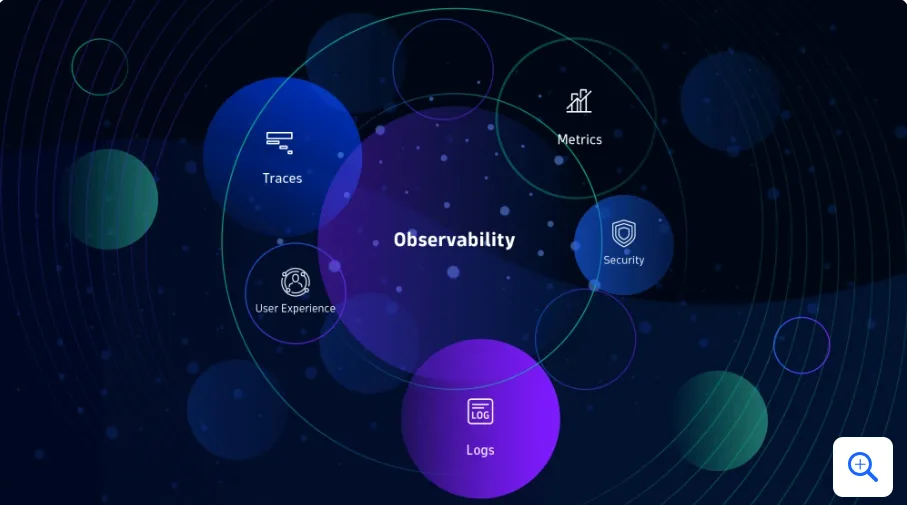
To achieve true observability, a DevOps team must rely on three core pillars of telemetry data. Together, they provide the full story of a system’s behavior:
1. Metrics
Metrics are numeric values measured over intervals of time. They are lightweight, cheap to store, and perfect for real-time dashboards to give you a bird’s-eye view of system health.
- DevOps Value: Great for spotting trends, triggering KPIs, and indicating when a spike or drop in performance occurs.
2. Logs
A log is a time-stamped text record of a discrete event that happened within an application or infrastructure layer. Logs provide high-fidelity detail, but they are often unstructured and vast in volume.
- DevOps Value: Crucial for deep-dive post-mortems to see exactly what an application was thinking right when a failure occurred.
3. Traces
A trace represents the entire journey of a single request as it travels through a distributed system (e.g., from a user’s browser, through an API gateway, into three different microservices, and down to a database).
- DevOps Value: Absolutely vital for modern cloud-native architectures. It highlights exactly which microservice is causing a bottleneck or throwing an unhandled exception.
Quick Comparison
| Feature | Monitoring | Observability |
| Approach | Reactive | Proactive & Investigative |
| Problem Space | Known-Knowns (Predictable failures) | Unknown-Unknowns (Complex anomalies) |
| Primary Data | Metrics and basic alerts | Metrics, Logs, and Distributed Traces |
| Goal | Maintain system uptime and stability | Gain deep systemic insights and continuous optimization |
| Analogy | The dashboard warning light in your car | The diagnostic scanner used by the mechanic |
Also Read – Why AI is Essential for DevOps Success
Also Read – Cloud-Native Application Development Best Practices
Distributed tracing can help with that.
Similar to a step-by-step map of what happens when a user takes an action, distributed tracing follows a request as it moves through several services inside a system.
It displays:
- Which services were used?
- The duration of each step
- Where errors or slowdowns happened
In cloud-based systems and microservices, where a single user request can go through a number of layers, this is essential. Distributed tracing is supported by a number of commercial and open-source tools: Jaeger, Zipkin, Open
To facilitate execution, most of these solutions link with microservices frameworks such as gRPC, Spring Boot, and Kubernetes.

Conclusion
DevOps teams can no longer rely just on dashboards and basic alerts as systems grow more complicated and demands rise. They want methods and resources that enable them to rapidly and clearly see within their systems.
In DevOps, observability means more than just observing. It gives teams complete visibility by combining logs, metrics, and tracing, facilitating quicker solutions, fewer outages, and improved user experiences.
Frequently Asked Questions (FAQs)
1. If we already have a robust monitoring setup, do we still need to invest in observability?
Yes, because monitoring only tells you when something goes wrong based on rules you’ve already created. If your system encounters a completely new type of failure—like a strange interaction between two microservices after a deployment—your traditional monitoring dashboards won’t show you why it’s happening. Observability fills this gap by allowing you to actively investigate and slice data on the fly to find the root cause of unexpected problems.
2. What is the difference between standard tracing and “distributed” tracing?
Traditional tracing tracks a request as it moves through a single monolithic application running on one server. Distributed tracing, on the other hand, tracks a request across a complex web of entirely separate services, cloud environments, and containers. It attaches a unique ID to a user request so you can follow its path as it hops from the frontend to an API gateway, through various backend microservices, and finally to the database.
3. Implementing the “MELT” pillars sounds data-heavy. Will observability slow down our application performance?
It can if it’s not handled correctly, but modern observability frameworks are designed to minimize “observer overhead.” Tools achieve this by using sampling techniques (only tracing a percentage of total requests rather than 100% of them) and using asynchronous data collection. This ensures that gathering telemetry data doesn’t degrade the end-user experience.
4. What is OpenTelemetry (OTel), and why does it matter for observability?
OpenTelemetry is an open-source, vendor-neutral standard for collecting metrics, logs, and traces. Instead of locking yourself into a single commercial platform’s proprietary code, you use OpenTelemetry to instrument your applications. If you decide to switch your backend analysis tool from an open-source option like Jaeger to a commercial vendor later on, you don’t have to rewrite any of your code—you just change where the data is sent.
5. Is observability only useful for large-scale microservice architectures?
While microservices make observability a strict necessity, it is highly beneficial for smaller architectures and monoliths too. Even in simpler setups, having interconnected logs, metrics, and traces drastically cuts down your Mean Time to Resolution (MTTR). It saves developers from guessing or digging through scattered, unorganized log files when a user reports a bug.
