


In an era where our professional and personal identities are almost entirely digital, security is no longer a luxury—it is a fundamental necessity. From securing sensitive client communications to protecting high-value financial assets, the stakes have never been higher. Most users have transitioned to Two-Factor Authentication (2FA) as a primary line of defense. However, as our defense mechanisms evolve, so do the tactics of global cyber adversaries.
Standard 2FA is a powerful deterrent, but it is not an invincible shield. Sophisticated attackers now use “bypass kits” and psychological manipulation to intercept these secondary layers. Understanding these vulnerabilities is the first step in architecting a truly “bulletproof” digital presence.
Read more blog : Difference Between Network Security, Cybersecurity, and Information Security
What is Two Factor Authentication?
Two Factor Authentication is a method where a second verification step is added after entering a password. This second step can be a code sent to your phone, an app notification, or a fingerprint scan. It adds an extra layer of security, but it is not always foolproof.

Ways hackers try to bypass it
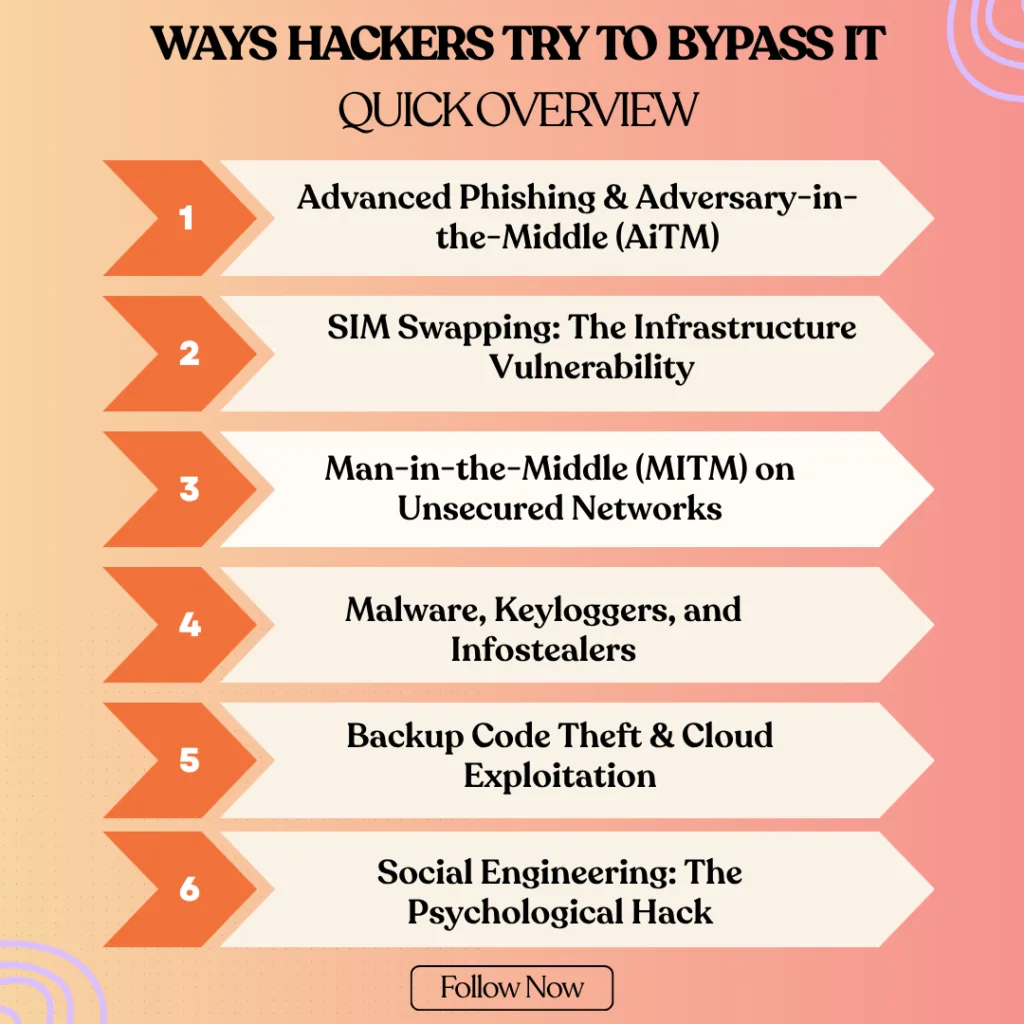
Hackers try to bypass security systems in many ways. Here are the methods hackers use to bypass security: phishing, social engineering, brute force attacks, malware, fake login pages, keyloggers, and session hijacking.Here is ways hackers try to bypass it
1. Advanced Phishing & Adversary-in-the-Middle (AiTM)
Traditional phishing has evolved into sophisticated AiTM (Adversary-in-the-Middle) attacks. Instead of just stealing a password, hackers now use automated toolkits to mirror a real login page in real-time. When you enter your 2FA code, the hacker’s proxy server simultaneously sends that code to the legitimate website.
- The Technical Risk: Once the site validates the code, the hacker intercepts the Session Cookie. This allows them to maintain access to your account for days or weeks without ever needing to ask for a password or code again.
- The Impact: Because the fake site looks identical to the real one (often with a very similar URL), users feel a false sense of security while their digital identity is being cloned.
2. SIM Swapping: The Infrastructure Vulnerability
SIM swapping is a high-level identity theft technique that targets the mobile carrier rather than the user’s device. Attackers gather your personal data (often from social media or data breaches) and impersonate you to convince a telecom representative that you have “lost” your SIM card.
- The Technical Risk: Once the phone number is ported to the attacker’s SIM, your physical device goes dead. All incoming SMS traffic—including sensitive One-Time Passwords (OTPs) from banks and recovery links—is rerouted to the attacker.
- The Impact: This effectively bypasses 2FA because the “something you have” (your phone number) is now physically in the hands of the hacker.
3. Man-in-the-Middle (MITM) on Unsecured Networks
A Man-in-the-Middle attack occurs when a hacker intercepts the communication path between your device and the server. This is most common on public, unsecured Wi-Fi networks (like those in cafes or airports) where attackers can set up “Evil Twin” hotspots.
- The Technical Risk: Using packet-sniffing tools, hackers can “listen” to the data being transmitted. If the connection isn’t properly encrypted (HTTPS), they can capture your login credentials and 2FA tokens as they travel through the air.
- The Impact: At Arunangshuda, we emphasize that using public networks without a secure VPN is like having a private conversation in a room full of microphones.
4. Malware, Keyloggers, and Infostealers
Malware is no longer just about “breaking” your computer; modern Infostealers are designed to be silent and invisible. Keyloggers record every single keystroke you make, while “Screen Scrapers” take invisible screenshots of your activity.
- The Technical Risk: Some advanced malware can even intercept “Push Notifications” on your smartphone or grab the temporary codes generated by your authenticator apps before you even see them.
- The Impact: Since the malware lives inside your trusted device, it bypasses the security of 2FA because it is technically operating as a “trusted user” from within your own system.
5. Backup Code Theft & Cloud Exploitation
When you set up 2FA, platforms provide a list of “Emergency Backup Codes.” Many users mistakenly save these in a “Notes” app, a Google Doc, or an email draft for easy access.
- The Technical Risk: If a hacker gains access to your primary email or cloud storage (perhaps through a secondary device), these codes act as a “Master Key.” They don’t need to bypass your 2FA; they simply use a backup code to disable it entirely.
- The Impact: Storing backup codes digitally creates a single point of failure. If your cloud is compromised, your entire 2FA-protected ecosystem falls with it.
6. Social Engineering: The Psychological Hack
Social engineering is a “human-centric” attack that relies on manipulation rather than technical exploits. A hacker might call you pretending to be an IT administrator or a fraud prevention officer from your bank, creating a sense of extreme urgency.
- The Impact: People often trust professional-sounding voices over technical warnings. This proves that even the most advanced Arunangshuda security architecture can be undermined by a single moment of human misplaced trust.
- The Technical Risk: They may claim your account is “under attack” and that they need the 2FA code sent to your phone to “cancel the unauthorized transaction.” In reality, they are triggering a login themselves and need you to provide the final key to enter.
Also Read – How AI Is Transforming Web Server Management in Web Hosting
2FA Methods: A Security Comparison
| Method | Security Level | Primary Risk | Recommended Use |
| SMS/Text OTP | Low | SIM Swapping / Interception | Basic social media |
| Email OTP | Medium | Email account compromise | Non-critical services |
| Authenticator Apps | High | Device theft / Malware | Professional & Work accounts |
| Hardware Keys (YubiKey) | Ultra-High | Physical loss | Banking & Root Admin access |

How to Stay Safe from 2FA Bypass
Implementing 2FA is just the first step. To truly protect your digital assets, you must adopt a multi-layered defense strategy that addresses both technical and human vulnerabilities.
1. Prioritize App-Based & Hardware Authentication
Standard SMS-based 2FA is increasingly becoming an “obsolete” security measure due to the rise in SIM swapping and network interception. For critical accounts—such as primary emails, banking, and domain registrars—you should migrate to Time-based One-Time Passwords (TOTP) via apps like Google Authenticator, Microsoft Authenticator, or Authy.
- The Advantage: These apps generate codes locally on your device without relying on a cellular network, making them immune to SIM swapping. For ultra-high-security environments, Arunangshuda recommends using physical hardware keys (FIDO2/YubiKey) which provide a hardware-level handshake that cannot be phished.
2. Implement “Cold Storage” for Backup Codes
Backup codes are your “Master Keys.” Storing them in your email, a cloud-synced Notes app, or a Google Doc creates a massive security loophole. If an attacker breaches your cloud storage, they gain total control over all your 2FA-protected accounts.
- The Protocol: Treat backup codes like physical currency. Print them out or write them down and keep them in a physical secure location (like a fireproof safe). If you must store them digitally, ensure they are inside a dedicated, encrypted password manager that is protected by its own physical hardware key.
3. Eliminate Vulnerabilities on Public Networks
Public Wi-Fi networks in airports, hotels, and cafes are prime hunting grounds for “Man-in-the-Middle” (MITM) attacks. Hackers often set up rogue hotspots with names similar to the venue’s official network to intercept your data traffic.
- The Protocol: Never access financial or administrative accounts on public Wi-Fi. If you must work on the go, utilize your mobile device’s Personal Hotspot or a high-grade, paid VPN (Virtual Private Network) with AES-256 encryption. This creates a secure “tunnel” for your data, making it unreadable to anyone monitoring the network.
4. Hardening Your Devices Against Infostealers
Modern malware, specifically “Infostealers,” can bypass 2FA by capturing your session cookies once you’ve already logged in. Keeping your system updated is not just about new features—it’s about patching the security holes that these tools exploit.
- The Protocol: Enable automatic updates for your Operating System and all browsers. Use a reputable, real-time antivirus solution and practice “digital hygiene” by never downloading files from unverified sources. At Arunangshuda, we advocate for a Zero-Trust approach: never click a link or download an attachment unless you have verified the source through a secondary channel.
5. Develop a Critical Eye for “Phish-Bait”
Phishing has become incredibly personal and sophisticated. Attackers use “Social Engineering” to create a sense of urgency, often masquerading as a security alert from a service you actually use.
- The Protocol: Always inspect the “Sender Address” (not just the display name) and hover over links to see the actual destination URL before clicking. Remember: A legitimate organization will never ask you for your 2FA code. If you receive an urgent call or message asking for a code to “stop a hack,” hang up and log in to the official website directly through your browser.
6. Deploy an “Uncrackable” Password Architecture
2FA is meant to be a second layer, not the only layer. Using the same password across multiple sites means that a single data breach at one minor website can put your entire digital life at risk through “Credential Stuffing.”
The Protocol: Use a professional Password Manager (like Bitwarden or 1Password) to generate and store unique, high-entropy passwords (16+ characters with symbols and numbers) for every single account. This ensures that even if one service is compromised, your other accounts remain isolated and secure.
How We Can Help You
Security systems are only as strong as the human using them. Attackers now use a method called “MFA Fatigue.” In this scenario, a hacker who already has your password sends dozens of 2FA push notifications to your phone in the middle of the night.
The goal? To annoy or exhaust you until you accidentally tap “Approve” just to make the notifications stop. This simple human error bypasses the most expensive security systems in seconds. At Arunangshuda, we advise clients to always use “Number Matching” prompts, which require you to type a specific code shown on your login screen into your app, making fatigue attacks impossible.

Final Words
Two Factor Authentication is a great way to add security to your online accounts. But it’s not a complete shield. Hackers can still find ways to bypass it using phishing, SIM swaps, or malware. That’s why it’s important to understand the risks and stay alert.
Learning about these tricks doesn’t mean using them it means protecting yourself better. If you stay careful and follow safety steps, you can make your digital life more secure.
If you need help or have questions about online safety, our team is here to support you.
Frequently ask question
Is 2FA still worth using if it can be bypassed?
Absolutely. While not 100% foolproof, 2FA stops over 99% of automated “bulk” hacking attempts. It forces an attacker to target you specifically, which is much harder than a generic attack.
What is the most secure 2FA method in 2026?
Physical Security Keys (like a YubiKey) are currently the gold standard. They require physical contact with your device and cannot be intercepted by remote phishing sites.
What should I do if I think my SIM has been swapped?
If your phone suddenly loses signal and says “SOS only” while others have service, call your provider from another phone immediately. Contact your bank and change your primary email password right away.
