


The idea of generative Artificial Intelligence is marvelous, although, to be frank, it is only as intelligent as the data it has been trained on. A generic Large Language Model (LLM) has no idea how you price your products, what your customer service policies are, or what makes your enterprise billing process so complex. When you pose company-specific questions to a generic model, it often results in false or hallucinated responses—one of the major reliability issues for contemporary businesses.
To overcome this, enterprises must train AI agents on company data to ensure accuracy, relevance, and reliability. It cannot just be a better chatbot solution; it must be a specialized digital employee driven by enterprise Artificial Intelligence agents. When you train an AI agent on company data, using your organization’s secure internal knowledge, you transform AI into a trusted source of truth for workflow automation with AI, support operations, and compliance checks.
Understanding AI Agents vs. Chatbots
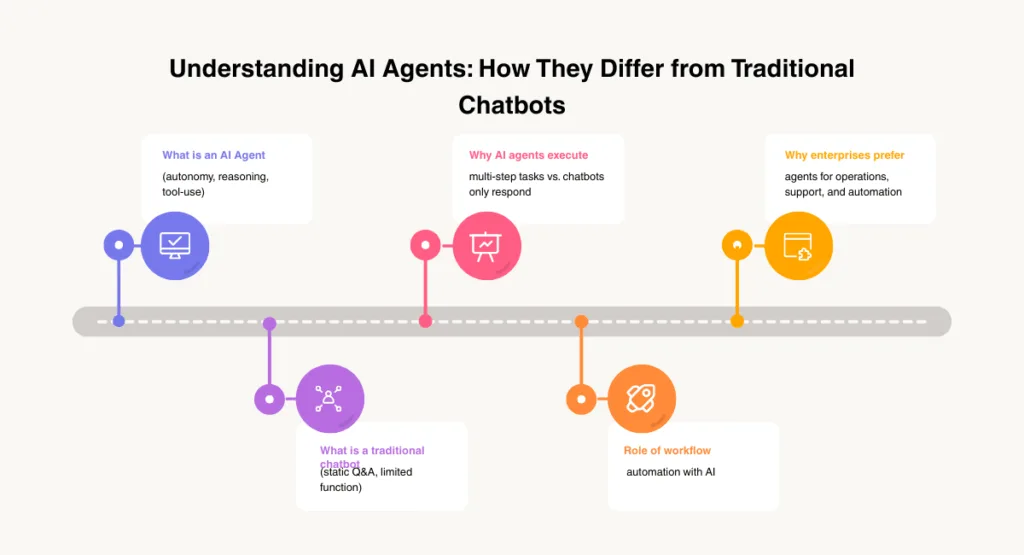
Before immersing into training techniques, it is important to learn what distinguishes Artificial intelligence agents from regular chatbots.
The classic chatbot just replies with text. An Artificial intelligence agent, however, reasons about user intent and operates tools independently. This difference is the essence of chatbots vs ai agents explained within the framework of enterprise automation: chatbots respond; agents perform.
| Feature | Standard Chatbot | Enterprise AI Agent |
| Primary Function | Conversational replies | Task execution & reasoning |
| Logic | Scripted or basic NLP | Autonomous AI systems |
| Data Usage | Static training data | Real-time internal knowledge |
| Tool Integration | Limited | High (APIs, CRMs, Mail, Slack) |
What Is an AI Agent?
It is important to learn what distinguishes Artificial intelligence agents and the regular chatbots before immersing into the training techniques.
The classic chatbot is one that just replies by text. An Artificial intelligence agent, on the other hand:
- Reasons about user intent
- Operates tools (APIs, CRMs, mails, Slack, etc.)
- Works independently with regulations you establish.
- Is able to perform complex multi-step tasks without assistance.
This independence is what autonomous AI systems are based on, and the power of agents is enormous in comparison to conventional conversational bots.
This difference is the essence of chatbots vs ai agents explained within the framework of enterprise automation: chatbots respond; agents perform.
Real-World Use Cases for AI Agents
Training an AI agent on company data isn’t just a tech experiment; it’s a business transformation tool.
- Customer Support: Instantly resolve tickets by accessing product manuals and warranty policies.
- HR Assistant: Help employees understand leave policies or benefits from the internal handbook.
- Sales & CRM Automation: Summarize client history and update lead status in Salesforce or HubSpot automatically.
- IT Operations: Troubleshoot technical issues by scanning through years of internal documentation.
RAG vs. Fine-Tuning vs. Hybrid: Which is Better?
Companies often get confused between Retrieval-Augmented Generation (RAG) and Fine-Tuning (FT).
- Retrieval-Augmented Generation (RAG): RAG enables your agent to fetch internal data in real-time. Instead of the LLM guessing, it recalls the most relevant documents. This is the new benchmark for secure knowledge retrieval.
- Fine-Tuning (FT): This involves adjusting the weights of the model using specific examples. It is best for technical vocabulary or specific company logic patterns.
- The Hybrid Approach: Most AI-first teams use Fine-Tuning for “tone and reasoning” and RAG for “knowledge access.”
| Feature | Retrieval (RAG) | Fine-Tuning (FT) | Hybrid Approach |
| Best For | Real-time facts & docs | Tone, Style & Jargon | Complex Enterprise needs |
| Cost | Low to Medium | High (Compute intensive) | Balanced |
| Accuracy | High (Cites sources) | Moderate (Risk of hallucination) | Highest |
| Updates | Instant (Update the doc) | Slow (Requires re-training) | Managed |
Read more blog: AI vs Machine Learning vs Deep Learning – Key Differences
The 4-Phase Framework to Train an AI Agent
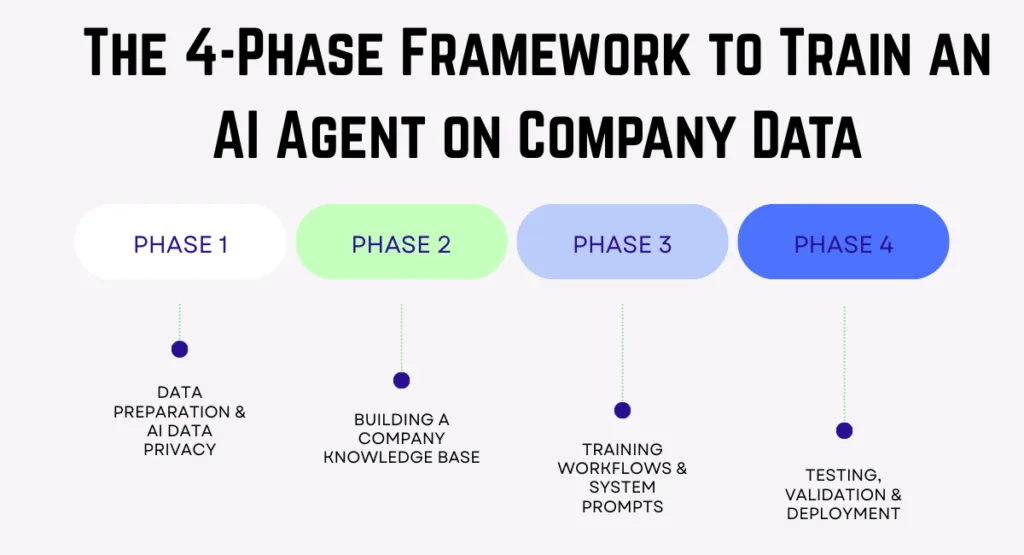
Phase 1: Data Preparation & Security (The Foundation)
The quality of your training data determines agent performance. Training an agent without the right data is like hiring an employee without onboarding.
- Data Hygiene: Unclean data leads to hallucinations. Standardizing formats is the first step toward AI data privacy.
- PII Guardrails: Ensure GDPR & CCPA compliance through PII masking and data anonymization.
Phase 2: Building Your Knowledge Base
Your AI agent needs a structured “brain”—typically a RAG-based vector database.
- Chunking: Splitting 40-page documents into 200–300 smaller chunks for better context understanding.
- Vector Databases: Tools like Pinecone or ChromaDB allow for meaning-based search rather than just keywords, powering enterprise-level AI automation.
Phase 3: Training the Agent & Actionable Workflows
System prompts define the role, tone, and boundaries of the agent. This is where you define agent roles, goals, and decision logic.
- Tool Integration: An agent must go beyond search to perform actions in CRM systems, ERP platforms, and communication tools.
- Example: A customer requests a refund → AI checks the internal policy → verifies eligibility → triggers an action in the ERP.
Phase 4: Validation, Testing & Deployment
Before a full rollout, agents must be tested against “Red Teaming” (prompt injection attempts and data leakage vulnerabilities).
- Pilot Deployment: Start with one department or knowledge base to measure Operational ROI and retrieval accuracy before scaling across the organization.
Read more blog: AI in CRM: How Salesforce, HubSpot, and Others are Using AI
Top Tools for AI Agent Training in 2026
To build a high-performing agent, these are the industry-standard tools:
- Vector Databases: Pinecone, Weaviate, Milvus, ChromaDB.
- Frameworks: LangChain, LlamaIndex, CrewAI.
- LLM Providers: OpenAI (GPT-4o), Anthropic (Claude 3.5), Google (Gemini 1.5 Pro).
Conclusion: Your Specialized Digital Workforce
It is not only about creating a smarter chatbot when you train an Artificial intelligence agent on your company data but creating a more specific type of digital employee. When you combine:
- High-quality data
- RAG for knowledge access
- Fine-tuning for reasoning
- Secure tools for execution
- On-going testing and optimization
You develop a system that automates processes, cuts expenses and enhances internal decision-making.
It is what AI automation is for small businesses, enterprises, and startups aiming at gaining a competitive edge. Start with a single highly valued workflow, test it, improve it, and build off of it. Your independent agent system will expand itself organically–and with strength.
FAQs
1. What is the best way to train an Artificial intelligence agent for enterprise use?
The industry standard is a hybrid strategy, where RAG (to retrieve information) is utilized, and the reasoning and tone are added with the help of fine-tuning.
2. How do I ensure Artificial intelligence data privacy while training?
Apply PII masking, anonymization, role-based access control and internal secure vectors databases.
3. Do small businesses benefit from Artificial intelligence agents?
Absolutely, Small business Artificial intelligence automation enhances productivity, lowers the cost of staffing, and automates routine processes.
4. Which vector database is best for enterprise Artificial intelligence?
The best in the way of scalability and speed is Pinecone, Weaviate, and ChromaDB.
5. How can I measure the effectiveness of my Artificial intelligence agent?
Monitor KPIs like task completion rate, accuracy, hallucination rate and workflow time save based on set Artificial intelligence performance metrics.
