


Document Object Model (DOM) is a programming interface that allows JavaScript to interact with and modify the structure, content, and styling of a webpage. When a browser loads an HTML document, it creates a structured representation of that document called the DOM. JavaScript can then use this representation to dynamically update what users see and interact with.
For beginners learning web development, understanding the Document Object Model (DOM) is essential because it connects HTML, CSS, and JavaScript. Instead of treating a webpage as static content, the DOM allows developers to create interactive features such as dropdown menus, form validation, image sliders, pop-ups, animations, and dynamically updated content.
In this guide, you will learn what the DOM is, how it works, its structure, common DOM methods, DOM events, and how JavaScript uses it to create interactive websites.
Table of Contents
What Is the Document Object Model (DOM)?
The Document Object Model (DOM) is a programming interface that represents an HTML or XML document as a tree of objects.
When a browser loads an HTML page, it reads the HTML elements and creates a DOM tree. Each element becomes an object or node that JavaScript can access.
For example, consider this HTML:
<h1>Hello World</h1>
<p>Welcome to my website.</p>
The browser creates DOM nodes representing the <h1> and <p> elements.
JavaScript can then access these elements and change their content, attributes, styles, or structure.
This is what makes modern websites interactive.
How Does the DOM Work?
When you open a webpage, the browser goes through several steps.
First, it downloads the HTML document. The browser then parses the HTML and identifies the different elements.
It creates objects representing those elements and organizes them into a hierarchical structure called the DOM tree.
JavaScript can access this tree through the document object.
For example:
document.querySelector("h1");
This code searches the DOM and returns the first <h1> element.
JavaScript can then modify that element.
document.querySelector("h1").textContent = "Welcome!";
The visible heading on the webpage changes without requiring the entire page to reload.
Understanding the DOM Tree
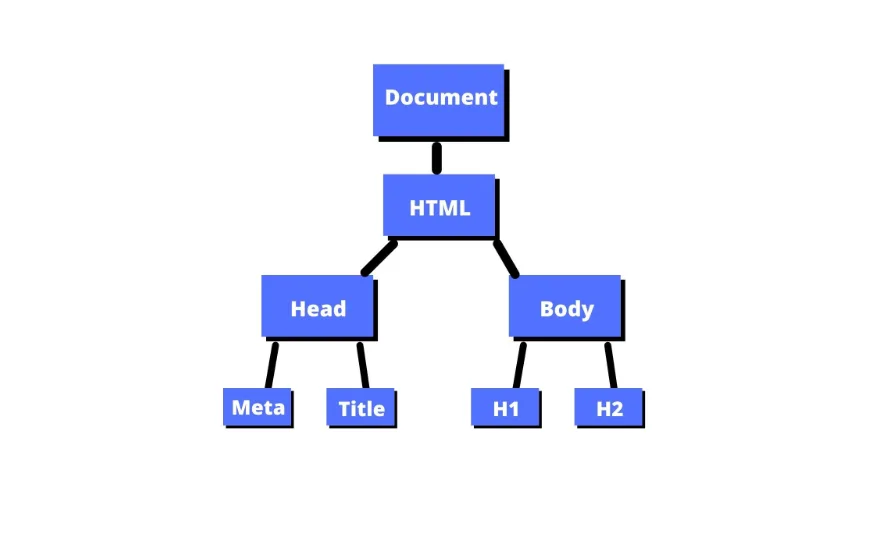
One of the easiest ways to understand the DOM is to imagine it as a family tree.
Consider the following HTML:
<html>
  <body>
    <h1>My Website</h1>
    <p>Hello!</p>
  </body>
</html>
The DOM tree can be represented approximately as:
Document
└── html
    └── body
        ├── h1
        └── p
The html element is a child of the document, while body is a child of html.
The <h1> and <p> elements are children of body.
This parent-child relationship is important because JavaScript can navigate between related nodes.
Types of DOM Nodes
The DOM contains different types of nodes.
Document Node
The document node represents the entire webpage.
JavaScript accesses it through the document object.
Element Nodes
Element nodes represent HTML elements such as:
<div><p><h1><button><img>
These are the elements developers manipulate most frequently.
Text Nodes
Text inside an HTML element is represented as a text node.
For example:
<p>Hello World</p>
The text “Hello World” is represented within the DOM as a text node associated with the paragraph element.
Attribute Information
HTML attributes such as id, class, src, and href provide additional information about elements and can be accessed or modified through DOM APIs.
Selecting Elements with JavaScript
One of the most common DOM tasks is finding an element.
JavaScript provides several methods for selecting elements.
getElementById()
This method finds an element using its ID.
const heading = document.getElementById("title");
querySelector()
querySelector() uses CSS selectors to find the first matching element.
const button = document.querySelector(".btn");
querySelectorAll()
This method returns all matching elements.
const items = document.querySelectorAll(".item");
getElementsByClassName()
This method selects elements based on their class name.
const boxes = document.getElementsByClassName("box");
For modern development, querySelector() and querySelectorAll() are especially useful because they support familiar CSS selector syntax.
Changing HTML Content
After selecting an element, JavaScript can modify its content.
One commonly used property is textContent.
const message = document.querySelector("#message");

message.textContent = "Hello from JavaScript!";
The displayed text changes immediately.
Developers can also use innerHTML when they need to insert or replace HTML markup.
message.innerHTML = "<strong>Hello!</strong>";
However, innerHTML should be used carefully when working with untrusted user input because improperly handled content can create security vulnerabilities.
Changing Attributes
The DOM also allows JavaScript to modify HTML attributes.
For example:
const image = document.querySelector("img");

image.setAttribute("src", "new-image.jpg");
You can also retrieve an attribute:
image.getAttribute("src");
Other common approaches include directly accessing certain properties:
image.src = "new-image.jpg";
This capability is useful for changing images, links, form properties, and other dynamic content.
Changing CSS with the DOM
JavaScript can modify an element’s styling through the DOM.
For example:
const box = document.querySelector(".box");

box.style.backgroundColor = "blue";
box.style.fontSize = "20px";
However, for larger applications, developers often prefer adding or removing CSS classes rather than modifying many individual style properties.
For example:
box.classList.add("active");
You can remove the class with:
box.classList.remove("active");
Or toggle it:
box.classList.toggle("active");
This approach keeps JavaScript and CSS responsibilities more organized.
DOM Events
DOM events allow websites to respond to user actions.
Common events include:
clicksubmitinputchangemouseoverkeydownload
For example, you can respond to a button click:
const button = document.querySelector("#btn");

button.addEventListener("click", function() {
  alert("Button clicked!");
});
When the user clicks the button, the event listener executes the function.
Events are fundamental to interactive websites because they allow JavaScript to respond to user behavior.
Creating and Removing Elements
The DOM is not limited to modifying existing elements. JavaScript can also create new elements.
For example:
const paragraph = document.createElement("p");

paragraph.textContent = "This is a new paragraph.";

document.body.appendChild(paragraph);
This creates a new paragraph and adds it to the webpage.
Elements can also be removed.
paragraph.remove();
This functionality is useful for applications where content needs to appear or disappear dynamically.
DOM Traversal
DOM traversal means moving between related nodes.
For example, developers can access:
- Parent elements
- Child elements
- Sibling elements
Some commonly used properties and methods include:
element.parentElement
element.children
element.firstElementChild
element.lastElementChild
element.nextElementSibling
element.previousElementSibling
DOM traversal can be helpful when the element you need is related to another element that you have already selected.
DOM Manipulation vs HTML
HTML defines the original structure of a webpage, while the DOM represents that structure as objects that programs can interact with.
For example, HTML might initially contain:
<p id="text">Original message</p>
JavaScript can modify the DOM:
document.getElementById("text").textContent = "Updated message";
The original HTML source does not necessarily change, but the page displayed in the browser does.
This distinction is important for beginners because the DOM represents the document currently loaded and managed by the browser.
Why Is the DOM Important?
The Document Object Model (DOM) is important because it provides a standard way for JavaScript to interact with webpages.
Without DOM APIs, creating dynamic browser experiences would be much more difficult.
Developers use the DOM for:
- Updating webpage content
- Creating interactive forms
- Building menus
- Validating user input
- Changing images
- Showing and hiding elements
- Handling user events
- Creating dynamic components
Almost every beginner JavaScript course introduces DOM manipulation because it provides the foundation for browser-based interactivity.
DOM Performance Considerations
DOM manipulation is powerful, but excessive updates can affect performance.
For example, repeatedly changing the page structure inside a large loop may cause unnecessary browser rendering work.
Developers can improve performance by minimizing unnecessary DOM operations, grouping updates, and avoiding repeated layout calculations.
Modern JavaScript frameworks such as React and Vue also provide abstractions that help developers manage UI updates efficiently, although understanding the underlying DOM remains valuable.
DOM vs Virtual DOM
You may encounter the term “Virtual DOM” when learning frontend frameworks.
The real DOM represents the actual webpage structure managed by the browser.
A Virtual DOM is an in-memory representation used by certain libraries and frameworks to determine what parts of the interface need updating.
For example, React can compare changes in its representation and efficiently update the real DOM when necessary.
Understanding the real DOM first makes concepts such as the Virtual DOM easier to understand.
Common DOM Methods Beginners Should Know
Here are some useful methods and properties to practice:
| Method or Property | Purpose |
|---|---|
getElementById() | Selects an element by ID |
querySelector() | Selects the first matching element |
querySelectorAll() | Selects all matching elements |
textContent | Gets or changes text |
innerHTML | Gets or changes HTML |
setAttribute() | Sets an attribute |
getAttribute() | Gets an attribute |
classList.add() | Adds a CSS class |
classList.remove() | Removes a CSS class |
createElement() | Creates a new element |
appendChild() | Adds a child element |
remove() | Removes an element |
addEventListener() | Responds to events |
Learning these methods will give beginners a strong starting point for DOM manipulation.
How to Learn the DOM as a Beginner
The best way to learn the DOM is through small practical projects.
Start by creating a webpage with HTML and CSS. Then use JavaScript to change text, modify styles, respond to button clicks, and create new elements.
Beginner-friendly projects include:
- To-do list
- Calculator
- Digital clock
- Image slider
- Quiz application
- Interactive form
- Counter application
These projects allow you to practice selecting elements, changing content, handling events, and manipulating the page.
Final Thoughts
The Document Object Model (DOM) is one of the most important concepts for anyone learning JavaScript and frontend web development. It represents an HTML document as a structured collection of objects that JavaScript can access and manipulate.
By learning how to select elements, change content, modify attributes, manipulate CSS classes, handle events, create elements, and navigate the DOM tree, you can start building interactive websites.
You do not need to memorize every DOM method. Start with the most common methods and practice them through small projects. Once you understand how the browser connects HTML to the DOM and how JavaScript interacts with that structure, more advanced frontend development concepts become much easier to understand.
Frequently Asked Questions
1. What is the Document Object Model (DOM)?
The Document Object Model (DOM) is a programming interface that represents an HTML or XML document as a tree of objects. JavaScript can use the DOM to access and modify webpage content, structure, attributes, and styles.
2. Why is the DOM important in JavaScript?
The DOM allows JavaScript to interact with webpages. It enables developers to change content, respond to user actions, modify styles, create elements, and build interactive browser experiences.
3. Is the DOM difficult to learn for beginners?
The basic DOM is relatively easy to learn once you understand HTML, CSS, and JavaScript fundamentals. Practicing with small projects such as to-do lists and calculators can help you understand DOM manipulation quickly.
4. What is the difference between DOM and Virtual DOM?
The DOM is the browser’s representation of the webpage, while a Virtual DOM is an in-memory representation used by some frontend libraries and frameworks to efficiently determine updates to the real DOM.
