



CRM Implementation Guide for Beginners explains how to plan, configure, test, and launch a customer relationship management system successfully. A CRM platform can centralize customer information, organize leads, automate follow-ups, and provide greater visibility into sales and service performance.
However, purchasing software is only the beginning. Businesses must define their goals, clean existing data, configure suitable workflows, connect essential applications, train employees, and monitor adoption after launch.
A structured CRM implementation process helps prevent common problems such as duplicate records, complicated pipelines, poor employee adoption, and unreliable reports. A careful CRM software setup also ensures that the platform reflects the company’s actual sales and customer-service processes instead of forcing employees to work around unsuitable configurations.
Salesforce describes CRM implementation as a process involving needs assessment, software selection, planning, customization, data migration, integration, testing, training, and continuous improvement.
Table of Contents
What Is CRM Implementation?
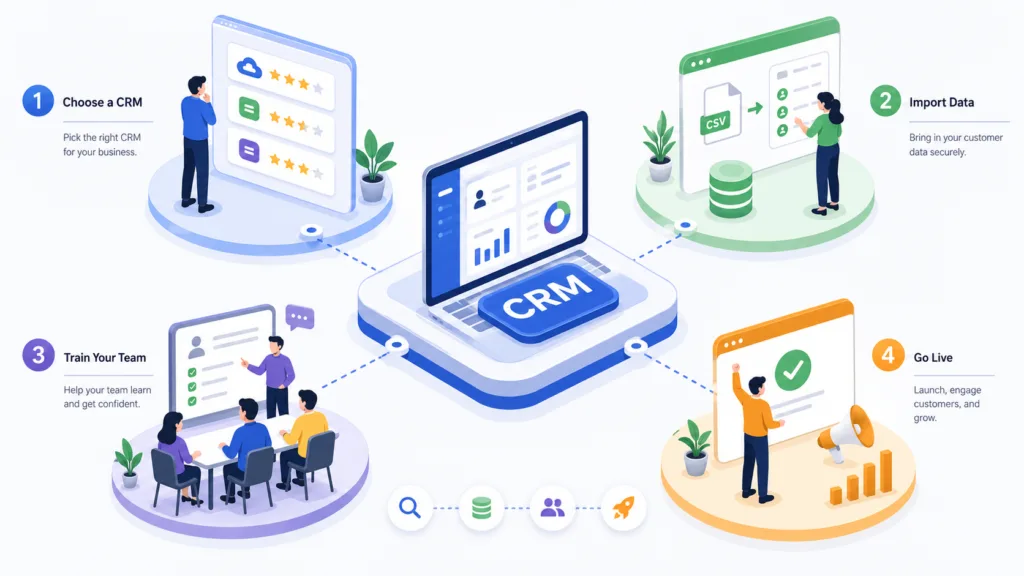
CRM implementation is the process of introducing customer relationship management software into a business. It includes planning how the platform will be used, moving existing customer information, configuring features, integrating other applications, and preparing employees to use the system.
A CRM can store:
- Customer and prospect contact details
- Emails, calls, and meeting notes
- Lead sources and qualification information
- Sales opportunities and pipeline stages
- Follow-up activities
- Proposals and quotations
- Customer-support history
- Marketing engagement
- Won and lost deal information
HubSpot explains that a CRM creates a centralized record of prospect and customer interactions, allowing teams to work with connected information instead of disconnected databases.
CRM Implementation Guide for Beginners: Step-by-Step Process
A successful implementation should be treated as a business improvement project rather than a basic software installation. The following steps can help beginners introduce a CRM without creating unnecessary complexity.
1. Define Your CRM Goals
Begin by identifying the specific problems the CRM must solve.
A business may want to:
- Reduce lead response times
- Prevent missed follow-ups
- Improve sales forecasting
- Track marketing sources
- Centralize customer information
- Automate repetitive tasks
- Improve customer support
- Increase sales-team productivity
Goals should be measurable. Instead of stating that the company wants to “improve sales,” set a clearer objective, such as reducing the average lead response time or increasing the percentage of qualified leads receiving follow-ups.
Salesforce recommends conducting a needs assessment with stakeholders from sales, marketing, customer service, commerce, and IT before choosing or configuring a CRM.
2. Map Your Customer Processes
Document how a prospect moves from initial enquiry to purchase and post-sale support.
Review important processes such as:
- Lead capture
- Lead qualification
- Sales assignment
- Follow-up
- Meetings and demonstrations
- Proposal creation
- Negotiation
- Customer onboarding
- Support and retention
Identify who performs each activity, what information they require, and where delays commonly occur.
Mapping these processes makes the CRM implementation process more practical because the system can be designed around real customer interactions. It also reveals unnecessary steps, duplicated work, and activities that could be automated.
Microsoft’s implementation guidance emphasizes connecting technology decisions with business processes, solution design, data, integration, security, testing, and project governance.
3. Select the Right CRM Platform
The best CRM is not necessarily the platform with the largest number of features. It is the one that supports your business requirements without creating unnecessary costs or complexity.
Compare platforms based on:
- Ease of use
- Contact and user limits
- Pipeline customization
- Automation capabilities
- Reporting and dashboards
- Email and calendar integration
- Mobile access
- Customer-service features
- Data security
- Scalability
- Pricing and support
A small business may need simple contact, task, and pipeline management. A larger organization may require several pipelines, advanced permissions, AI tools, custom reporting, and regional controls.
Salesforce recommends evaluating usability, scalability, required features, AI capabilities, and compatibility with existing systems when selecting a CRM.
4. Create a CRM Implementation Plan
A written plan should define the project’s scope, timeline, budget, responsibilities, and success measurements.
Assign a project owner who can coordinate departments and make sure important decisions are completed on time. Larger projects may also require an implementation partner, technical administrator, data specialist, and representatives from each department.
Your plan should include:
- Project objectives
- Required features
- Implementation stages
- Assigned responsibilities
- Data-migration schedule
- Integration requirements
- Testing activities
- Training sessions
- Launch date
- Post-launch support
A staged CRM software setup is usually safer than activating every feature at once. Businesses can begin with contacts, leads, opportunities, and tasks before introducing advanced automation or AI.
5. Clean and Prepare Customer Data
Do not transfer every old spreadsheet and contact list directly into the new platform.
Existing information may contain:
- Duplicate contacts
- Invalid email addresses
- Inconsistent company names
- Missing phone numbers
- Outdated customer records
- Incorrect lead sources
- Unnecessary fields
Create rules for how names, locations, phone numbers, industries, and other information should be formatted. Decide which records should be migrated, archived, corrected, or removed.
Salesforce lists keeping CRM data clean and organized as a core CRM best practice because reliable customer records support reporting, automation, and collaboration.
Businesses should also define who owns data quality after launch. Without ongoing responsibility, even a clean database will gradually become unreliable.
6. Configure Fields and Sales Pipelines

CRM platforms usually provide standard fields and pipeline stages, but businesses may need to adjust them.
A basic sales pipeline could contain:
- New lead
- Contacted
- Qualified
- Meeting scheduled
- Proposal sent
- Negotiation
- Won
- Lost
Each stage should represent a meaningful change in the buying process. Employees should understand the exact conditions required to move a deal from one stage to another.
Avoid creating too many fields during the initial CRM software setup. Every required field adds work for users. Include information only when it supports communication, automation, qualification, reporting, or decision-making.
7. Set User Roles and Permissions
Not every employee should have access to every customer record or administrative setting.
Create roles based on job responsibilities. Sales representatives may need access to their own leads and opportunities, while managers may require team reports and forecasting information. System administrators may need permission to change workflows and integrations.
Important controls include:
- Multi-factor authentication
- Role-based permissions
- Limited administrator access
- Login monitoring
- Regular access reviews
- Immediate removal of former employees
Permissions should be tested before launch to confirm that users can complete their work without accessing unnecessary confidential information.
8. Connect Essential Business Applications
CRM integration connects the platform with tools such as email, calendars, websites, accounting software, marketing platforms, calling systems, ecommerce stores, and customer-support applications.
Salesforce defines CRM integration as connecting third-party applications so customer information can synchronize automatically between systems.
Before creating integrations, determine which system should be the main source for each type of information. For example, the CRM may own lead and opportunity records, while accounting software remains responsible for invoices and payments.
A controlled integration plan prevents duplicate records and makes the CRM implementation process easier to manage.
9. Build Useful Automation
CRM automation can save time by handling repetitive activities.
A workflow might:
- Assign new leads according to location
- Send an enquiry confirmation
- Create a follow-up task
- Notify a manager about an inactive opportunity
- Update a lifecycle stage
- Send a customer onboarding email
- Create a renewal reminder
Begin with simple, high-value workflows. Do not automate every possible interaction immediately.
Every workflow needs clear entry conditions, actions, ownership, and stopping rules. For example, an automated sales sequence should stop when the prospect replies, purchases, unsubscribes, or is marked as unsuitable.
10. Test the CRM Before Launch
Testing helps identify errors before they affect real customers and employees.
Ask users to test complete scenarios, including:
- Creating a new lead
- Assigning a salesperson
- Updating a deal stage
- Sending an email
- Scheduling a task
- Converting a lead
- Producing a sales report
- Restricting record access
- Synchronizing information with another application
Users should record errors, confusing steps, missing fields, and incorrect automation. The project team can then correct the system and repeat testing.
Microsoft organizes implementation guidance around stages including strategizing, initiation, implementation, preparation, and operation, highlighting the importance of preparation before the system enters normal use.
11. Train Employees by Role
CRM training should focus on the activities each employee performs.
Sales representatives need to understand leads, opportunities, stages, tasks, and follow-ups. Managers need dashboards, reports, and forecasting. Marketing employees may need campaign, segmentation, and automation training.
Provide:
- Live demonstrations
- Practical exercises
- Written process instructions
- Short video tutorials
- Frequently asked questions
- Post-launch assistance
Explain how the platform benefits employees by reducing manual work and making customer information easier to find. Salesforce identifies strong training as an essential CRM best practice and treats user adoption as an ongoing activity rather than a one-time launch task.
12. Launch, Measure, and Improve
After launch, monitor whether employees are using the system correctly and whether the CRM is producing the expected business results.
Useful measurements include:
- User login and adoption rates
- Data completeness
- Lead response time
- Follow-up completion
- Lead-to-opportunity conversion
- Opportunity win rate
- Average sales cycle
- Customer retention
- Revenue by lead source
The first version of a CRM does not need to be perfect. Review feedback, remove unnecessary fields, improve training, correct automation, and update reports as the business develops.
Common CRM Implementation Mistakes
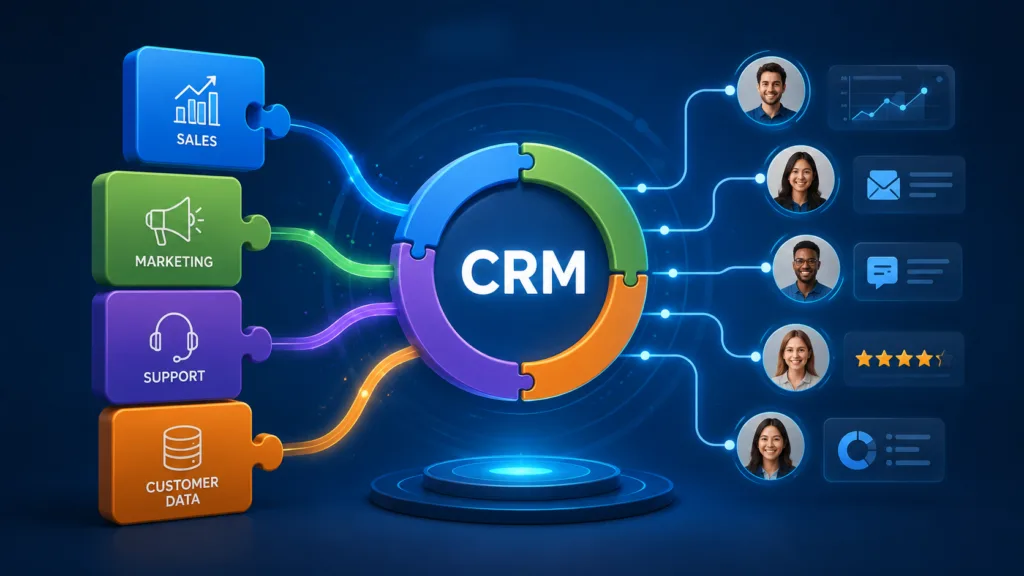
Beginners commonly make the mistake of introducing too many features at once. Other risks include migrating poor-quality data, creating complicated pipelines, providing limited training, and failing to assign responsibility for the system.
Businesses should also avoid copying every process from their previous spreadsheets. CRM implementation provides an opportunity to simplify work rather than reproduce old inefficiencies in new software.
Conclusion
This CRM Implementation Guide for Beginners provides a clear path from goal setting and software selection to migration, configuration, testing, training, and long-term improvement.
A successful CRM implementation process depends on clear business requirements, reliable data, employee involvement, and measurable objectives. A practical CRM software setup should begin with essential features and expand only when the business has a genuine need.
When implemented carefully, a CRM can improve follow-ups, strengthen collaboration, create more reliable reporting, and give businesses a complete view of their customer relationships.
Frequently Asked Questions
1. How long does CRM implementation take?
The timeline depends on the number of users, data volume, customization, integrations, and business complexity. A basic implementation may take several weeks, while a complex multi-department project may require several months.
2. What should be implemented first in a CRM?
Start with essential contact records, lead management, pipeline stages, assigned ownership, tasks, user permissions, and basic reports. Advanced automation and customization can be introduced later.
3. Who should be involved in CRM implementation?
The project should involve management, sales, marketing, customer service, IT, and representative users. Each group provides information about different customer processes and system requirements.
4. How can a business increase CRM adoption?
Keep the system simple, involve users early, provide role-based training, reduce unnecessary data entry, explain the benefits, and respond to employee feedback after launch.
