


Finding the best CRM software for small businesses in 2026 is more critical than ever. Customer relationship management (CRM) is no longer a “nice-to-have” for growing companies—it is the central hub for sales, marketing, and customer support. But with dozens of options, how do you choose the best CRM software for small businesses in 2026 without wasting budget or overwhelming your team? The answer lies in understanding your specific needs: contact management, pipeline visibility, automation, and ease of use.
According to a 2026 Gartner study, 78% of small businesses that implemented a CRM saw revenue growth within 12 months, compared to only 45% without one. This guide reviews the best CRM software for small businesses in 2026 across five categories, comparing features, pricing, pros, cons, and ideal use cases. Whether you are a solopreneur, a 10-person agency, or a 50-person growing company, the small business CRM solutions on this list will help you close more deals and retain more customers.
Table of Contents
Best CRM Software for Small Businesses in 2026: Top 5 Platforms
Let’s examine the best CRM software for small businesses in 2026 in detail. Each platform serves a different type of small business, so read carefully to find your perfect match.
1. HubSpot CRM – Best Free Option
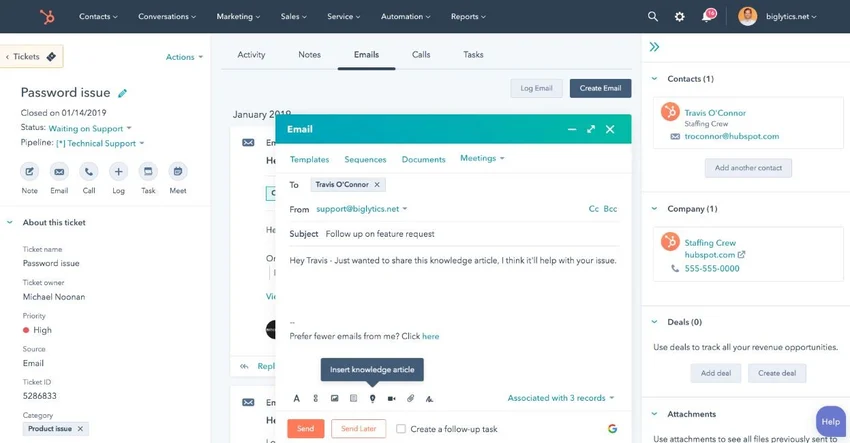
HubSpot CRM consistently ranks as the best CRM software for small businesses in 2026 for companies just getting started. Its free tier includes unlimited contacts, deal tracking, email tracking, meeting scheduling, and live chat. No credit card required. No time limit.
What makes HubSpot one of the small business CRM solutions worth considering is its ecosystem. As you grow, you can add Marketing Hub, Service Hub, and Sales Hub—all integrated with the same contact database. The interface is intuitive, and the onboarding is free.
Pros: Completely free for core features, excellent usability, large app marketplace, strong support community.
Cons: Paid tiers get expensive ($50-$1,200/month), reporting is limited on free tier, automation requires paid upgrade.
Pricing: Free (up to 1 million contacts). Paid from $50/month per seat.
Best for: Solopreneurs, startups, and teams with 1-5 users who need a free entry point.
2. Pipedrive – Best for Sales Pipeline Management
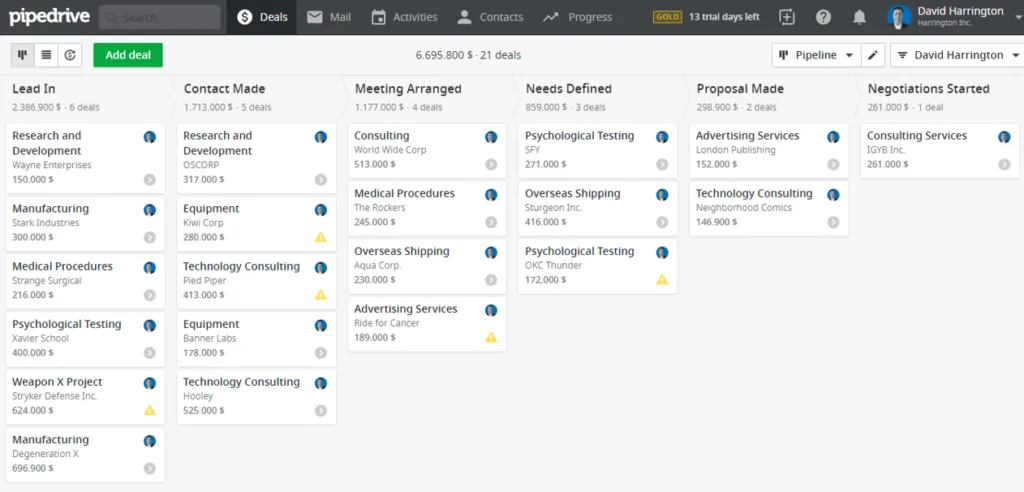
Pipedrive is the best CRM software for small businesses in 2026 for sales-focused teams. Its visual pipeline is unmatched—you drag and drop deals across stages, and the system automatically updates tasks, emails, and follow-ups. The “activity-based” approach ensures you never lose track of a lead.
For small business CRM solutions that prioritize sales velocity, Pipedrive is the clear winner. It integrates with 300+ apps (email, calendar, calling, marketing automation) and includes AI-powered deal insights that predict win probability.
Pros: Intuitive visual pipeline, strong mobile app, excellent sales automation, AI-powered insights.
Cons: Limited marketing features, reporting is less robust than HubSpot, customer support can be slow.
Pricing: Starts at $24/month per user. Advanced plans at $49-$99/month.
Best for: Sales teams of 3-20 people who need pipeline visibility above all else.
3. Zoho CRM – Best for Value and Features
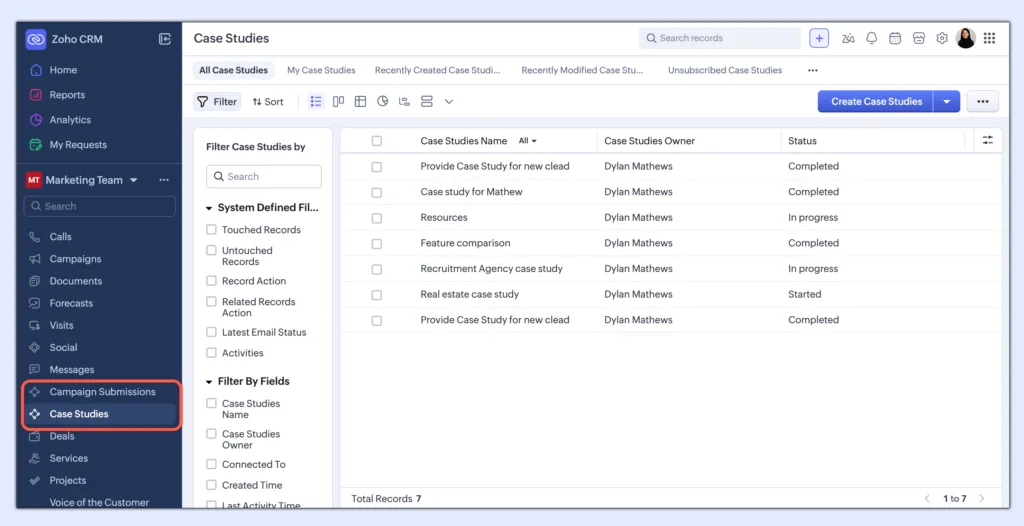
Zoho CRM is the best CRM software for small businesses in 2026 for companies that want enterprise-level features at small-business prices. It includes lead scoring, workflow automation, AI assistant (Zia), social media integration, and advanced analytics—all for under $50/user/month.
Among affordable CRM tools, Zoho offers the most features per dollar. It also integrates seamlessly with Zoho’s ecosystem (Books, Invoice, Campaigns, Desk) for a complete business suite. The learning curve is steeper than HubSpot, but the power is unmatched.
Pros: Affordable, feature-rich, AI-powered insights, strong ecosystem, customizable.
Cons: Steeper learning curve, interface feels dated, support is inconsistent.
Pricing: Starts at $20/month per user. Professional at $35/month. Enterprise at $50/month.
Best for: Growing companies (10-50 employees) that need robust features on a budget.
4. Freshsales – Best for AI-Powered Automation
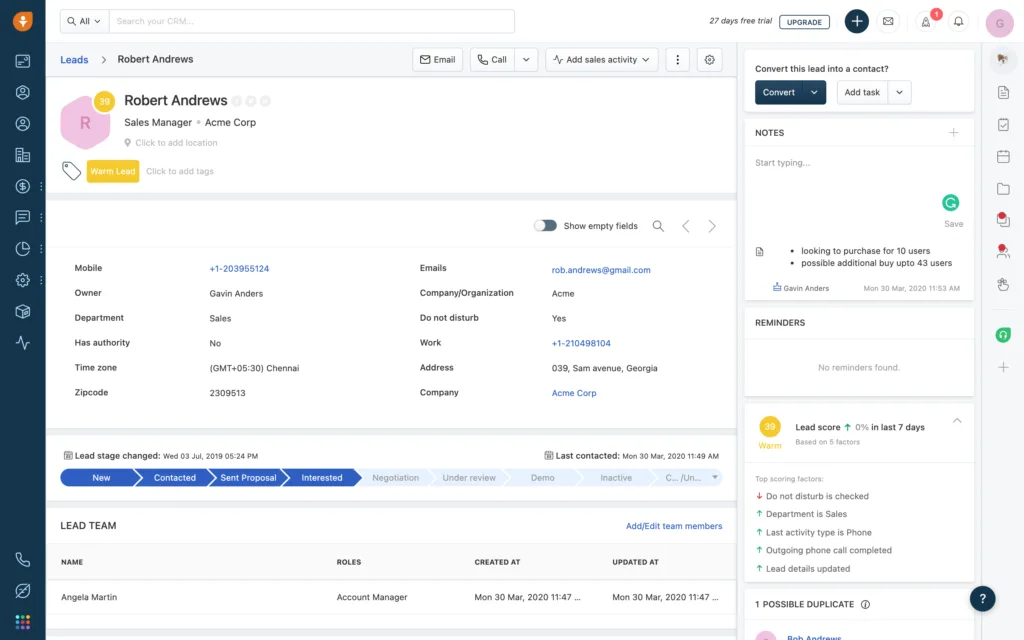
Freshsales (by Freshworks) is the best CRM software for small businesses in 2026 for teams that want AI-driven automation. Its built-in AI (Freddy) scores leads, predicts deal closure, and suggests next-best actions. The platform includes email tracking, phone integration, appointment scheduling, and visual deal boards.
For small business CRM solutions that prioritize automation over customization, Freshsales is a top contender. It also includes a built-in phone system with local caller ID—saving you from buying a separate VoIP service.
Pros: Strong AI capabilities, built-in phone system, intuitive interface, good automation.
Cons: Customization is limited compared to Zoho, reporting is basic, integration marketplace is smaller.
Pricing: Free (up to 3 users). Paid from $18/month per user. Pro at $39/month. Enterprise at $69/month.
Best for: Sales teams of 5-30 people who want AI-driven lead management and built-in calling.
5. Monday.com CRM – Best for Visual Workflow Management
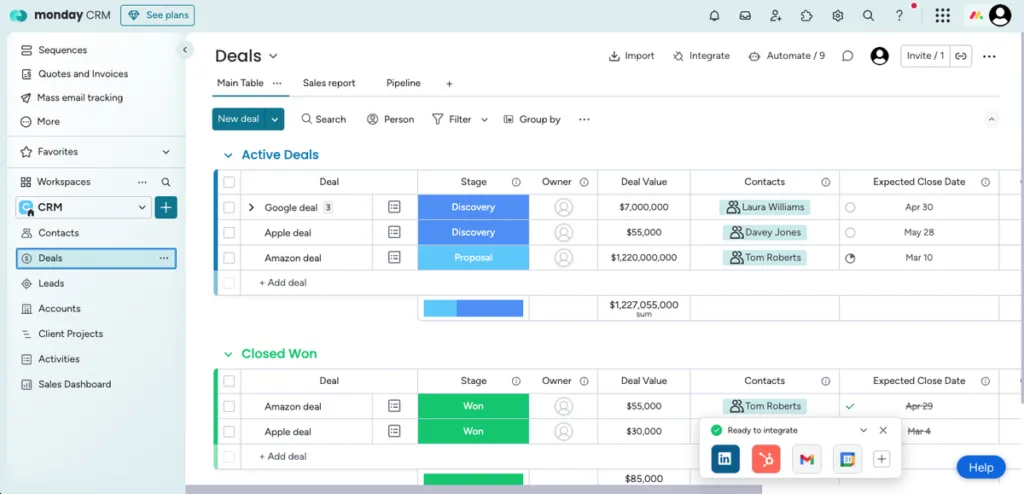
Monday.com CRM is the best CRM software for small businesses in 2026 for teams already using Monday.com for project management. It offers the same visual, flexible interface—customizable boards, automations, and dashboards—applied to sales pipelines.
For affordable CRM tools that double as project management, Monday.com CRM is unique. You can manage leads, track sales activities, and also run marketing campaigns and customer support from the same platform. The learning curve is gentle, and the visual approach appeals to creative teams.
Pros: Beautiful interface, highly customizable, strong project management integration, good automation.
Cons: Limited reporting, fewer sales-specific features than Pipedrive, pricing scales with users.
Pricing: Starts at $15/month per user (minimum 3 users). Pro at $25/month. Enterprise custom.
Best for: Small businesses (5-30 people) that want CRM + project management in one platform.
How to Choose the Best CRM Software for Small Businesses in 2026
With these five small business CRM solutions, how do you choose? Follow this framework.
Step 1: Define your budget. Free (HubSpot), low-cost (Pipedrive, Zoho), or premium (Freshsales, Monday). Include implementation and training costs.
Step 2: Identify your primary use case. Sales pipeline only? Pipedrive. All-in-one marketing+sales? HubSpot. AI automation? Freshsales. Value+features? Zoho. Project management integration? Monday.
Step 3: Count your users. HubSpot free works for small teams. Pipedrive and Zoho scale to 50+. Monday and Freshsales work best at 5-30 users.
Step 4: List your must-have integrations. Email (Gmail, Outlook), marketing (Mailchimp, Klaviyo), accounting (QuickBooks, Xero). Check each vendor’s integration marketplace.
Step 5: Run a 14-30 day free trial. Every platform on this list offers a free trial. Test with real data and real workflows. Get team feedback.
Implementation Best Practices for Small Business CRM
To get the most from the best CRM software for small businesses in 2026, follow these rules.
1. Clean your data before import. Deduplicate contacts. Standardize fields. Remove unsubscribed or invalid emails. Garbage in, garbage out.
2. Configure pipelines before training. Map your actual sales process to the CRM stages. Do not accept the default—customize it.
3. Train all users thoroughly. The best small business CRM solutions fail without adoption. Budget 2-4 hours of training per user. Create quick-reference guides.
4. Automate repetitive tasks. Set up email templates, follow-up reminders, and deal-stage automations. The more automation, the higher adoption.
5. Review and refine monthly. Check pipeline health, deal velocity, and user adoption. Adjust workflows and retrain as needed.
Common Mistakes When Choosing CRM for Small Business
Avoid these three errors.
Mistake #1: Choosing the cheapest option without evaluating features. A free CRM that lacks automation wastes more time than it saves. Pay for what you need.
Mistake #2: Overlooking integrations. Your CRM must connect to your email, calendar, and marketing tools. Check the app marketplace before buying.
Mistake #3: Skipping user training. The best CRM software for small businesses in 2026 is useless if your team does not use it. Invest in onboarding.
Final Verdict
The best CRM software for small businesses in 2026 depends on your specific needs. HubSpot CRM wins for free entry-level use. Pipedrive wins for sales pipeline focus. Zoho CRM wins for value and features. Freshsales wins for AI-powered automation. Monday.com wins for visual workflow management. Start with a free trial of your top two choices. Clean your data. Train your team. Automate where possible. Within 90 days, you will see improved sales visibility, faster follow-ups, and more closed deals. The right CRM is an investment that pays for itself many times over.
Frequently Asked Questions (FAQs)
Q1: What is the best free CRM for small businesses in 2026?
HubSpot CRM is widely considered the best free CRM for small businesses. It offers unlimited contacts, deal tracking, email tracking, meeting scheduling, live chat, and Gmail/Outlook integration—all at no cost. There is no time limit, and you can upgrade to paid tiers as you grow. For solopreneurs and teams under 5 users, HubSpot’s free tier provides everything you need. Other free options include Freshsales (up to 3 users) and Zoho CRM (up to 3 users with limited features). However, HubSpot’s free tier is the most generous among affordable CRM tools.
Q2: How much should a small business spend on CRM software?
For a small business (under 50 employees), budget $20-$50 per user per month for a solid CRM. This translates to $240-$600 per user annually. For a 10-person team, annual CRM spend is $2,400-$6,000. This is a tiny fraction of the revenue impact: businesses with CRM see 25-35% higher sales productivity and 20-30% higher lead conversion rates. The small business CRM solutions on this list range from free to $50/user/month. Start at the low end, upgrade as you need more features. The best CRM software for small businesses in 2026 pays for itself through faster sales cycles and higher win rates.
Q3: Can I switch CRM systems later if my business grows?
Yes, but with effort. Most CRMs allow data export to CSV, and many offer migration tools or partners. However, switching costs include: (1) data migration (2-4 weeks of work), (2) retraining users (2-4 hours each), (3) reconfiguring integrations (1-2 weeks). To avoid this, choose a small business CRM solution that offers tiered plans (e.g., HubSpot, Zoho) so you can grow within the same platform. Only switch if your needs fundamentally change—e.g., you need manufacturing-specific features or global compliance. The best CRM software for small businesses in 2026 offers growth paths to enterprise tiers.
Q4: Do I need a CRM if I only have a few customers?
Yes, if you plan to grow. Even with 50 customers, manual tracking in spreadsheets becomes error-prone. You forget follow-ups, miss renewal dates, and lose context between interactions. A CRM like HubSpot (free) or Pipedrive ($24/month) gives you a single source of truth for every customer interaction—emails, calls, notes, and deals. It also scales with you. Starting early means your team builds habits around the CRM, and data accumulates from day one. The best CRM software for small businesses in 2026 is designed for exactly this situation: easy to start, powerful enough to grow.
