


You have used the debugging process with monolithic applications, you know the routine: check the logs, replicate the error, trace the stack, eliminate the bug. Debugging agents? That is a totally different thing. Agents do not simply implement code, they make decisions, strategize, and act in a variety of tools, systems, and environments.
Everything, be it Developers Agents writing and testing code or Product Management Agents analyzing roadmaps and customer feedback is powered by modern agents. In extremely controlled fields such as Agentic Automation in Legal Work, one failure without a word can translate to wrong contracts, nonconformity, or misplaced trust.
The unfortunate thing about agent debugging is that failures are hardly ever single. Even a single error in thinking would trickle down the line of tools and still yield something that seems to be all right on the superficial. This is why failure tracking and tool chains are no longer optional anymore, they are essential.
Understanding Agent Architectures
There are many flavors of agent based systems, but what they all have in common is that they are provided with complexity under the cover of autonomy.
1. Single-Agent vs Multi-Agent Systems
It is a single agent system whereby tasks are performed end to end. The debugging in this case is complex though it can be handled. Multi-agent systems however, bring in coordination, delegation and shared state. When something breaks, the question is: who did not do his job–and why?
2. Tool-Calling Agents and Orchestration Layers
Most modern agents rely on Tool Calling for Agents they don’t just think; they invoke APIs, query databases, write files, or trigger workflows. Orchestration layers decide when and how these tools are used, adding another layer that can fail silently.
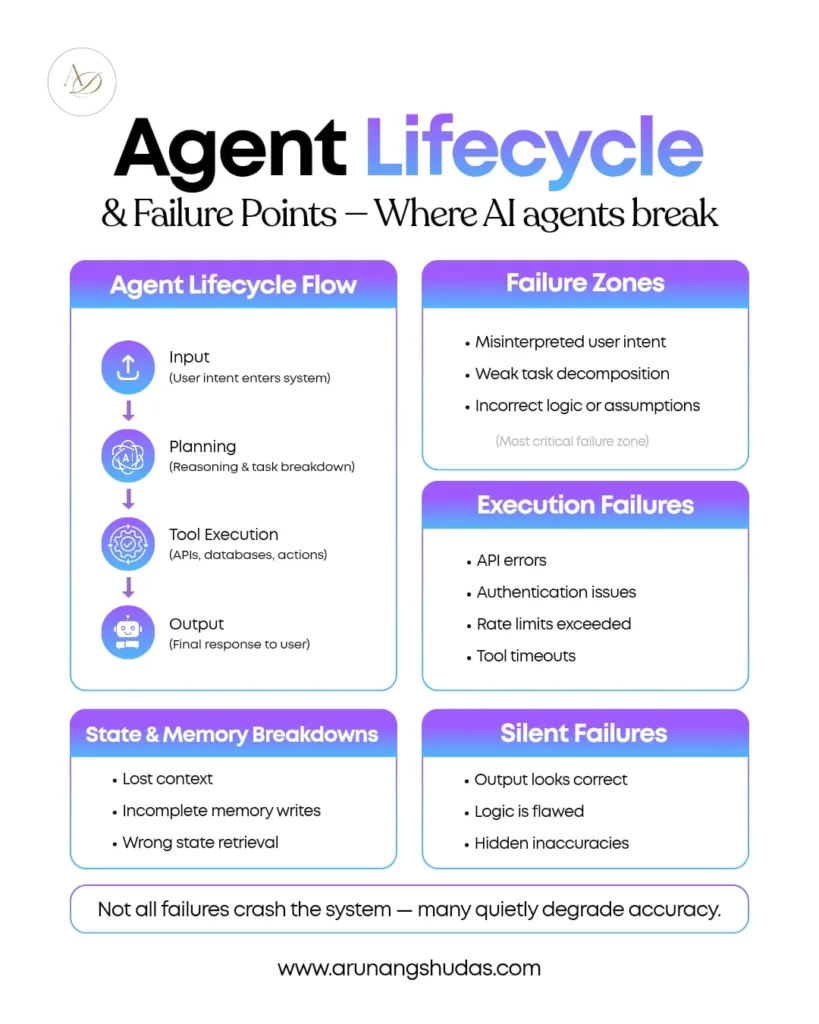
3. The Agent Lifecycle Explained
On a high level the agent processes flow are:
Input/ Planning/ Tool Execution/Output.
A failure may occur at every stage. The planning may select the inappropriate tool. Administering the execution may fail because of rate “throttlenecks. Production may appear to be correct but logically incorrect.
4. Where Failures Typically Occur
As a matter of fact, the vast majority of failures occur along the borders where the thought processes collide with reality. That’s where tool chains live.
What Is a Tool Chain in Agent-Based Systems?
The tool chain is the succession of tools which an agent invokes in performing a task. Picture it as a relay race: when one of the runners trips the whole race is compromised.
Tools that are commonly used in a chain include APIs, databases, file systems, external services, and LLM function calls. In Product Management Agents, as an example, one request may include the retrieval of analytics information, the summarization of feedback, and the creation of a draft roadmap.
The greater the number of tools that are present, the greater is the probability of failure. Dependencies multiply. Latency increases. And it is exponentially more difficult to debug when you do not trace the whole chain.
Common Failure Types in Agent Tool Chains
1. Planning and Reasoning Failures
These occur in anticipation of the call of any tool. This may cause the agent to choose the incorrect tool, hallucinate parameters or get caught up in a reasoning loop. You can find this frequently in the early-life Developer Agents which have not been put into a tight jacket.
2. Execution Failures
The traditional problems such as API timeouts, authentication failures, and improper payloads are included. They are more readily detected–but not unless you are writing them down.
3. State and Memory Failures
The context is vital to agents. The bizarre behavior may be due to token overflow, corrupted memory, or lost state, particularly in the long-running workflow such as Agentic Automation in Legal Work.
4. Silent Failures – The Most Dangerous Kind
The agent returns an answer. It looks reasonable. But it’s wrong. These are not errors but rather failures and therefore, they are very difficult to detect unless validated and traced.
Tracing Tool Chains – A Step-by-Step Debugging Framework
It is at this stage that most competitor blogs fail. Let’s fix that.
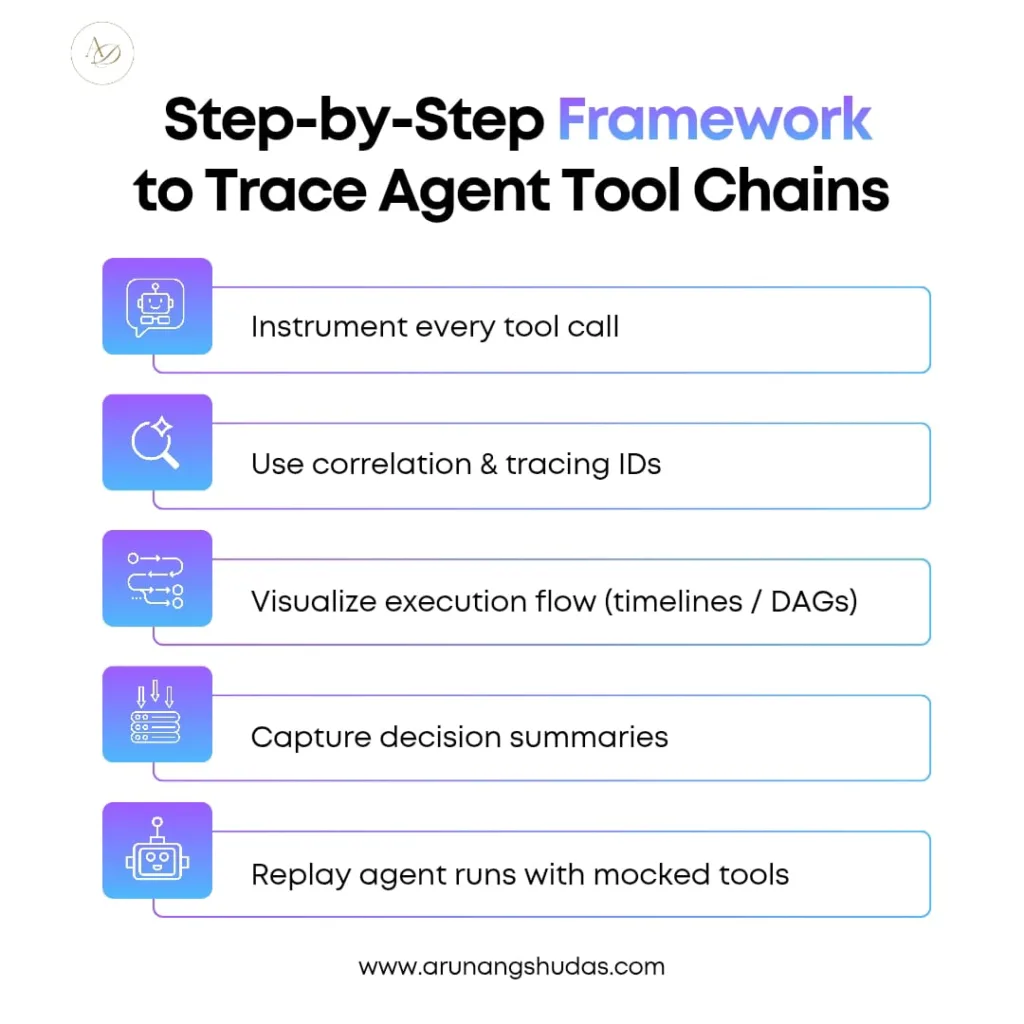
Step 1: Instrument Every Tool Call
All tool calls must record inputs, outputs, timestamps and metadata. Correlation IDs are important in this way that you track every agent that has been executed.
Step 2: Visualize Execution Flow
Text logs are not enough. Timeline Trace and DAG views give you a graphical view of dependencies and bottlenecks.
Step 3: Capture Intermediate Reasoning
Always record summaries of decisions made in structure, not raw chain-of-thought. This provides an idea about why an agent will select a tool without spilling any sensitive reasoning.
Step 4: Replay Agent Runs
Deterministic replays by selecting mocked tool responses enable you to debug without impacting on production systems. This is indispensable in complicated Tool Calling instructions to Agents.
Debugging Techniques for Agent Failures
| Technique | Use Case | Benefit |
| Structured Logging | Runtime failures | Faster root cause analysis |
| Tracing IDs | Distributed agents | End-to-end visibility |
| Tool Mocking | External APIs | Safe, repeatable testing |
| Failure Injection | Resilience testing | Predict failures |
| Output Validation | Silent errors | Accuracy improvement |
These techniques turn debugging from guesswork into a repeatable process.
Popular Tools for Tracing and Debugging Agents
The open-source tools, such as OpenTelemetry, LangSmith, PromptFlow, and Jaeger, provide intensive insight into the workflow of agents. Scalability and advanced analytics are added with commercial services like Datadog APM, Sentry, and Honeycomb.
During the selection of a tool, consider tool-call visibility, replay support, and multi-agent tracing. The issue of cost and performance is also an important point, particularly in Product Management Agents that are heavy in production.
Real-World Debugging Example – Agent Tool Chain Failure
Consider an example of a legal research agent applied in Legal Work in Agentic Automation. The tool chain consists of citation model, document database, and a summarization model.
The failure? The citation API presented partial information, which was not authenticated by the agent. The last result was smooth–but referred to the wrong statute.
The problem was found in a few minutes by tracing. The resolution was easy enough; rigid output validation and a recovery tool. This bug might have taken months to be traced.
Best Practices for Preventing Agent Failures
It is always better to prevent than to debug. Defensive tool schemas, rigorous input / output validation, backoff retries and human in the middle checkpoints can drastically decrease risk risk – particularly in the case of Developer Agents running autonomously.
Performance vs Observability Trade-offs
Admittedly, logging is expensive and CPU-intensive. But blind agents cost more. Sampling in production and full tracing in the development. Measurability is not an overhead, but an investment.
Security Considerations While Debugging Agents
Never log sensitive data. Mask API keys. Secure trace storage. Adherence is not a choice – particularly where Agentic Automation is applied to Legal Work which is regulated.
The Future of Agent Debugging
The future is proactive. Automated failure detection, self-healing agents, and AI-assisted debugging will soon be standard. Observability will be baked into agent frameworks, not bolted on.
Conclusion
Debugging agents isn’t just harder than traditional debugging—it’s fundamentally different. Tool chains introduce complexity, and silent failures raise the stakes. Tracing tool chains and failures is no longer optional. It’s the backbone of reliable, scalable agent systems. If you’re building agents today, invest in observability now—or pay for it later.
FAQs
1. Why are debugging agents more complex than traditional apps?
Because agents make decisions, call tools, and manage state dynamically, creating multiple failure points.
2. What are tool chains in agent systems?
They are sequences of tools an agent uses to complete a task, such as APIs, databases, and external services.
3. How do silent failures impact agent reliability?
They produce incorrect but plausible outputs, making errors hard to detect without validation.
4. Which tools are best for debugging agents?
OpenTelemetry, LangSmith, and Datadog are popular choices depending on scale and needs.
5. Can agent failures be prevented entirely?
Not entirely, but strong validation, tracing, and human oversight can reduce them drastically.
