


In the realm of database management, the concept of indexing plays a crucial role in ensuring fast, efficient data retrieval. Indexing is a technique that enables databases to locate and access data quickly, which is essential as data sets grow. Without indexing, databases would need to scan each record sequentially, leading to significant delays.
Database indexing is a technique that creates a sorted structure to speed up data retrieval in relational databases. Indexes improve query performance, help filtering and sorting, and support joins, at the cost of extra storage and slower writes.
Understanding Database Indexing

At its core, database indexing is a data structure that improves the speed of data retrieval operations on a database table at the cost of additional storage space and maintenance overhead. An index is essentially a copy of a database column (or columns) that has been sorted to allow for quicker search operations. Think of it like an index in a book: instead of flipping through every page to find a particular topic, you can refer to the index at the back, which tells you exactly where to look.
Indexes can be applied to any column within a table, and their primary purpose is to make it faster to locate specific rows without needing to scan the entire table. The most common use case for indexing is for primary keys, where each entry in the index is unique, but it can also be applied to other columns, especially those frequently used in WHERE clauses or JOIN operations.
How Indexing Works
Think of a database index like the index at the back of a massive textbook. Instead of flipping through every single page to find a specific topic, you look up the keyword in the index to find the exact page number instantly.
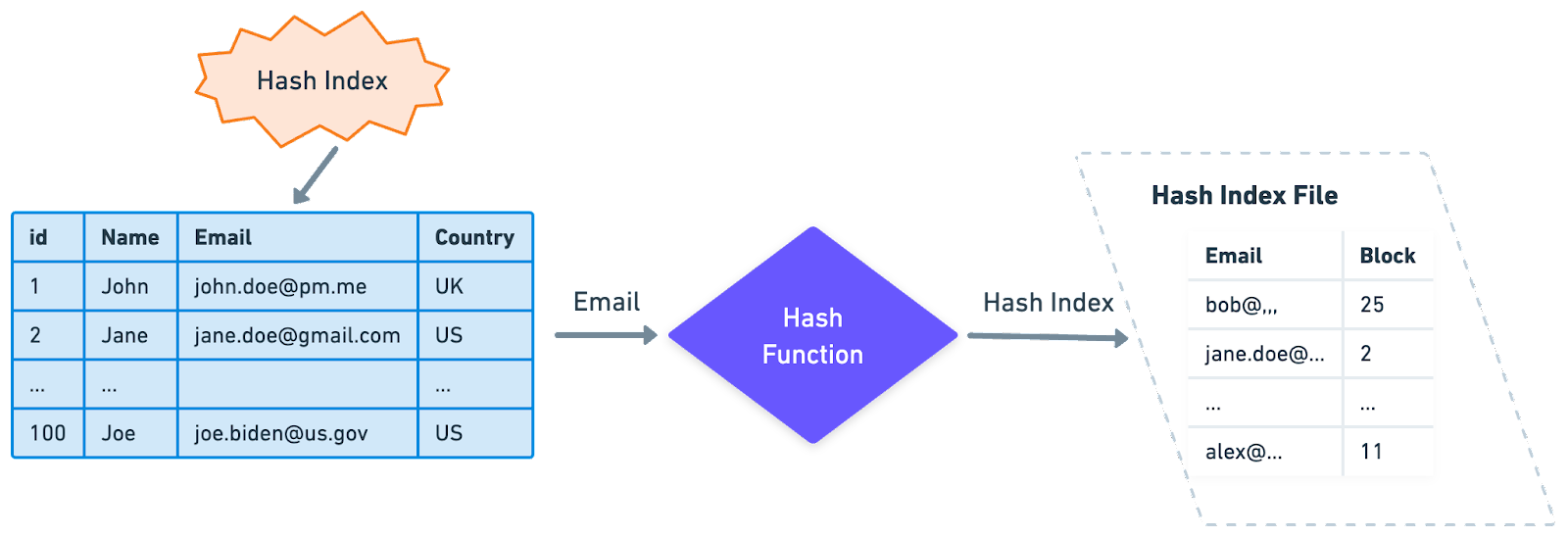
In a database, indexes are implemented using specialized data structures—most commonly B-trees or Hash Tables—which organize and store column data in a highly optimized layout. When you create an index on a specific column, the database engine generates a separate, sorted structure for that column, drastically reducing the number of steps required to locate a particular row.
Index Scan vs. Full Table Scan
When you execute a query, the database engine undergoes a quick decision-making process:
- Without an Index (Full Table Scan): The database must scan through every single row in the table, from top to bottom, to find matching records. If your table has millions of rows, this process becomes incredibly slow and resource-intensive.
- With an Index (Index Scan): The database automatically checks if an index is available for the columns in your query. If it exists, the engine bypasses the main table and leaps directly to the relevant data points via the index, pulling the required rows in a fraction of a second.
A Real-World Example
Imagine you have an Employees table containing columns for EmployeeID, Name, and Department.
If your application frequently runs queries looking for specific employees by their ID, creating an index on the EmployeeID column is a game-changer. Instead of grinding through thousands of employee records sequentially, the database leverages the pre-sorted index structure to pinpoint and retrieve the exact EmployeeID instantly.
Why It’s Important
If you need to add a quick section explaining why it matters right after that content, you can use this:
- Reduced Server Load: By eliminating full table scans, indexing lowers CPU and memory consumption on your database server, saving on infrastructure costs.
- Blazing-Fast Query Speed: Turns slow, resource-heavy searches into near-instantaneous results, greatly improving application performance.
- Enhanced User Experience: Faster data retrieval means faster page load times and smoother interactions for your end-users.
Types of Database Indexing
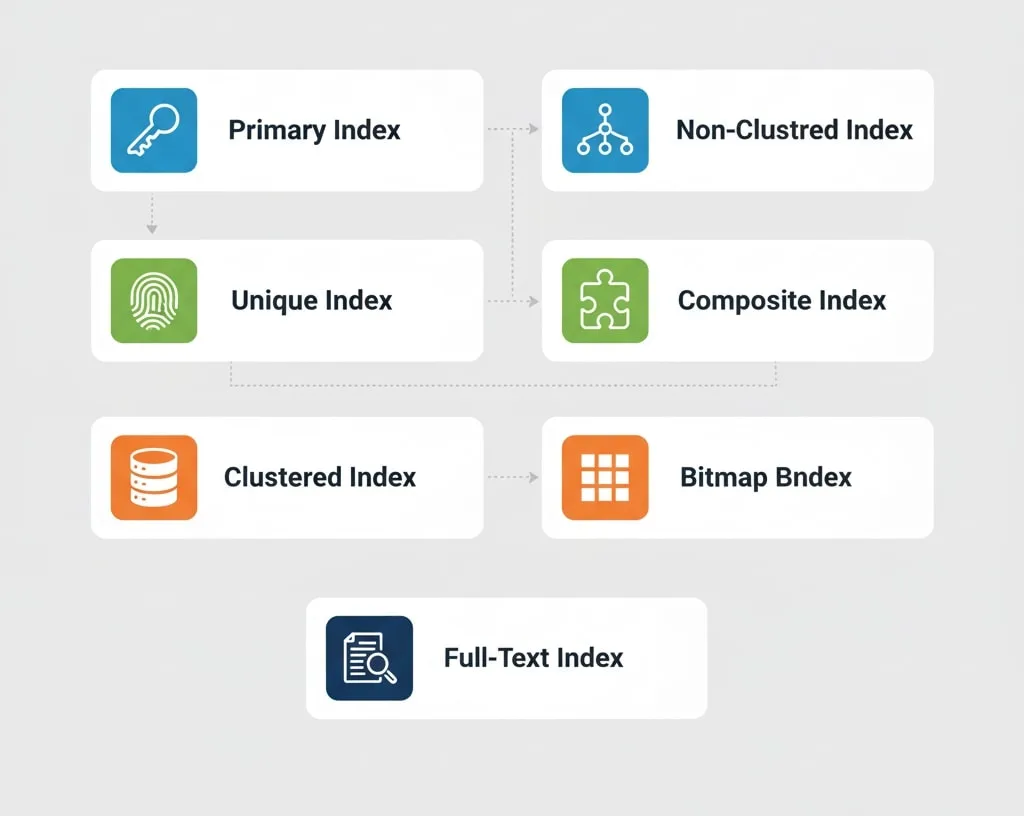
There are several types of indexing techniques, each with its own benefits and best-use cases. Here are some of the most commonly used types of indexes in databases:
1. Primary Index
A primary index is automatically generated when you define a primary key. It guarantees that every value in the column is distinct, serving as a rapid point of entry for row lookups. Most database engines implement this as a B-tree structure.
2. Unique Index
Similar to a primary index, a unique index can be applied to any non-primary column where duplicate entries must be prevented (e.g., an email or username column). It acts as an automatic constraint to enforce strict data integrity.
3. Clustered Index
This index dictates the physical sorting order of the actual data rows inside the table. Because physical data can only be sorted one way on disk, you can only have one clustered index per table. It is almost always assigned to the primary key for ultra-fast, direct data retrieval.
4. Non-Clustered Index
Unlike a clustered index, this is a separate structure completely uncoupled from the physical layout of the table rows. Think of it as a secondary lookup table that contains the indexed column’s values alongside a pointer (or row ID) directing the engine to the actual data. It is perfect when you have multiple columns frequently searched by specific queries.
5. Composite Index
Also known as a multi-column index, this includes two or more columns in a single index structure. It is incredibly useful for queries that frequently filter or sort by multiple parameters simultaneously (e.g., searching for a user by last_name AND first_name).
6. Bitmap Index
Instead of standard tree branches, this type uses strings of bits (0s and 1s) to map data rows. It is highly efficient for columns with low cardinality (few unique values, like a status or Boolean field) and is heavily favored in data warehouses for rapid analytical queries using Boolean logic.
7. Full-Text Index
Specifically optimized for searching unstructured, bulky text (like articles, product descriptions, or comments). It moves beyond basic character matching to enable advanced search engine features, like keyword parsing, fuzzy searching, and phrase matches within extensive text bodies.
Read more blog : 10 Common Mistakes in Database Indexing
Summary Checklist: Which Index Do You Need?
| Scenario | Best Index Choice |
| Enforcing a unique login email address | 2. Unique Index |
| Sorting your entire table by chronological IDs | 3. Clustered Index |
Searching by multiple filters (e.g., Country + State) | 5. Composite Index |
Aggregating data on a column with low variety (e.g., Is_Active) | 6. Bitmap Index |
| Building a search bar for your application articles | 7. Full-Text Index |
Why Is Database Indexing Important?

Without indexing, retrieving data from large databases would be incredibly slow and computationally expensive. Here are the key reasons why indexing is crucial:
1. Improves Query Performance
- Indexing significantly improves query performance by reducing the number of rows the database needs to examine. Instead of scanning every row, the database can leverage the index to quickly locate relevant data. This is especially beneficial for databases with millions of records, where sequential scanning would be impractical.
2. Speeds Up Search Operations
- In applications where search functionality is heavily used, such as e-commerce or content management systems, indexing is essential. Indexes allow users to find specific information quickly, enhancing user experience and reducing the load on the server.
3. Enhances Sorting and Filtering
- Indexes help speed up sorting and filtering operations, which are often required in SQL queries using ORDER BY and WHERE clauses. For instance, if a database is frequently sorted by a certain column, creating an index on that column will optimize the sorting process.
4. Supports Join Operations
- Indexing becomes even more critical when dealing with join operations, which involve combining data from multiple tables. Indexes on the joined columns allow for faster data retrieval and reduced resource usage during complex queries.
5. Reduces Resource Usage
- By reducing the time needed to retrieve data, indexes help decrease CPU and memory usage, especially during peak times when multiple users are accessing the database simultaneously. Efficient indexing can lead to better server performance and potentially lower hardware costs.
6. Facilitates Data Integrity
- Some indexes, like unique indexes, help maintain data integrity by preventing duplicate entries in a table. For example, creating a unique index on an email column in a user table would prevent multiple users from having the same email address.
Read more blog : The Impact of Database Architecture on Trading Success
Trade-offs and Considerations in Indexing
While indexing has several advantages, it’s not without its trade-offs:
The Trade-Offs of Database Indexing
While indexes drastically accelerate data retrieval, they are not a free lunch. Every index you add introduces architectural overhead that can impact your system’s efficiency.
Here are the key challenges and considerations you need to keep in mind:
1. Increased Storage Requirements
An index is not just a pointer; it is a separate physical data structure stored on disk. For massive datasets, the storage footprint of these structures can become substantial. As you pile on more indexes, your database’s total disk space requirement grows, directly increasing your infrastructure costs.
2. Slower Write Operations (INSERT, UPDATE, DELETE)
While indexes speed up reads, they actively slow down writes. Every single time a row is inserted, modified, or deleted, the database engine must pause to recalculate and update all relevant indexes to ensure data consistency. In high-velocity, transaction-heavy systems (like e-commerce checkouts or IoT data logging), having too many indexes can severely bottleneck write performance.
3. Continuous Index Maintenance
As data is constantly modified, indexes naturally become fragmented over time, causing their performance to degrade. To counter this, databases require regular maintenance—such as index rebuilding or reorganization. This cleanup process is highly resource-intensive and can temporarily spike CPU and memory usage on active databases.
Finding the Sweet Spot: Choosing the Right Indexes
To build a high-performing database, you must treat indexing as a balancing act between read speed and write overhead. Over-indexing is a common mistake that can actually degrade overall application performance.
Best Practices for Smart Indexing:
- Analyze Query Patterns: Don’t guess. Use database profiling tools (like
EXPLAINorEXPLAIN ANALYZE) to see which slow-running queries are performing full table scans. - Target High-Cardinality Columns: Prioritize indexing on columns frequently used in
WHEREclauses,JOINconditions, orORDER BYoperations that contain highly diverse data (like unique IDs or emails). - Avoid Indexing Frequently Changed Columns: If a column’s data updates every few seconds, the constant index re-indexing overhead will likely outweigh any read performance benefits.

Conclusion
Database indexing is a powerful technique for improving the performance and efficiency of data retrieval operations in relational databases. By understanding the different types of indexes and carefully selecting which columns to index, database administrators can dramatically enhance application performance, reduce resource usage, and improve overall user experience. However, indexing is not a one-size-fits-all solution; it requires careful planning, monitoring, and maintenance to ensure it aligns with the unique demands of each database.
Frequently Asked Questions (FAQ)
1. What is a database index and why is it important?
A database index is a specialized data structure (like a B-tree) that organizes and stores column data in a sorted layout, acting much like the index at the back of a textbook. It is crucial because it allows the database engine to find specific records near-instantly, bypassing the need to search through every single row sequentially. This drastically reduces query response times from seconds to milliseconds.
2. What is indexing and its importance?
Indexing is the process of creating a separate, optimized search path for your database tables. Its primary importance lies in performance optimization: it eliminates resource-heavy full table scans, improves application load speeds, lowers server CPU/memory usage, and ensures a fast, seamless experience for end-users interacting with large scales of data.
3. What is an indexing database?
While “indexing database” is often a colloquial term used by searchers, it usually refers to a database engine that utilizes indexed structures (or dedicated search databases like Elasticsearch) specifically optimized for rapid data discovery and full-text retrieval. In standard relational databases, it refers to a table setup where strategic indexes have been explicitly built over data columns to facilitate high-speed querying.
4. What are the 4 main types of database indexes?
While there are many specialized indexes, the four most widely used types in modern databases are:
Primary Index: Automatically built on a primary key to ensure uniqueness and fast individual row lookups.
Clustered Index: Dictates the actual physical sorting order of data rows on the storage disk (only one allowed per table).
Non-Clustered Index: A separate lookup structure containing pointers back to the physical data rows (multiple allowed per table).
Composite Index: A single index that spans across multiple columns to accelerate complex queries with multiple filters.
5. When should you avoid creating a database index?
You should avoid indexing columns that are constantly being updated, inserted, or deleted, as the database must rewrite the index every time a change occurs, slowing down write operations. Additionally, avoid indexing tables with very few rows (where a full table scan is already instant) or columns with very low data variety (low cardinality), as the index structure will provide little to no performance benefit while wasting valuable disk space.
