


Load balancing is a crucial component in backend systems and plays a significant role in ensuring reliability, availability, and scalability of applications. Especially in today’s digital landscape, where online services are expected to be fast and reliable, load balancing is essential for distributing incoming traffic efficiently across multiple servers to prevent any one server from becoming overwhelmed. This post will delve into the fundamentals of load balancing, the types of load balancing algorithms, the technology behind it, and how it enhances backend systems.
What is Load Balancing?
Load balancing is the process of distributing incoming network traffic across multiple servers, which are collectively known as a server farm or a server pool. In backend systems, load balancers work to maintain a smooth flow of data requests by ensuring that no single server is overburdened. This is especially important in environments where there are fluctuating traffic patterns, such as e-commerce platforms during sale periods, streaming services during peak hours, or any web application experiencing high volumes of requests.
Why Load Balancing Is Essential for Modern Infrastructure
In high-traffic environments, relying on a single application server is a recipe for disaster. When millions of users simultaneously hit an infrastructure, that single server quickly faces resource exhaustion, leading to slow response times or complete system outages.
A load balancer acts as a strategic traffic cop positioned right in front of your server pool. It intercepts all incoming client requests and intelligently routes them across multiple backend servers. This architecture transforms a fragile, single-point-of-failure setup into a highly resilient, distributed system.
1. Maximizing Application Performance
When application traffic spikes, a single server’s CPU, memory, and network bandwidth can easily choke. By spreading the request volume across a cluster of multiple servers, no single machine bears the entire processing burden.
- Resource Optimization: It ensures an even distribution of computational load, keeping individual utilization at an optimal level.
- Concurrency: The system can process thousands of concurrent database queries and API calls simultaneously, maintaining crisp responsiveness for every end-user.
2. Achieving Fault Tolerance and High Availability
Hardware failures, software bugs, and routine server maintenance are inevitable. Without a load balancer, if your primary server goes down, your entire business goes offline.
- Continuous Health Checks: Load balancers continuously monitor the status of your backend pool by sending automated “ping” requests.
- Seamless Failover: If a server stops responding or returns error codes, the load balancer instantly flags it as unhealthy and reroutes all incoming traffic to the remaining healthy servers. The user experiences zero downtime, and engineering teams can debug the broken server in isolation without interrupting production.
3. Enabling Seamless Horizontal Scalability
When application demand grows, you have two choices: scale vertically (buying a bigger, more expensive server) or scale horizontally (adding more standard servers to your pool). Vertical scaling has strict physical limits and requires downtime to upgrade. Horizontal scaling is infinite and seamless—but it requires a load balancer.
- Elastic Expansion: As traffic scales up, you can spin up five new server instances and register them with the load balancer. It will immediately begin sending a share of traffic to the new instances.
- Cost-Efficient Downscaling: When traffic drops (e.g., during middle-of-the-night lulls), you can safely remove servers from the pool to save on cloud infrastructure costs without dropping a single active user connection.
4. Drastically Reducing Latency
Latency—the delay between a user making a request and receiving a response—is a critical metric for user retention. Load balancers minimize this delay using two primary routing methods:
- Least Connections Routing: The load balancer identifies which server is currently handling the fewest active requests and directs new traffic there, preventing any single server from becoming a bottleneck.
- Geographical/Proximity Routing: Advanced global load balancers look at the user’s IP address and route their request to the data center physically closest to them, slashing network travel times over the internet.
Read more blog : How Can Someone Build a Scalable SaaS Product from Scratch?
How Load Balancing Works
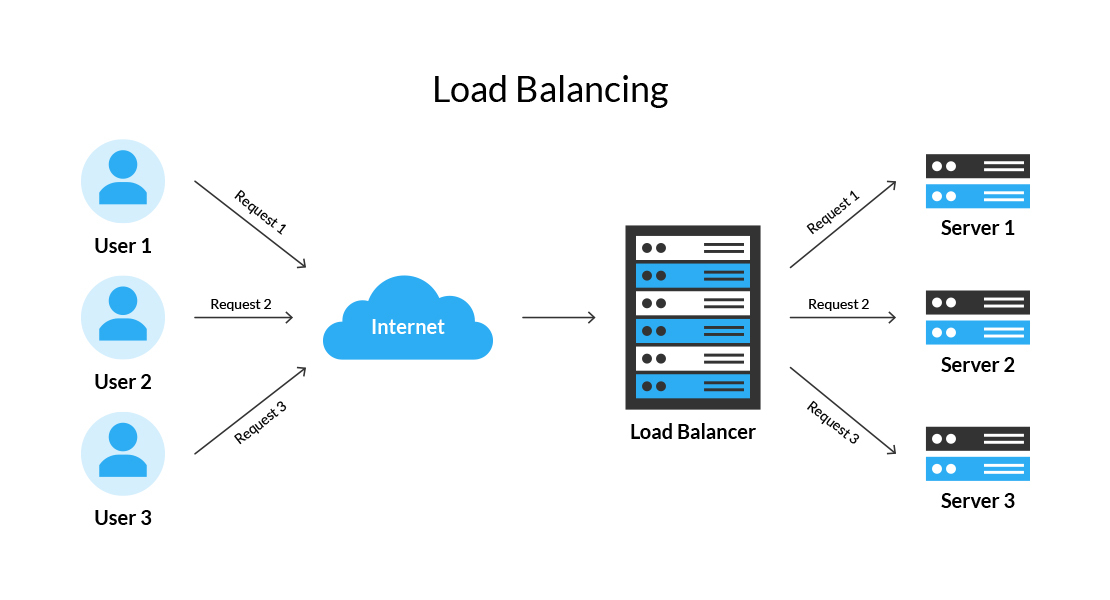
At its core, a load balancer acts as a reverse proxy, receiving incoming traffic and forwarding it to one of several backend servers. A load balancer can be deployed either as a hardware device, software solution, or cloud-based service. It analyzes each incoming request and directs it to the optimal server based on the current load, network conditions, and specific algorithms or rules.
Here’s a simplified process flow for load balancing in backend systems:
- Request Reception: The load balancer receives a request from a client (e.g., a user accessing a website).
- Decision Making: Based on the chosen algorithm, the load balancer selects the best server to handle the request.
- Forwarding: The load balancer forwards the request to the selected server.
- Response: Once the server processes the request, it sends the response back to the client, often routed through the load balancer.
Understanding Layer 4 vs. Layer 7 Load Balancing
To build a truly scalable network architecture, you must decide where in the networking stack your traffic decisions should happen. Load balancers are primarily categorized by the layer of the Open Systems Interconnection (OSI) model at which they operate.
While there are various types, the industry standard comes down to a choice between Layer 4 (Transport Layer) and Layer 7 (Application Layer) load balancing. Choosing the right one depends entirely on your traffic patterns, security requirements, and application complexity.
1. Layer 4 Load Balancers: High-Speed Transport Routing
Layer 4 load balancers operate at the Transport layer, managing data streams governed by protocols like TCP (Transmission Control Protocol) and UDP (User Datagram Protocol).
How It Works
A Layer 4 load balancer handles traffic completely “blind” to the application’s actual content. It does not inspect the HTTP headers, HTML, cookies, or the specific message payload. Instead, it makes instant routing decisions based strictly on low-level network packets:
- Source and Destination IP Addresses
- TCP/UDP Port Numbers
When a packet arrives, the load balancer modifies the destination IP address to match a healthy server selected from its pool (using Network Address Translation, or NAT) and forwards it immediately.
[Client Request] ---> [ Layer 4 Load Balancer ] ---> [ Server Pool ]
                     (Inspects IP & Port Only)
Key Advantages
- Blazing Fast Performance: Because it doesn’t spend CPU cycles parsing complex application data, it routes packets almost instantaneously.
- Resource Efficiency: It requires significantly less memory and processing power than higher-layer balancers.
- Protocol Agnostic: It can route any type of traffic—whether it’s HTTP, database connections (MySQL/PostgreSQL), SMTP (email), or custom gaming protocols—because it only cares about raw TCP/UDP streams.
Ideal Use Cases
Layer 4 balancers are perfect for edge routing where raw speed is critical, for non-web applications (like database clusters, SSH gateways, or media streaming), and for simple, uniform architectures where every backend server handles identical tasks.
2. Layer 7 Load Balancers: Intelligent Application Routing
Layer 7 load balancers operate at the top of the stack—the Application layer. They are highly sophisticated, context-aware devices designed to understand protocols like HTTP, HTTPS, WebSocket, and gRPC.
How It Works
Unlike Layer 4, a Layer 7 load balancer terminates the network connection. It acts as a reverse proxy, opening a TCP connection with the client, completely reading and parsing the incoming application request, and then opening a separate connection to a backend server. This allows it to peek inside the application envelope and evaluate:
- The HTTP Request URL/Path (e.g.,
/api/v1/usersvs./static/images) - HTTP Headers and Cookies (useful for session persistence or user-agent detection)
- Query Parameters and Form Post Data
Key Advantages
- Microservices and Path-Based Routing: You can route traffic to entirely different server pools based on the URL. For example, traffic to
example.com/videogoes to a video-optimized server cluster, whileexample.com/checkoutgoes to a highly secure payment cluster. - Smart Session Persistence (Sticky Sessions): By reading cookies, the load balancer can ensure that a specific user stays locked to the exact same backend server for the duration of their shopping session.
- SSL/TLS Termination: The load balancer can decrypt HTTPS traffic right at the entrance of your infrastructure, inspect it for malicious payloads, and pass it back to internal servers via plain HTTP—saving your backend servers from heavy cryptographic workloads.
- Advanced Security and Filtering: Because it understands HTTP, it can act as a Web Application Firewall (WAF) to block SQL injection attacks, cross-site scripting (XSS), or malicious bots before they ever touch your application code.
Ideal Use Cases
Layer 7 balancers are essential for modern web applications, microservices architectures, Content Delivery Networks (CDNs), and APIs that require complex routing, security filtering, and context-aware traffic shaping.
Read more blog : How does a Content Delivery Network (CDN) improve performance?
Summary Comparison: Layer 4 vs. Layer 7
| Feature | Layer 4 Load Balancing | Layer 7 Load Balancing |
| OSI Layer | Layer 4 (Transport) | Layer 7 (Application) |
| Protocols Handled | TCP, UDP | HTTP, HTTPS, WebSocket, gRPC |
| Data Inspected | IP addresses, Port numbers | URLs, Cookies, HTTP Headers, Payloads |
| Speed / Latency | Ultra-low latency (extremely fast) | Marginally higher latency (due to data parsing) |
| CPU/Memory Overhead | Low | High |
| SSL Termination | No (Passes encrypted packets through) | Yes (Can decrypt and encrypt traffic) |
| Best For | High-volume raw traffic, DB clusters | Microservices, web apps, API routing |
Load Balancing Algorithms
Load balancers use various algorithms to determine how to distribute traffic across servers. Some of the most common algorithms are:
1. Round Robin
In a round-robin configuration, requests are sent to servers sequentially. The load balancer distributes each new request to the next server in the pool in a circular manner. Once it reaches the last server, it loops back to the first server and starts again. This is a simple but effective method, particularly when all servers have roughly the same capacity and performance.
2. Least Connections
The least connections algorithm directs traffic to the server with the fewest active connections. This method ensures that the server with the lightest load receives the next request, making it suitable for applications with long-lived connections or inconsistent workloads.
3. Least Response Time
This method routes traffic to the server with the lowest response time and active connections. It is ideal for latency-sensitive applications since it reduces the time it takes for a client to receive a response.
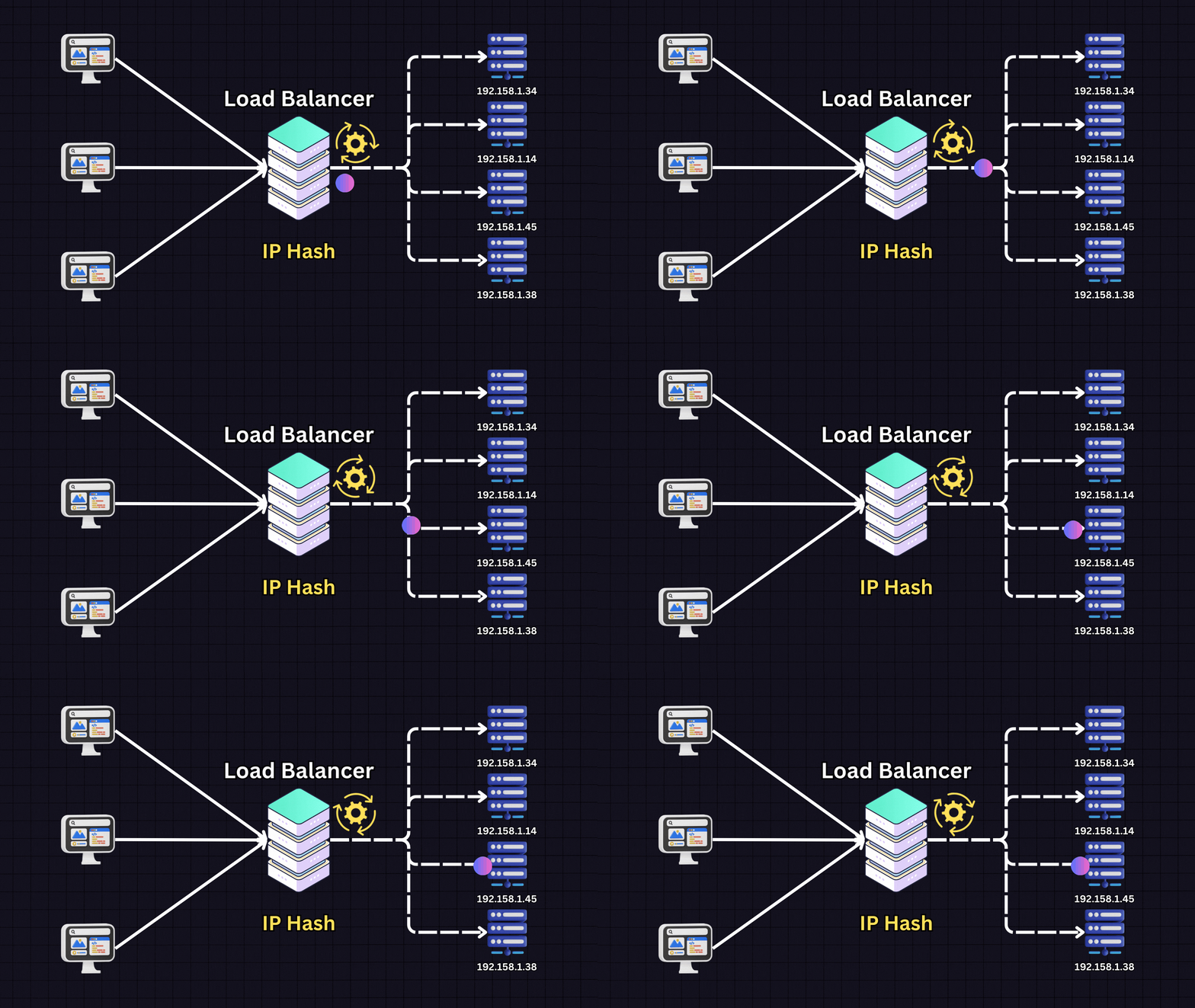
4. IP Hash
With IP hash, the load balancer uses the client’s IP address to determine which server to send the request to. This ensures that each client is routed to the same server, making it effective for applications that require session persistence.
5. Weighted Round Robin
Similar to round robin, but each server is assigned a weight based on its capacity. Servers with higher weights receive more requests. This is useful when there are servers with varying levels of power, memory, or storage in the pool.
6. Weighted Least Connections
Similar to the least connections method, but each server has an assigned weight. This method favors servers with higher capacities but still takes into account the number of connections.
Load Balancing in the Cloud
Many modern applications are hosted in the cloud, where load balancing can be done at the infrastructure level by cloud providers. Cloud providers like AWS, Google Cloud, and Microsoft Azure offer load-balancing services that can dynamically adjust to changing traffic patterns and scale as needed. Cloud load balancers often come with additional features, such as geographic distribution, integrated health checks, and support for microservices architectures.
Cloud-based load balancing also supports advanced use cases, such as:
- Global Load Balancing: Distributing traffic across multiple data centers worldwide to improve latency and redundancy.
- Auto-scaling: Automatically adding or removing servers in response to traffic demands.
- Security: Many cloud load balancers come with built-in security features, like DDoS protection and encryption, providing an additional layer of defense against malicious attacks.
Load Balancing and Microservices
In microservices architectures, where applications are divided into small, independent services, load balancing becomes even more critical. With many services communicating with each other, there’s a need to manage traffic between services efficiently. In these setups, load balancing can happen at multiple levels:
- API Gateway Load Balancing: The API gateway acts as a load balancer for requests coming into the application from external clients.
- Service Mesh Load Balancing: A service mesh handles traffic within the microservices ecosystem, often incorporating features like service discovery and monitoring.
- Client-Side Load Balancing: In some cases, the client (e.g., a microservice) decides which instance of another service to send a request to, reducing dependency on a central load balancer.
Real-World Challenges in Load Balancing (And How to Solve Them)
While implementing a load balancer is essential for scaling modern web infrastructure, it is not a “set-it-and-forget-it” solution. Introducing a load balancer adds an architectural layer between your users and your application servers. This structural shift introduces a unique set of technical hurdles that engineering teams must proactively design around.
Below, we break down the four most critical challenges in load balancing and the standard architectural strategies used to overcome them.
1. The Dilemma of Session Persistence (Sticky Sessions)
By default, load balancers aim to distribute incoming traffic evenly across all backend nodes. However, many legacy or stateful applications store user session data—such as an active shopping cart or user authentication state—locally within the memory (RAM) of the specific server that handled the initial login.
If a user’s first request lands on Server A, but their subsequent checkout request is routed to Server B, Server B will have no record of their session. The user is abruptly logged out or loses their progress, destroying the user experience.
How to Solve It:
- Session Affinity (Sticky Sessions): The load balancer inserts a custom cookie into the user’s browser or tracks their IP address. For the remainder of the session, the load balancer ensures all traffic from that specific user is pinned to the exact same backend server.
- The Downside: This can lead to uneven traffic distribution if a few “sticky” users generate massive workloads, overloading one server while others sit idle.
- Centralized Session Stores (Recommended): A more robust, cloud-native approach is to make your application servers completely stateless. Instead of storing session data in local server memory, all servers read and write session states to a high-speed, shared external database like Redis or Memcached. This allows any server in the pool to handle any request seamlessly.
2. SSL/TLS Termination and Overhead
Securing data in transit via HTTPS is non-negotiable. However, the cryptographic handshake required to encrypt and decrypt HTTPS traffic is incredibly CPU-intensive. If every backend application server has to handle its own SSL handshakes alongside processing business logic and database queries, overall system performance drops significantly.
How to Solve It:
- SSL Termination (Offloading): The load balancer acts as the secure edge gateway of your network. It hosts the SSL/TLS certificate, decrypts incoming client traffic right at the entrance, and passes the unencrypted HTTP requests to the backend servers over a secure, isolated internal private network. This frees up massive amounts of backend CPU capacity.
- SSL Bridging: If your industry regulations (like HIPAA or PCI-DSS) strictly mandate end-to-end encryption, you must use SSL bridging. The load balancer decrypts the traffic to inspect it for threats, re-encrypts it, and sends it to the backend server. While secure, this re-introduces the processing overhead challenge, requiring high-performance load balancing hardware or instances.
3. Latency, Bottlenecks, and Single Points of Failure
The primary goal of a load balancer is to eliminate single points of failure. Ironically, if you only deploy a single load balancer instance, you have simply moved the bottleneck.
Every single packet of data flowing into and out of your application must pass through this single device. If a massive traffic spike or a Distributed Denial of Service (DDoS) attack overwhelms the load balancer’s CPU or network bandwidth, your entire application goes dark.
How to Solve It:
- High-Availability (HA) Pairs: Never deploy a single load balancer in production. Instead, deploy them in an active-passive or active-active cluster.
- In an Active-Passive setup, a primary load balancer handles 100% of the traffic while a secondary standby balancer continuously monitors its health. If the primary instance fails, a mechanism like Virtual Router Redundancy Protocol (VRRP) instantly reassigns the public IP address to the backup balancer.
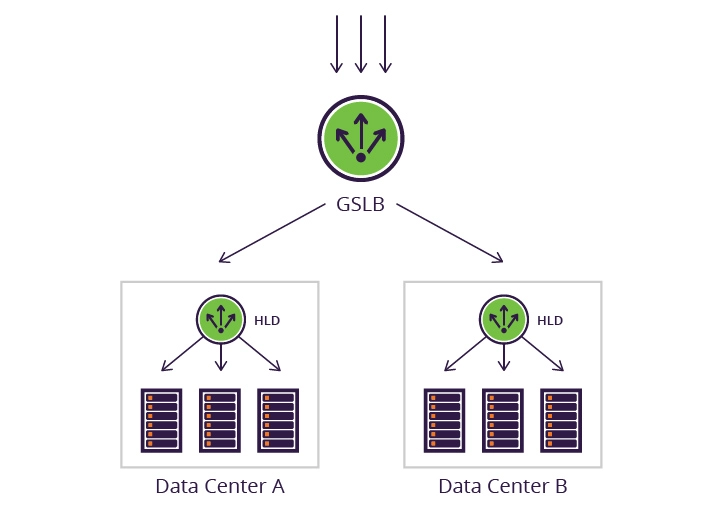
- DNS Round Robin / Global Server Load Balancing (GSLB): For massive, internet-scale applications, traffic is first split at the DNS level across multiple distinct data centers, each guarded by its own high-availability load-balancing cluster.
4. Configuration Complexity and “Split-Brain” Risks
Managing a distributed load-balanced ecosystem requires meticulous configuration, continuous health monitoring, and precise tuning. As your infrastructure scales, configuring routing rules manually becomes impossible.
Furthermore, load balancers rely on “health checks” to determine if a server is dead or alive. If the health check parameters are configured poorly, the load balancer might accidentally isolate healthy servers. For instance, if a database query slows down temporarily, a hyper-aggressive health check might mark every single application server as “unhealthy,” leading to a self-inflicted cascade failure where the system completely shuts itself down.
How to Solve It:
- Infrastructure as Code (IaC): Use configuration management and IaC tools like Terraform or Ansible to automate the deployment, scaling, and rule-mapping of your load balancers. This eliminates human error and ensures consistency across staging and production environments.
- Intelligent Health Checking: Design deep health check endpoints (e.g.,
/healthzor/status) that verify not just if the web server is running, but if the server can successfully talk to its underlying database and cache. Implement threshold dampening (e.g., only remove a server if it fails three consecutive health checks over 30 seconds) to avoid premature traffic cuts.
Conclusion
Load balancing is a fundamental aspect of modern backend systems, providing performance improvements, fault tolerance, and scalability. By distributing traffic across multiple servers using algorithms like round robin, least connections, or IP hash, load balancers help maintain a reliable and responsive user experience. Whether used in traditional server clusters or modern microservices architectures, load balancing enables systems to handle high volumes of traffic efficiently, providing a better experience for users and increasing the robustness of backend systems. As demand grows, so too does the importance of load balancing in delivering scalable and highly available applications.
Frequently Asked Questions
Q1: What is the difference between hardware and software load balancers?
Historically, load balancing required dedicated physical appliances—hardware load balancers—built with proprietary processors (ASICs) tailored specifically for network routing. While incredibly fast and reliable, they are expensive, rigid, and difficult to scale on demand.
Q2: What are the most common load-balancing algorithms?
Load balancers use specific algorithms to determine which backend server should receive the next request. The choice depends on your application’s statefulness and resource distribution:
Round Robin: Requests are distributed sequentially down the list of servers. Best when all backend servers have identical hardware specifications and tasks take a similar amount of time to process.
Weighted Round Robin: Servers are assigned a weight based on their processing capacity. A server with double the capacity of another will receive twice as many requests.
Least Connections: Traffic is directed to the server with the fewest active, open client connections. This is ideal for applications where requests vary drastically in processing time (e.g., a simple data fetch vs. a heavy report generation).
IP Hash: The load balancer uses a mathematical formula on the client’s IP address to assign them to a specific server. This provides a basic form of session persistence without using cookies.
Q3: How do health checks prevent traffic from hitting a broken server?
A load balancer keeps a dynamic registry of “active” servers. It continuously tests their availability by sending background requests (health checks) to a specified endpoint at regular intervals (e.g., every 5 seconds).
If a server fails to respond, or returns an HTTP error code (like 500 Internal Server Error), the load balancer instantly removes that server from its active pool. Incoming user requests are seamlessly directed to the remaining healthy servers. Once the broken server recovers and passes a consecutive number of health checks, the load balancer automatically re-introduces it to the traffic rotation.
Q4: Can a load balancer protect my application from security threats?
Yes. Because a load balancer sits at the absolute perimeter of your infrastructure, it acts as a highly effective first line of defense.
Advanced Layer 7 load balancers can be bundled with a Web Application Firewall (WAF) to inspect incoming application data, allowing them to block malicious payloads like SQL injection or Cross-Site Scripting (XSS) before they hit your core application servers. Furthermore, they can act as a shield against DDoS (Distributed Denial of Service) attacks by enforcing strict rate limits and dropping suspicious protocol violations at the edge.
Q5: What is the difference between DNS Round Robin and a standard Load Balancer?
While both distribute traffic, they operate at completely different levels of the network.
DNS Round Robin involves mapping a single domain name to multiple public IP addresses within your domain provider’s settings. When a browser asks for your website’s IP address, the DNS server cycles through the list.
The Problem: DNS lacks awareness of server health. If one of those IP addresses goes completely down, the DNS server will still hand that broken IP to users until a manual change is made and the DNS cache clears across the internet.
