



Cross-Origin Resource Sharing (CORS) is a crucial browser security mechanism that restricts web applications from requesting resources from a different origin (domain, protocol, or port) than the one serving the application.
While CORS protects users against malicious cross-site exploits, it frequently triggers debugging headaches when integrating microservices, REST APIs, or client-side single-page applications (SPAs).
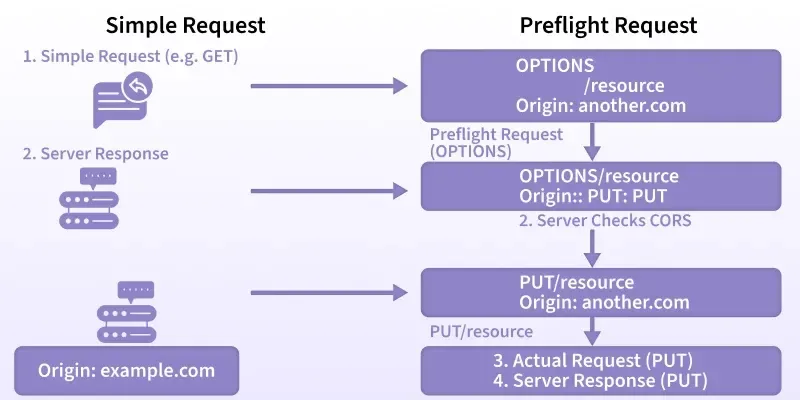
1. No ‘Access-Control-Allow-Origin’ Header Present
Error Message
Plaintext
Access to fetch at 'https://api.example.com/data' from origin 'https://app.example.com' has been blocked by CORS policy: No 'Access-Control-Allow-Origin' header is present on the requested resource.
Why This Happens
The browser initiates a cross-origin request, but the server does not return the Access-Control-Allow-Origin response header. Because this header is missing, the browser refuses to expose the response payload to your frontend code.
How to Fix
You must explicitly configure your backend to return the appropriate origin header.
Manual Header Setup (Node.js/Express):
JavaScript
app.use((req, res, next) => {
  // Allow all origins (Development only)
  res.header("Access-Control-Allow-Origin", "https://app.example.com");
  next();
});
Using the cors Middleware:
JavaScript
const cors = require("cors");

// Allow specific trusted origin
app.use(cors({
  origin: "https://app.example.com"
}));
2. CORS Policy Blocks Preflight Requests
Error Message
Plaintext
Response to preflight request doesn't pass access control check: It does not have HTTP ok status.
Why This Happens
When a request uses methods other than GET, HEAD, or POST, or contains custom headers (like Authorization or Content-Type: application/json), the browser issues an automatic preflight check using the OPTIONS HTTP method. If your server does not explicitly respond to OPTIONS requests with a 200 or 204 status, the browser drops the actual request.
How to Fix
Handle the OPTIONS method on your backend endpoints or use standard middleware:
JavaScript
const express = require("express");
const cors = require("cors");
const app = express();

// Automatically handles preflight (OPTIONS) requests across all routes
app.use(cors());
app.options("*", cors());
3. CORS Policy Blocks Credentials Requests
Error Message
Plaintext
The value of the 'Access-Control-Allow-Origin' header in the response must not be the wildcard '*' when the request's credentials mode is 'include'.
Why This Happens
Your frontend sets credentials: 'include' (or withCredentials: true in Axios) to send HTTP cookies, session tokens, or TLS client certificates. For security reasons, browsers strictly forbid the wildcard * origin when credentials are transmitted.
How to Fix
Explicitly declare the origin and allow credentials on the backend:
JavaScript
const cors = require("cors");

app.use(cors({
  origin: "https://app.example.com", // Specific origin required
  credentials: true                  // Sets Access-Control-Allow-Credentials: true
}));
4. Mixed Content: Mismatched Protocols (HTTP vs. HTTPS)
Error Message
Plaintext
Mixed Content: The page at 'https://app.example.com' was loaded over HTTPS, but requested an insecure resource 'http://api.example.com/data'. This request has been blocked; the content must be served over HTTPS.
Why This Happens
Browsers enforce strict transport security. If your frontend application is served over https://, it cannot make unencrypted http:// API requests, even if the backend returns valid CORS headers.
How to Fix
- Production: Issue an SSL/TLS certificate for your API backend and update all client-side endpoints to use
https://. - Local Development: If you need to test against local HTTP services from an HTTPS staging app, use a tunneling tool (such as ngrok or Cloudflare Tunnel) to provide an HTTPS endpoint.
5. CORS Header Loss on Server Redirects
Error Message
Plaintext
Access to fetch at 'https://api.example.com/v1/users' (redirected from 'https://api.example.com/users') from origin 'https://app.example.com' has been blocked by CORS policy.
Why This Happens
When an API responds with an HTTP redirect (301 or 302), the browser follows the redirect, but many proxy servers and web frameworks strip custom headers during the redirection hop. If the intermediate or target response misses the CORS headers, the browser aborts the request.
How to Fix
- Backend: Ensure reverse proxies (like Nginx, Apache, or AWS API Gateway) append CORS headers to
3xxredirect status codes. - Frontend: Request the final canonical URL directly to eliminate unnecessary redirects:
JavaScript
// Avoid triggering a 301 trailing-slash redirect
fetch("https://api.example.com/v1/users/", {
  method: "GET",
  headers: { "Content-Type": "application/json" }
});
6. Incorrect ‘Access-Control-Allow-Headers’ Configuration
Error Message
Plaintext
Request header field authorization is not allowed by Access-Control-Allow-Headers in preflight response.
Why This Happens
Your frontend is sending non-standard HTTP request headers (such as Authorization, X-API-Key, or X-Requested-With), but your server has not declared them as acceptable in its preflight response.
How to Fix
Whitelist the required custom headers on your server:
JavaScript
const cors = require("cors");

app.use(cors({
  origin: "https://app.example.com",
  allowedHeaders: ["Content-Type", "Authorization", "X-API-Key"]
}));
7. Disallowed HTTP Method (‘Access-Control-Allow-Methods’)
Error Message
Plaintext
Method PUT is not allowed by Access-Control-Allow-Methods in preflight response.
Why This Happens
The frontend attempts to call an endpoint with a write/update method like PUT, PATCH, or DELETE, but the server’s preflight configuration only whitelists basic read/submit methods (GET, POST).
How to Fix
Explicitly whitelist the RESTful verbs your API endpoints consume:
JavaScript
const cors = require("cors");

app.use(cors({
  origin: "https://app.example.com",
  methods: ["GET", "POST", "PUT", "PATCH", "DELETE", "OPTIONS"]
}));
Quick Reference Summary
| CORS Issue | Primary Cause | Solution |
| Missing Origin Header | No Access-Control-Allow-Origin returned | Add origin header or install backend CORS middleware |
| Preflight Block | Server fails to handle OPTIONS requests | Enable preflight handling on API routes with a 200/204 status |
| Credentials Failure | Wildcard * used with cookies/auth headers | Specify exact origin and set credentials: true |
| Mixed Content | Calling http:// API from https:// client | Upgrade backend endpoints to HTTPS |
| Redirect Failure | CORS headers stripped during 3xx redirects | Attach CORS headers to redirect responses; call direct URLs |
| Header Restriction | Custom headers (e.g., Authorization) missing in allowlist | Add required headers to Access-Control-Allow-Headers |
| Method Restriction | HTTP method (e.g., PUT, DELETE) not whitelisted | Add HTTP verbs to Access-Control-Allow-Methods |

Final Thoughts
CORS errors can be frustrating, but understanding why they happen helps you fix them quickly. Here’s a quick recap:
You may also like:
1) 5 Common Mistakes in Backend Optimization
2) 7 Tips for Boosting Your API Performance
3) How to Identify Bottlenecks in Your Backend
4) 8 Tools for Developing Scalable Backend Solutions
5) 5 Key Components of a Scalable Backend System
6) 6 Common Mistakes in Backend Architecture Design
7) 7 Essential Tips for Scalable Backend Architecture
8) Token-Based Authentication: Choosing Between JWT and Paseto for Modern Applications
9) API Rate Limiting and Abuse Prevention Strategies in Node.js for High-Traffic APIs
10) Can You Answer This Senior-Level JavaScript Promise Interview Question?
11) 5 Reasons JWT May Not Be the Best Choice
12) 7 Productivity Hacks I Stole From a Principal Software Engineer
13) 7 Common Mistakes in package.json Configuration
Read more blogs from Here
Share your experiences in the comments, and let’s discuss how to tackle them!
Follow me on Linkedin
Frequently Ask Question:
Why do CORS errors only appear in the browser and not in Postman or cURL?
CORS is purely a client-side browser security policy designed to protect end users from cross-site request forgery and unauthorized data theft. Standalone tools like Postman, cURL, or server-to-server HTTP clients do not enforce CORS restrictions.
Can I fix CORS errors solely from my frontend JavaScript code?
No. CORS headers must be sent by the server hosting the resource. The only client-side workarounds are using a dedicated reverse proxy or setting up a development proxy in tools like Vite or Next.js to forward requests server-side.
Is using Access-Control-Allow-Origin: * safe for production APIs?
A wildcard (*) origin is safe only for public, read-only data that requires no authentication or cookies. For private, user-specific, or authenticated endpoints, always whitelist explicit domains.
What is the difference between simple requests and preflighted requests?
Simple requests use GET, HEAD, or standard POST methods with basic headers (like text/plain or application/x-www-form-urlencoded) and execute immediately. Preflighted requests send an initial OPTIONS request first to verify permissions before the browser sends the actual payload.
How do I bypass CORS during local development?
You can configure a dev server proxy (such as Webpack Dev Server or Vite Proxy) to route requests through your local frontend domain, or use the cors package in your local backend environment configured to accept http://localhost:3000.
