


Convolutional Neural Networks (CNNs) have revolutionized computer vision, enabling machines to detect features, track objects, and interpret images with superhuman accuracy.
At the core of any CNN is the convolution operation, where a small matrix called a filter (or kernel) slides over an input image to extract critical visual data. While concepts like filter size and padding get plenty of attention, there is an equally vital hyperparameter that heavily dictates the performance, speed, and size of your network: Stride.
In this detailed guide, we will break down exactly what stride is, how it alters your network’s math, and how to pick the perfect stride configuration for your deep learning models.
What is Stride?
In a Convolutional Neural Network, stride refers to the step size (measured in pixels) at which the convolutional filter moves across the input matrix.
When a model performs a convolution, the kernel does not just sit still; it systematically shifts horizontally from left to right, and vertically from top to bottom. The number of pixels it hops during each shift is the stride value.
- Stride = 1: The filter shifts over by exactly 1 pixel at a time. This creates highly dense, overlapping receptive fields.
- Stride = 2: The filter skips a pixel, shifting by 2 pixels at a time. This rapidly downsamples the image size.
The Anatomy of a Convolution Operation
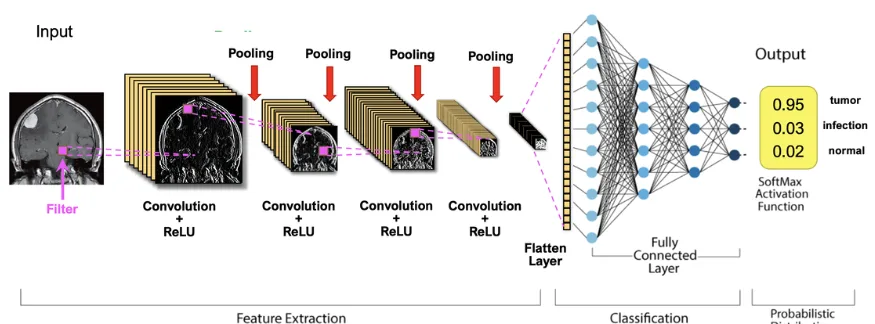
To see how stride behaves in the wild, let’s look at the mechanical breakdown of how filters extract features:
- The Dot Product: The filter drops onto a localized patch of the input image. It calculates an element-wise multiplication between its own weights and the pixel values of that patch, summing them into a single value.
- The Step (Stride): Once that single value is recorded, the filter moves to the next patch. The length of this move is dictated by your stride setting.
- The Feature Map: This iterative sliding process generates a completely new matrix known as a feature map, which isolates specific visual traits like edges, textures, or shapes.
Read more blog : The Foundation of Convolutional Neural Networks
As shown in the architectural diagram above, changing your stride directly alters the scale of the resulting layers:
- Convolving a $7 \times 7$ input with a $3 \times 3$ filter using Stride = 1 retains a large $7 \times 7$ output grid (when padded).
- Applying the exact same filter to the exact same input using Stride = 2 condenses the output map down to a compact $4 \times 4$ grid.
The Mathematical Formula for Output Size
You do not have to guess what size your feature maps will be. You can calculate the exact spatial dimensions (Width and Height) of an output layer using this standard architectural formula:
$$\text{Output Size} = \left\lfloor \frac{W – F + 2P}{S} \right\rfloor + 1$$
Where:
- $W$ = Input spatial dimension (Width/Height)
- $F$ = Filter size (Kernel width/height)
- $P$ = Padding size
- $S$ = Stride value
- $\lfloor \dots \rfloor$ = The floor function (rounding down to the nearest integer if the division results in a fraction)
Architectural Note: If the result of your formula is not a whole number, it means your filter does not fit evenly across the image. The network will drop the remaining edge pixels unless you adjust your padding ($P$) to balance the equation.
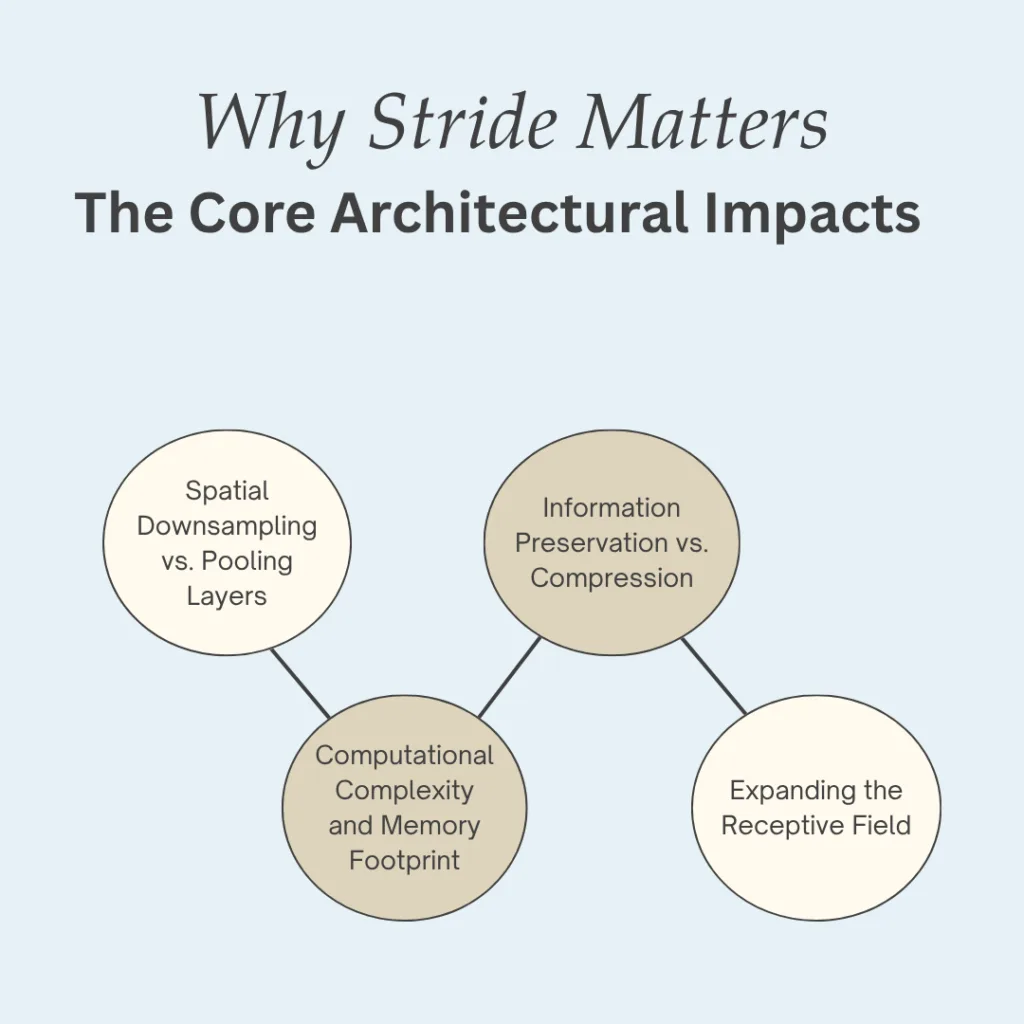
Why Stride Matters: The Core Architectural Impacts
Adjusting your stride values is not just a formatting choice—it alters the fundamental physics of your neural network.
1. Spatial Downsampling vs. Pooling Layers
Historically, deep learning practitioners used a stride of 1 alongside separate Pooling Layers (like Max Pooling) to shrink feature maps. Modern architectures (such as ResNet) frequently ditch pooling layers entirely, utilizing a Stride = 2 convolution to handle both feature extraction and downsampling at the exact same time.
2. Information Preservation vs. Compression
- Smaller Strides (S=1): Ensure maximum information retention. Because the filter patches overlap heavily, the network captures granular, micro-level structural details.
- Larger Strides (S≥2): Purposely discard highly redundant localized pixels. This aggressively compresses the information flow, encouraging the network to prioritize global, macroeconomic shapes rather than tiny details.
3. Computational Complexity and Memory Footprint
Larger strides dramatically reduce the spatial area of your feature maps. A smaller feature map means far fewer parameters to calculate in subsequent layers, leading to:
- Substantially lower GPU memory (VRAM) consumption.
- Faster forward and backward training passes.
- Smaller deployment model files.
4. Expanding the Receptive Field
The further your network progresses into its deeper layers, the larger its receptive field needs to be (the area of the original input image that a single deep neuron can “see”). Larger strides expand the receptive field quickly, allowing deeper layers to understand how disparate parts of an image relate to one another.
Computer Vision Applications: Matching Stride to the Task
Different computer vision tasks require vastly different configurations of stride parameters.
1. Image Classification
In classification networks (e.g., identifying if an image contains a vintage car), early layers often use a larger stride (like $S=2$ or even $S=4$ in classic architectures like AlexNet) to shed massive raw pixel data quickly. As shown in the visualization above, early layers focus on minor low-level edges, while deeper layers care about abstract, high-level structural concepts.
2. Object Detection
For models tasked with finding and drawing bounding boxes around objects (like YOLO or Faster R-CNN), accuracy requires recognizing objects at multiple scales. These architectures typically combine small strides in early layers (to track tiny objects) with larger strides deeper in the backbone to catch large foreground objects.
3. Semantic Segmentation
In pixel-level tasks like medical imaging or autonomous driving lane-detection, losing spatial resolution is dangerous. Segmentation models use very small strides ($S=1$) or leverage specialized Dilated Convolutions to widen the receptive field without dropping pixels, ensuring output masks match the original input resolution perfectly.
Summary Reference Table
| Stride Setting | Information Density | Computational Speed | Spatial Map Size | Primary Use Case |
| Stride = 1 | Extremely High (Maximum Overlap) | Slower (More calculations) | Retained / Large | Edge detection, texture analysis, segmentation |
| Stride = 2 | Balanced Compression | Fast (Saves VRAM) | Reduced by ~50% | Dimensionality reduction, modern classification backbones |
| Stride ≥ 3 | High Loss / Ultra-Compressed | Blazing Fast | Aggressively Tiny | Initial input layers processing massive high-res imagery ($4\text{K}$ or $8\text{K}$) |

Conclusion
Mastering stride allows you to control the delicate balance between spatial resolution, processing speed, and memory usage. By strategically setting your stride values layer by layer, you can design hyper-efficient networks optimized specifically for your targeted hardware and computer vision goals.
Frequently Ask Question:
1. What happens if the stride calculation results in a fraction?
When using the output dimension formula, the division by stride ($S$) may not result in a whole number:
$$\text{Output Size} = \frac{W – F + 2P}{S} + 1$$
If this calculation results in a decimal, standard deep learning frameworks like PyTorch and TensorFlow apply a floor function ($\lfloor \dots \rfloor$), which rounds the number down to the nearest integer. Effectively, this means the filter will stop sliding once it reaches a point where it cannot fully fit over the remaining edge pixels. The remaining pixels are simply ignored unless extra padding is added to accommodate them.
2. Can a stride value be asymmetrical (different for horizontal and vertical directions)?
Yes. While it is highly common in computer vision to use a single scalar value for stride (such as $S=1$ or $S=2$ which applies symmetrically to both axes), you can pass a tuple—like stride=(2, 1).
This tells the model to shift the filter by 2 pixels horizontally but only 1 pixel vertically. This approach is widely utilized in tasks where the input data has highly asymmetrical features, such as parsing audio spectrograms or scanning text documents in NLP.
3. What is the difference between Stride and Pooling?
Both parameters are used to downsample and shrink the spatial resolution of feature maps, but they accomplish it through different paths:
Stride: Downsamples during the convolution process itself by forcing the kernel to skip pixels. It uses learnable weights to determine what data gets passed forward.
Pooling (e.g., Max Pooling): Is a separate, fixed non-parametric layer that drops in after a convolution. It does not learn any weights; it simply applies a hard function (like choosing the maximum value in a $2 \times 2$ window) to compress the image.
Modern Shift: Modern architectures like ResNets frequently omit pooling layers completely, relying instead on a convolution layer with a stride=2 to handle feature extraction and downsampling at the same time.
4. What is the difference between “Valid” and “Same” padding in relation to stride?
When writing code in Keras/TensorFlow, you will often encounter these two keywords:
padding=’valid’: Means zero padding is used ($P=0$). The feature map will shrink naturally based on your filter size and stride.
padding=’same’: The framework automatically calculates and injects the exact amount of zero padding needed to ensure the output spatial dimensions match the input spatial dimensions. Note: If your stride is set to $S \ge 2$, padding=’same’ will make the output size exactly $\lceil W / S \rceil$ (the input size divided by the stride, rounded up).
5. Why can’t we just use a massive stride (e.g., Stride = 5 or 10) to train networks faster?
While a very large stride drastically slashes your VRAM usage and speeds up training times, it introduces a severe penalty: aliasing and heavy information loss.
If a filter skips 5 or 10 pixels at a time, it completely misses localized spatial context. The network becomes unable to learn micro-features like textures, sharp curves, or delicate borders, rendering the model highly inaccurate for complex vision tasks.
