


Analytics software for startups is the compass and dashboard for navigating growth. For SaaS companies and early-stage ventures, data isn’t just a report—it’s the critical feedback loop that informs product development, marketing strategy, and customer success.
Choosing the right platform means moving beyond basic vanity metrics to understanding user behavior, tracking key business outcomes, and making confident, data-driven decisions. This guide focuses on five powerful yet accessible platforms that deliver maximum insight for growing teams.
Table of Contents
Key Features of a Modern Analytics software for startups
Before exploring the tools, understand the capabilities that matter. A robust SaaS analytics platform should excel at User Behavior Tracking (session recording, event tracking, funnel analysis); Product & Business Metrics (monitoring MRR, churn, feature adoption); Data Visualization & Dashboards (creating clear, shareable reports); Data Integration (combining data from multiple sources); and Collaboration (enabling teams to share and discuss insights).
1. Mixpanel
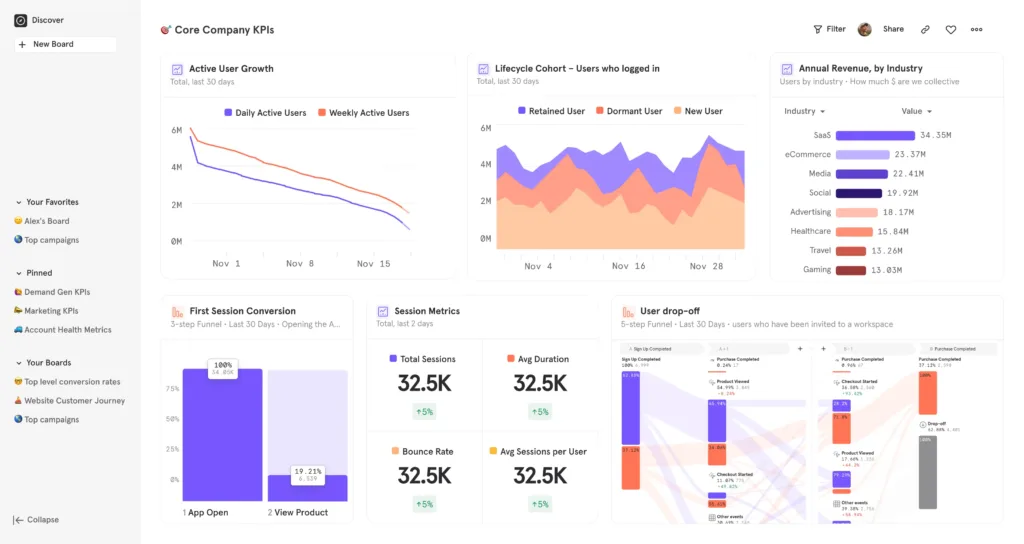
Brief Overview: Mixpanel is a product analytics leader focused on tracking user interactions to understand behavior and drive engagement. It moves beyond pageviews to analyze actions users take, making it ideal for understanding the “why” behind user journeys.
Best for: Product-led startups and SaaS companies that need deep behavioral analysis, cohort retention tracking, and feature adoption metrics.
Pricing: Offers a generous free plan for up to 100,000 monthly tracked users. Paid plans start at $20/month.
Pros: Powerful funnel and retention analysis; easy event tracking setup; strong segmentation and cohort capabilities.
Cons: Can become expensive at scale; less focused on traditional web analytics like traffic sources.
2. Amplitude
Brief Overview: A direct competitor to Mixpanel, Amplitude offers sophisticated product analytics with a strong emphasis on democratizing data across the organization. Its robust toolkit includes predictive analytics and is built to handle complex, large-scale data.
Best for: Fast-scaling startups with complex products, needing predictive insights and a platform that serves both technical and non-technical teams.
Pricing: A robust free plan (Amplitude Starter) with 10 million monthly events. Paid plans are custom-quoted.
Pros: Comprehensive behavioral analytics; excellent data governance tools; powerful collaboration features for teams.
Cons: The transition from the free to paid plan can be a significant cost jump; advanced features require deeper configuration.
3. Heap
Brief Overview: Heap takes a fundamentally different approach by automatically capturing every user interaction (clicks, form submissions, pageviews) retroactively, eliminating the need to manually define events upfront.
Best for: Startups that need flexibility and want to avoid the engineering overhead of traditional event tracking. Ideal for teams that are iterating rapidly.
Pricing: A free plan is available for basic data needs. Paid plans start at $3,600/year.
Pros: Captures data automatically from day one; allows for retroactive analysis without code changes; reduces initial setup friction.
Cons: Can generate a very large dataset that requires careful management; pricing can be high for smaller startups on paid plans.
4. Google Analytics 4 (GA4)
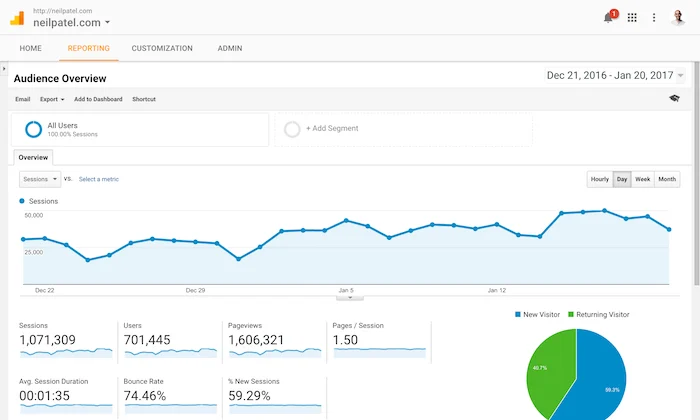
Brief Overview: The ubiquitous and free standard from Google. GA4 is an event-driven platform designed to provide a unified view of the customer journey across websites and apps, with a strong focus on privacy and predictive modeling.
Best for: Every startup as a foundational, free tool for marketing attribution, understanding acquisition channels, and getting basic user engagement metrics.
Pricing: Completely free for standard use.
Pros: Free and powerful for marketing analytics; strong integration with Google Ads and the broader Google ecosystem; built-in machine learning insights.
Cons: Steep learning curve and a less intuitive interface than some rivals; less focused on deep product analytics compared to Mixpanel or Amplitude.
5. Mode
Brief Overview: Mode is an analytics platform built for collaboration between data analysts and business teams. It combines a powerful SQL editor, Python/R notebooks, and interactive dashboards, serving as a central hub for data work.
Best for: Startups with a dedicated data analyst or tech-savvy founders who want the flexibility of writing custom SQL queries and building sophisticated, custom reports.
Pricing: A free “Starter” plan is available for individual explorers. Team plans require a custom quote.
Pros: Unmatched flexibility for custom analysis; brilliant for collaborative data exploration; connects directly to your data warehouse.
Cons: Requires SQL knowledge to unlock its full potential; not a “plug-and-play” behavioral analytics tool.
Choosing the Right Analytics Software for Your Startup
Your choice depends heavily on your team’s expertise and primary data needs. For deep product and user behavior insight, Mixpanel or Amplitude are the leaders. If you want to avoid upfront tracking setup and value retroactive analysis, Heap is revolutionary. As a free, foundational tool for marketing and web metrics, GA4 is non-negotiable. For teams with SQL skills wanting limitless customization, Mode is a powerhouse.
Consider starting with a stack: use GA4 for acquisition data and Mixpanel/Amplitude for product analytics. This approach covers both how users find you and what they do once they’re in your product. Remember, the goal is to create a cohesive analytics strategy, not just to implement a tool. Ensure your chosen platform integrates well with the other components of your essential SaaS toolkit to avoid data silos.
To build a complete startup tech stack, consider combining these tools with task and project management tools and customer support software for SaaS.
Frequently Asked Questions (FAQ)
Q1: What’s the biggest mistake startups make when implementing analytics?
A: The most common mistake is “track everything” paralysis—either setting up overly complex event schemas from day one or, conversely, tracking nothing. Start by identifying 3-5 key user actions that define success in your product (e.g., “user completed onboarding,” “created a project,” “invited a teammate”). Focus your initial implementation on tracking these core events cleanly. You can always expand later.
Q2: When should we graduate from a free tool like GA4 to a paid platform?
A: The trigger is usually when you need to ask “why” questions about user behavior that GA4 can’t easily answer. If you’re constantly wondering, “Why did users drop off at this step?” or “Which features are our most engaged users actually using?”, you need the funnel and retention analysis of a dedicated SaaS analytics platform like Mixpanel or Amplitude.
Q3: Do we need a data warehouse like BigQuery or Snowflake to use these tools?
A: Not initially. Most of these tools (Mixpanel, Amplitude, Heap) are designed as all-in-one solutions that store and process your event data for you. However, as you scale, many companies choose to route their raw event data to a warehouse for long-term storage and to combine it with other business data (finance, CRM). Tools like Mode are specifically built to analyze data that’s already in a warehouse.
Q4: How can we ensure our team actually uses the analytics software we choose?
A: Drive adoption by connecting data to daily rituals. Integrate key dashboards into your weekly team meetings. Set up automated Slack or email alerts for significant metric changes (e.g., “Daily sign-ups dropped by 20%”). Most importantly, leadership must consistently reference the data in decision-making, modeling its value and creating a true data-driven culture.
