



ERP software for manufacturing helps companies manage production, inventory, purchasing, sales, finance, quality control, and other operations through one connected platform. Instead of depending on separate spreadsheets and disconnected applications, manufacturers can use a centralized system to track materials, orders, costs, schedules, and finished products.
Manufacturing involves several connected activities. Raw materials must arrive on time, machines must be available, employees need clear work instructions, and finished products must meet quality standards. A delay or error in one area can affect the entire production process.
A modern manufacturing ERP system improves visibility across departments and helps businesses make decisions using accurate information. It also works as production management software, allowing managers to plan work, monitor resources, control costs, and respond more quickly to changing customer demand.
Table of Contents
What Is ERP Software for Manufacturing?
Enterprise resource planning, commonly called ERP, is business management software that connects essential operations through a shared database.
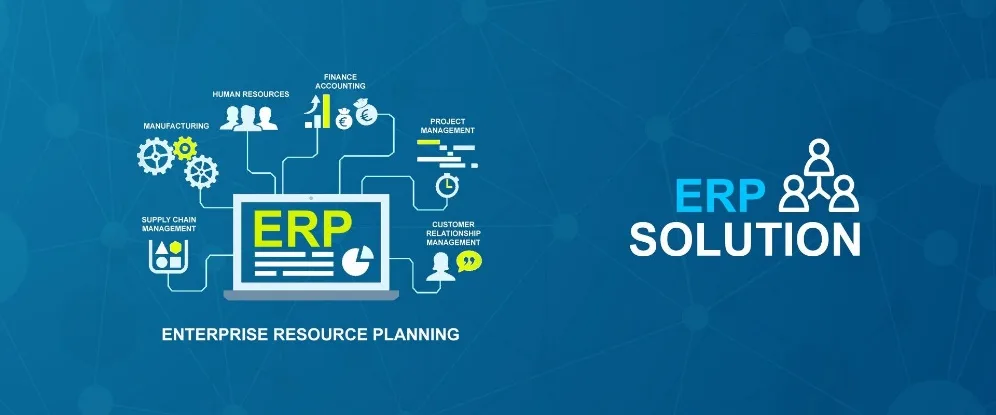
A manufacturing-focused ERP platform usually combines financial management with industry-specific features such as production planning, bills of materials, material requirements planning, shop-floor control, and quality management.
Common modules include:
- Finance and accounting
- Inventory management
- Purchasing and procurement
- Sales and order processing
- Production planning
- Warehouse management
- Quality control
- Equipment maintenance
- Human resources
- Reporting and analytics
When these modules are connected, information entered by one department becomes available to other authorized teams.
For example, when a customer places an order, the ERP can check finished-product inventory, calculate the required raw materials, create a production order, identify shortages, and update the expected delivery date.
Why Manufacturers Need an ERP System?
Small manufacturers often begin by using spreadsheets, accounting software, and manual production records. This approach may work while the company has a limited number of products and orders.
However, it becomes difficult to manage when the business adds more customers, suppliers, employees, machines, warehouses, or production lines.
Disconnected systems can create problems such as:
- Inaccurate inventory records
- Delayed production schedules
- Duplicate data entry
- Missing raw materials
- Poor cost visibility
- Late customer deliveries
- Inconsistent quality checks
A manufacturing ERP system creates one source of operational information. Managers can see what has been ordered, what is being produced, which materials are available, and whether production is running according to schedule.
1. Bill of Materials Management
A bill of materials, or BOM, is a detailed list of the raw materials, components, quantities, and instructions required to manufacture a product.
For example, a furniture manufacturer may create a BOM containing wood panels, screws, handles, hinges, paint, packaging materials, and labour requirements.
An ERP system can maintain separate BOMs for different products and product versions. When a production order is created, the software uses the BOM to calculate material requirements.
Accurate BOM management helps manufacturers avoid using incorrect components and improves production-cost calculations. It also makes product changes easier to control because teams can track revisions and approved versions.
2. Production Planning and Scheduling
Production planning determines what should be manufactured, when production should begin, and which resources are required.
Without reliable planning, manufacturers may face idle machines, employee overtime, delayed orders, and unfinished work.
ERP platforms can schedule production according to customer orders, inventory levels, machine capacity, employee availability, and delivery deadlines.
Effective production management software can show which work orders are planned, active, delayed, or completed. Managers can then adjust priorities when an urgent customer order arrives or a machine becomes unavailable.
Production scheduling becomes particularly important when several products depend on the same machines, employees, or raw materials.
3. Material Requirements Planning
Material requirements planning, commonly called MRP, calculates which materials a manufacturer needs and when they must be available.
The system considers:
- Customer orders
- Demand forecasts
- Current inventory
- Bills of materials
- Open purchase orders
- Supplier lead times
- Production schedules
- Safety stock levels
If the required quantity is not available, the ERP may recommend a purchase order or production order.
MRP helps manufacturers avoid two costly situations. The first is a material shortage that stops production. The second is excess inventory that occupies warehouse space and ties up working capital.
4. Real-Time Inventory Control
Manufacturers must track raw materials, work-in-progress items, finished goods, rejected products, packaging materials, and spare parts.
ERP inventory tools can display the quantity, location, and status of each item. Companies may also track products through serial numbers, batch numbers, barcodes, expiry dates, and warehouse bins.
Real-time inventory information helps purchasing teams order the right materials and allows sales teams to provide more accurate delivery dates.
A connected manufacturing ERP system can automatically update stock when materials are received, issued to production, returned, damaged, transferred, or converted into finished products.
5. Shop-Floor Management
The shop floor is where manufacturing work is performed. Managers need to know which orders are in production, which machines are being used, and whether employees are meeting expected targets.
ERP systems may allow operators to record:
- Production start and completion times
- Materials consumed
- Quantities produced
- Labour hours
- Machine usage
- Scrap and waste
- Production delays
- Quality results
This information allows managers to compare planned production with actual performance.
Some businesses connect machines, sensors, barcode scanners, and Internet of Things devices directly to the ERP. Automated data collection can reduce manual entry and improve production visibility.
6. Quality Control
Product quality affects customer satisfaction, returns, safety, compliance, and brand reputation.
Manufacturing ERP platforms can create quality checks for incoming materials, production stages, and finished products.
The system may store inspection results, test measurements, defects, rejected quantities, and corrective actions. It can also prevent unapproved or defective items from being used or shipped.
For example, a food manufacturer may check temperature, weight, and expiry information, while an engineering company may measure component dimensions and material strength.
Quality records also support audits and help businesses identify recurring supplier or production problems.
7. Manufacturing Cost Control
Understanding the true cost of production is essential for pricing and profitability.
Manufacturing costs may include:
- Raw materials
- Direct labour
- Machine time
- Electricity
- Packaging
- Transportation
- Waste
- Overhead expenses
ERP software for manufacturing can compare planned costs with actual costs for every production order.
If the actual cost is higher, managers can investigate whether the difference came from material price changes, excessive waste, overtime, machine downtime, or inefficient production.
This information allows businesses to set more accurate selling prices and identify products that generate limited profit.
8. Procurement and Supplier Management
Manufacturers depend on suppliers for raw materials, components, packaging, tools, and equipment.
ERP software can store supplier prices, minimum order quantities, delivery times, payment terms, and quality history. Purchasing teams can compare vendors before placing an order.
Automated workflows may create purchase requests when stock falls below a defined level. Managers can then review and approve the request according to company rules.
Supplier performance reports help businesses identify late deliveries, quality problems, price increases, and incomplete orders.
9. Equipment Maintenance
Unexpected machine failure can stop production and delay customer deliveries.
Manufacturing ERP platforms may include maintenance tools for scheduling inspections, servicing equipment, tracking spare parts, and recording repair history.
Preventive maintenance is performed according to time, usage, or machine condition. It reduces the likelihood of sudden breakdowns and may extend equipment life.
The system can also calculate downtime and maintenance expenses, helping managers determine whether a machine should be repaired or replaced.
10. Sales and Order Management
Sales orders directly influence production requirements.
When sales and manufacturing systems are connected, the ERP can check stock, calculate material availability, create production orders, and estimate delivery dates.
Sales employees can provide customers with more reliable information without repeatedly contacting production or warehouse teams.
The platform may also manage quotations, customer pricing, invoices, returns, and order history.
This connection between sales and production reduces communication gaps and helps manufacturers fulfil orders more accurately.
11. Reporting and Analytics
Manufacturing ERP dashboards can provide information about:
- Production output
- Machine utilization
- Inventory turnover
- Material shortages
- Manufacturing costs
- Order completion times
- Supplier performance
- Waste and scrap
- Product quality
- On-time delivery rates
Managers can use these reports to identify delays, reduce unnecessary costs, and improve operational planning.
Modern production management software may also use artificial intelligence and predictive analytics to forecast demand, detect unusual activity, and recommend production adjustments.
Cloud ERP vs On-Premise Manufacturing ERP

Cloud ERP is hosted by a software provider and accessed through the internet. It usually requires less internal infrastructure and can support employees working across different locations.
On-premise ERP is installed on infrastructure controlled by the manufacturer. It may provide greater technical control but requires the company to manage servers, backups, updates, security, and maintenance.
Cloud ERP may suit small and growing manufacturers that want easier scalability. On-premise software may appeal to companies with specialized infrastructure requirements or complex legacy systems.
The right option depends on budget, internet availability, internal IT skills, security needs, and customization requirements.
How to Choose Manufacturing ERP Software?
Before selecting a platform, businesses should document their production processes and identify their main operational problems.
Important features may include:
- BOM management
- Material requirements planning
- Production scheduling
- Inventory tracking
- Quality management
- Shop-floor control
- Cost calculation
- Equipment maintenance
- Supplier management
- Barcode integration
Ask shortlisted vendors to demonstrate a realistic workflow. The presentation should show how the platform handles a customer order, material shortage, purchase request, production order, quality inspection, and final shipment.
Businesses should also compare implementation costs, subscriptions, user limits, customization, training, data migration, technical support, and integration capabilities.
Common Manufacturing ERP Mistakes
One common mistake is selecting software before documenting business requirements. Another is trying to customize every process instead of using suitable standard workflows.
Manufacturers may also underestimate data migration. Incorrect product codes, inventory balances, bills of materials, and supplier records can create serious problems after launch.
Employee training is equally important. Warehouse teams, machine operators, purchasing staff, finance employees, and managers require training based on their responsibilities.
ERP implementation should be treated as a business improvement project rather than only a software installation.
Conclusion
ERP software for manufacturing connects production, inventory, purchasing, sales, finance, quality, and maintenance within one platform. It helps manufacturers improve planning, reduce material shortages, calculate costs, monitor the shop floor, and fulfil customer orders more accurately.
The right manufacturing ERP system provides reliable data across departments, while effective production management software helps managers schedule resources and monitor daily operations.
However, software alone cannot improve a poorly defined production process. Manufacturers also need accurate data, clear workflows, employee training, and regular performance reviews. When implemented correctly, ERP can reduce operational costs, improve product quality, and create a stronger foundation for business growth.
Frequently Asked Questions
1. What is manufacturing ERP software?
Manufacturing ERP software is a business management platform that connects production planning, inventory, purchasing, finance, sales, quality control, and other manufacturing processes through one database.
2. Can small manufacturers use ERP software?
Yes. Small manufacturers can use ERP to replace spreadsheets, improve stock accuracy, create production schedules, and calculate manufacturing costs. They should choose a system that matches their current size and future growth requirements.
3. What is the difference between ERP and MRP?
MRP mainly focuses on material requirements and production planning. ERP covers a wider range of functions, including MRP, accounting, purchasing, inventory, sales, human resources, and reporting.
4. How long does manufacturing ERP implementation take?
The timeline depends on the company’s size, number of users, modules, data quality, integrations, and customization. A simple implementation may take a few months, while a complex multi-location project may take considerably longer.
