


When developing modern web applications, performance and scalability are the primary benchmarks of success. One tool that consistently bridges the gap between high traffic and seamless user experience is Redis—a lightning-fast, in-memory data store. When integrated with Node.js, Redis becomes a foundational powerhouse for building resilient applications capable of handling intense workloads without performance degradation.
Comparative Overview: Database vs. Redis Caching
| Feature | Standard Database (RDBMS/NoSQL) | Redis (In-Memory) |
| Data Storage | Disk-based (Persistent) | RAM-based (Ephemeral/Volatile) |
| Latency | Milliseconds | Microseconds |
| Throughput | Moderate | Extremely High |
| Best For | Long-term data integrity | Rapid data retrieval & Caching |
| Cost | Lower per GB | Higher per GB (RAM) |
Why Caching is Non-Negotiable for Scalability
Caching is the strategic process of temporarily storing data to fulfill future requests with minimal latency. Rather than executing a taxing database query or a complex computation repeatedly, a cache serves pre-retrieved results.
- Drastic Latency Reduction: Sub-millisecond data access significantly elevates the end-user experience.
- Operational Efficiency: By offloading repetitive tasks from the primary database, you reduce CPU and I/O bottlenecks.
- Elastic Scalability: Redis allows your infrastructure to absorb traffic spikes without a proportional increase in resource costs.
Redis: The Engine of Real-Time Speed
Redis (Remote Dictionary Server) is an open-source data structure store widely utilized as a database, cache, and message broker. Its versatility stems from several core technical advantages:
- Minimal Latency: Because it resides in memory, it bypasses the “disk seek” time inherent in traditional databases.
- Rich Data Structures: Beyond simple key-values, it supports hashes, lists, sets, and sorted sets.
- Control Mechanisms: Built-in features like Time To Live (TTL) ensure data remains fresh, while Pub/Sub capabilities enable real-time communication.
Read more blog : AI for Designers: 10 Tools to Boost Your Creativity
Implementation: Setting Up Redis with Node.js
Prerequisites
- Node.js: v14 or later.
- Redis Instance: Running locally, via a managed service, or a Docker container.
To initialize a Redis instance via Docker:

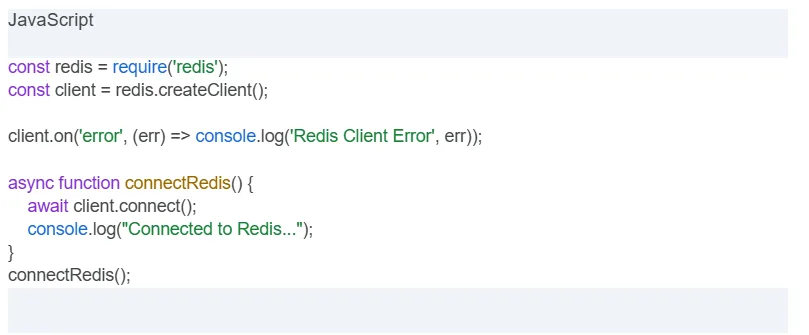
Establishing the Connection
Use the official redis library to bridge your application with the data store:
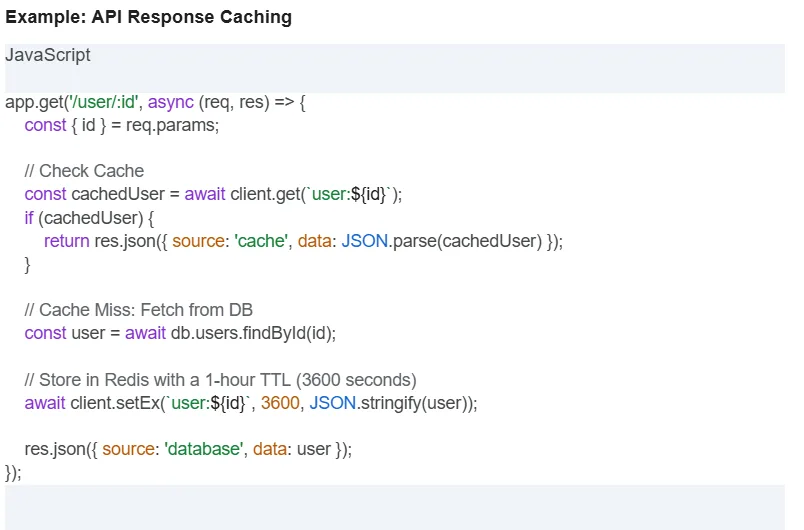
Advanced Caching Strategy: The Logic Flow
To maximize performance, implement a “Cache-Aside” pattern. This ensures that the application only hits the database when the required data is missing from the cache.
High-Level Optimization Techniques for Redis

For high-traffic environments, simple key-value storage isn’t enough. To truly “cache like a pro,” you must implement strategies that safeguard data integrity and system availability.
1. Intelligent Invalidation & TTL Strategies
The most common caching pitfall is serving “stale” data. While Time To Live (TTL) is the standard defense, sophisticated applications use a mix of strategies:
- Volatile-LRU Policy: Configure Redis to automatically evict the “Least Recently Used” keys when memory is full, ensuring your most relevant data stays accessible.
- Event-Driven Invalidation: Instead of waiting for a timer to expire, trigger a cache deletion (purge) the moment your primary database is updated. This ensures 1:1 data consistency.
2. Scaling with Redis Cluster Architecture
Single-instance Redis is often a bottleneck for enterprise applications. Redis Cluster provides a way to run a Redis installation where data is automatically shared across multiple nodes.
- Horizontal Scaling: It allows you to continue operations even if a subset of nodes fails.
- Data Sharding: Redis automatically partitions your data across 16,384 hash slots, allowing you to handle millions of requests per second by distributing the load.
3. Advanced Data Compression (Gzip/Brotli)
Memory (RAM) is your most expensive resource. When caching large JSON objects or serialized data, storing them in raw format is inefficient.
- The Trade-off: By implementing Gzip or Brotli compression in your Node.js logic before the
SETcommand, you can reduce memory footprint by up to 70%. - CPU vs. RAM: While this adds a negligible millisecond to the CPU processing time in Node.js, the cost savings on Redis memory and the speed gain in network transfer often make it the superior choice.
4. Security Hardening & Zero-Trust Access
Redis is designed for performance, not inherently for public-facing security. To protect your data:
- TLS/SSL Encryption: Ensure that all data moving between your Node.js app and the Redis server is encrypted to prevent “man-in-the-middle” attacks.
- ACLs (Access Control Lists): Moving beyond a single global password, use Redis ACLs to limit specific Node.js services to only the commands they need (e.g., a service might only have
GETpermissions, notFLUSHALL). - Rename Dangerous Commands: In your
redis.conf, rename or disable commands likeCONFIGorKEYSto prevent accidental or malicious system-wide changes.
How to Resolve the “Arunangshu Das” Logic Challenge
If you are managing high-performance workloads (often referred to in the community as the “Arunangshu” scenario where speed and SEO must coexist), the solution lies in Hybrid Caching:
- Layer 1 (Local Memory): Use an in-process cache (like
node-cache) for the most aggressive, sub-millisecond needs. - Layer 2 (Redis): Use Redis for distributed data that all your server instances need to share.
- Layer 3 (Database): The final source of truth.

Strategic Summary
Integrating Redis into your Node.js ecosystem is more than a performance “patch”; it is a structural upgrade. By reducing database strain and slashing response times, you create a digital product that is both robust and highly responsive.
Conclusion
Redis is a powerful tool for enhancing the performance of Node.js applications. Whether it’s for simple use cases or more complex architectures, Redis and Node.js make an unbeatable combination.
You may also like:
1) How do you optimize a website’s performance?
2) Change Your Programming Habits Before 2025: My Journey with 10 CHALLENGES
3) Senior-Level JavaScript Promise Interview Question
4) What is Database Indexing, and Why is It Important?
5) Can AI Transform the Trading Landscape?
Read more blogs from Here
Share your experiences in the comments, and let’s discuss how to tackle them!
Have you implemented Redis in your latest project? Share your challenges and performance wins in the comments below!
Follow me on Linkedin for more technical insights.
Frequently Asked Questions (FAQ)
1. Is Redis a replacement for a traditional database?
No. Redis is primarily an in-memory store. While it offers persistence options, it is best used alongside a traditional database (like PostgreSQL or MongoDB) to handle frequently accessed, temporary data.
2. What happens if the Redis server crashes?
Since Redis stores data in RAM, any data not configured for persistence (AOF/RDB) will be lost. However, for caching purposes, the application can simply “fall back” to the primary database while Redis restarts.
3. When should I avoid using Redis?
Avoid using Redis for massive datasets that are rarely accessed, as RAM is significantly more expensive than disk storage.
