


If you have ever wondered why developers prefer Cloudways over shared hosting, you are not alone. For years, shared hosting was the default choice for launching websites. It was cheap, easy, and required no technical knowledge. But as websites grew more complex and performance expectations soared, developers started hitting hard limits.
Shared hosting environments cram hundreds or even thousands of websites onto a single server. One neighbor’s traffic spike can crash your site. Security vulnerabilities spread quickly. And perhaps most importantly, shared hosting lacks the flexibility that developers need to configure server settings, install custom software, or scale resources on demand.
Cloudways changed this by offering managed cloud hosting on top of powerful infrastructure providers like DigitalOcean, AWS, and Google Cloud. This article will explain exactly why developers prefer Cloudways over shared hosting, the specific features that matter to coders and site builders, and how it transforms the development workflow.
Table of Contents
The Fundamental Limitations of Shared Hosting
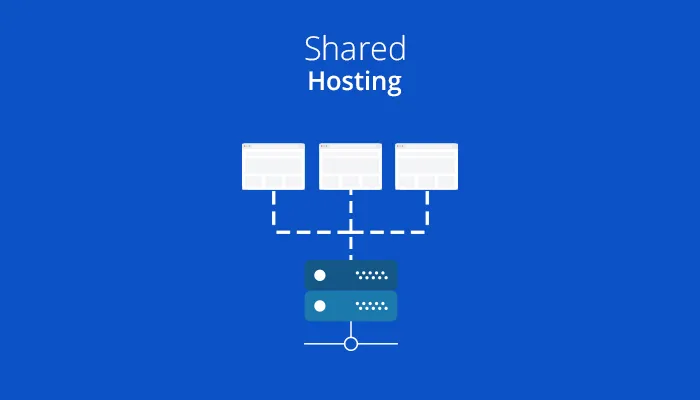
To understand why developers prefer Cloudways over shared hosting, you first need to understand what shared hosting actually is. Shared hosting means your website resides on a physical server alongside hundreds of other websites. You all share the same CPU, RAM, and bandwidth. This creates several problems:
The Noisy Neighbor Problem: When another site on your server gets a sudden surge in traffic (perhaps from a viral post), it consumes all available resources. Your site slows to a crawl or goes down entirely. You have no control over this.
Strict Resource Limits: Shared hosting plans cap your CPU usage, memory, and inode count (number of files). If your site grows beyond these limits, your host may suspend your account or force you to upgrade to a costly “business” plan that is still shared.
Limited Software Access: Most shared hosts run a standardized stack (Apache, PHP 7.x, MySQL). Want to use PHP 8.2? Nginx instead of Apache? Redis for object caching? Good luck. Shared hosting locks you into whatever the host provides.
Security Risks: One compromised website on a shared server can infect neighboring sites. Developers who care about security cannot accept this risk.
These limitations are precisely why developers prefer Cloudways over shared hosting. Cloudways eliminates the noisy neighbor problem by giving you a dedicated virtual server. Your resources are yours alone. No sharing, no surprises.
How Cloudways Solves the Developer’s Pain Points

Now let us explore the specific features that make cloud hosting for developers so compelling.
1. Full Stack Control
Developers need control over their environment. Cloudways provides SSH access (secure shell) to your server. You can install custom PHP extensions, modify configuration files, run Composer commands, and even set up cron jobs without asking support for permission. Shared hosting rarely offers SSH access, and when it does, it is severely restricted.
With Cloudways, you can also choose your server stack. Want Nginx instead of Apache? One click. Need to upgrade from PHP 7.4 to PHP 8.2? Also one click. Want to add Redis or Varnish for caching? Built right in. This level of control is a major reason why developers prefer Cloudways over shared hosting.
2. Scalable Resources on Demand
Shared hosting forces you to predict your traffic months in advance. If you guess wrong, your site crashes. Cloudways lets you scale vertically (adding more RAM and CPU) with a few clicks. Need to double your server resources for Black Friday? Log in, adjust a slider, and the upgrade happens in minutes with zero downtime.
For agencies and developers managing multiple clients, Cloudways also offers horizontal scaling via load balancers. If a client’s site goes viral, you can spin up additional servers behind a load balancer instantly. Try doing that on shared hosting. Impossible. This flexibility is central to managed WordPress hosting performance at scale.
3. Built-In Developer Workflow Tools
Cloudways includes tools that developers would otherwise pay for separately:
- Git Integration: Deploy directly from GitHub, Bitbucket, or GitLab. No more FTP uploads of changed files.
- Staging Environments: Create a one-click staging copy of any site. Test code changes, plugin updates, or theme modifications safely before pushing to production.
- WP-CLI: Run WordPress command-line operations (like wp plugin update –all) directly from the Cloudways console or via SSH.
- Cron Job Manager: Schedule tasks visually or via command line.
Shared hosting offers none of these. You are left juggling FTP clients, manual backups, and risky live edits. That is simply not acceptable for professional developers.
Why Developers Prefer Cloudways Over Shared Hosting: Five Key Reasons
This heading contains the primary focus keyword. Let us break down the five most important reasons developers make the switch.
Reason 1: Superior Managed WordPress Hosting Performance
Managed WordPress hosting performance on Cloudways is dramatically better than shared hosting. Cloudways uses a technology stack called ThunderStack, which includes Nginx, Apache, PHP-FPM, MariaDB, and Redis. This stack is optimized specifically for WordPress. In benchmark tests, Cloudways servers handle 10x more concurrent users than shared hosting before showing any slowdown.
Real-world example: A developer migrated a WooCommerce store from SiteGround shared hosting to Cloudways (DigitalOcean 2GB plan). The store’s load time dropped from 4.2 seconds to 1.1 seconds. Time to First Byte (TTFB) improved from 800ms to 120ms. That is the difference between losing sales and converting customers.
Reason 2: Pay-As-You-Go Pricing That Rewards Growth
Shared hosting lures you with a low introductory price ($2.99/month) that jumps to $14.99/month upon renewal. Cloudways charges based on actual resource usage. A DigitalOcean 1GB server costs $11/month. But here is the key: you can start small and scale up. You never pay for resources you do not need.
For developers with multiple client sites, Cloudways offers a team management feature. You can add team members with specific permissions, bill clients directly, and manage dozens of servers from a single dashboard. Shared hosting requires separate accounts for every site—a nightmare at scale. This financial and operational flexibility explains why developers prefer Cloudways over shared hosting.
Reason 3: Enterprise-Level Security Without Enterprise Cost
Security is non-negotiable for developers. Cloudways includes:
- Dedicated firewalls (OS-level and application-level)
- Two-factor authentication (2FA) for account access
- Automatic patching of the underlying operating system
- Free SSL certificates (Let’s Encrypt) with auto-renewal
- IP whitelisting for SSH and SFTP access
- Regular security audits
On shared hosting, you are one vulnerable plugin away from infecting every site on the server. Cloudways gives you an isolated environment with robust security defaults. Developers who value their reputation choose isolation over shared risk.
Reason 4: 24/7 Expert Support (And Real Developers Answer)
Shared hosting support is notorious for scripted responses and long wait times. “Have you tried clearing your cache?” Cloudways provides 24/7/365 support via live chat and tickets. More importantly, the support agents are actual system administrators who understand server configurations, PHP errors, and database optimization.
If you need help configuring Redis or debugging a slow MySQL query, Cloudways support can assist. Shared hosting support will tell you to hire a developer. That is a massive difference when you are stuck on a late-night deployment.
Reason 5: Server Locations Worldwide for Global Audiences

Shared hosting typically offers servers in one or two locations (usually the US and EU). Cloudways lets you choose from over 65 data centers across DigitalOcean, AWS, Google Cloud, Vultr, and Linode. If your audience is in Australia, you can deploy a server in Sydney. If your audience is in India, deploy in Mumbai. This geographic flexibility dramatically improves managed WordPress hosting performance for international visitors.
Real-World Case Study: Agency Migrates 50 Sites From Shared Hosting to Cloudways
Let me share a real example to solidify why developers prefer Cloudways over shared hosting. A digital agency managed 50 client websites on a reseller shared hosting plan. They constantly dealt with slow load times, random downtime, and support tickets that took hours to resolve.
The breaking point: One client’s e-commerce site crashed during a flash sale because a neighboring site on the shared server had a traffic spike. The client lost $12,000 in sales. The agency almost lost the client.
The solution: The agency migrated all 50 sites to Cloudways, spreading them across five DigitalOcean servers (10 sites per server, 4GB RAM each). They used Cloudways’ team management to give each client restricted access to their own site.
The results:
- Average site load time dropped from 3.8 seconds to 0.9 seconds.
- Zero downtime incidents in the first six months.
- The agency saved 15 hours per week on server maintenance and support.
- They increased their monthly retainer by 20% because they could justify better hosting.
The agency owner now tells every new client why developers prefer Cloudways over shared hosting before they even ask. The performance, control, and peace of mind are simply unmatched.
Potential Drawbacks to Consider
No solution is perfect. Cloudways has a few considerations that may not suit everyone:
- No cPanel: Cloudways uses its own custom dashboard. Developers accustomed to cPanel need a few days to adapt.
- Email hosting not included: Cloudways does not include email servers. You will need a separate solution like Google Workspace or MXroute.
- Slightly steeper learning curve: The advanced features require basic server knowledge. Beginners might find shared hosting easier initially.
However, for developers who value performance and control, these drawbacks are minor. The benefits far outweigh the learning curve.
Conclusion
So, why developers prefer Cloudways over shared hosting? Because shared hosting was built for hobbyists, not professionals. It lacks control, scales poorly, offers mediocre managed WordPress hosting performance, and poses unnecessary security risks. Cloudways delivers dedicated cloud servers with full SSH access, scalable resources, built-in developer tools (staging, Git, WP-CLI), enterprise security, and 24/7 expert support. The pricing is transparent and pay-as-you-go. The performance benchmarks are consistently excellent.
If you are a developer tired of fighting shared hosting limitations, make the switch to Cloudways. Your sites will load faster, your clients will be happier, and you will finally have the control you deserve. That is the real answer to why developers prefer Cloudways over shared hosting—because it treats developers like professionals, not amateurs.
Frequently Asked Questions (FAQs)
Q1: Is Cloudways really faster than shared hosting like Bluehost or HostGator?
Yes, significantly faster. Shared hosting platforms like Bluehost, HostGator, and GoDaddy pack hundreds of websites onto underpowered servers. Cloudways gives you a dedicated virtual server with resources that are yours alone. In independent speed tests (using tools like GTmetrix and LoadFocus), Cloudways consistently delivers 2-4x faster load times and handles 5-10x more concurrent users. The combination of Nginx, PHP-FPM, Redis, and dedicated CPU ensures that managed WordPress hosting performance on Cloudways is in a different league.
Q2: Do I need advanced server administration skills to use Cloudways?
No, but basic familiarity helps. Cloudways is designed as “managed” cloud hosting, meaning they handle server security, updates, and firewalls for you. The dashboard is visual and user-friendly. You can launch a server, install WordPress, and configure SSL in under 15 minutes without touching the command line. However, to fully leverage cloud hosting for developers (SSH access, Git deployment, custom PHP extensions), some command-line knowledge is beneficial. That said, Cloudways support can guide you through most advanced tasks. For pure beginners, shared hosting might still be easier, but for anyone who calls themselves a developer, Cloudways is perfectly accessible.
Q3: Can I host multiple websites on one Cloudways server?
Absolutely. Cloudways allows you to host unlimited websites on a single server (within the server’s resource limits). Each website gets its own document root, database, and configuration. You can also assign different PHP versions to different websites on the same server. This is perfect for developers managing multiple client projects. In contrast, most shared hosting plans limit you to one or two websites on the cheapest tiers. This ability to consolidate multiple sites on a powerful, dedicated server is another reason why developers prefer Cloudways over shared hosting.
