


Email marketing has become an indispensable tool for businesses of all sizes, but managing campaigns manually can be time-consuming. This is where email marketing SaaS platforms step in. These tools automate repetitive tasks, streamline workflows, and allow marketers to focus on strategy rather than execution.
By leveraging features such as pre-built templates, audience segmentation, and scheduling, teams can save hours each week without compromising on quality. Whether you are a small business owner or part of a marketing team, implementing email marketing SaaS can drastically improve efficiency, reduce errors, and enhance customer engagement.
In this article, we’ll explore how these platforms can transform your marketing efforts and free up valuable time.
Table of Contents
Top 5 Ways Email Marketing SaaS Automates Routine Tasks
Automation is the core benefit of email marketing SaaS, helping businesses streamline their marketing efforts while saving hours of manual work every week. Below are the top ways these platforms simplify routine tasks and enhance productivity:
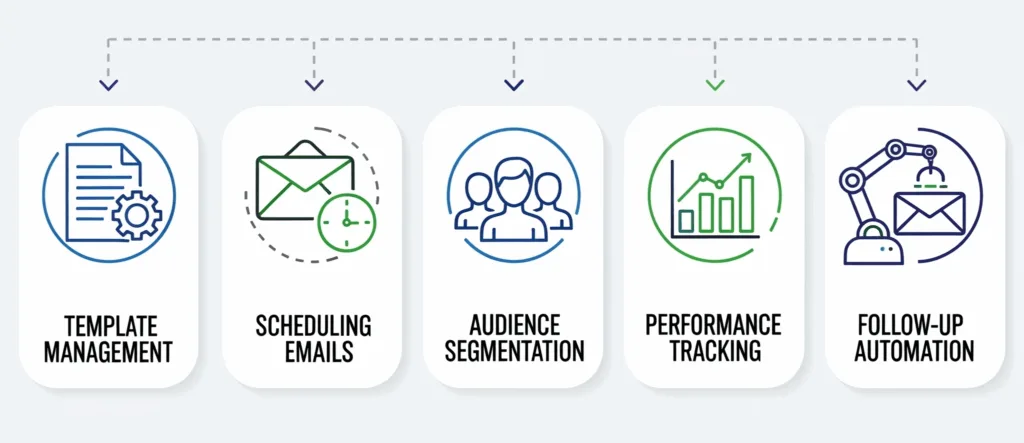
- Template Management
Most email marketing SaaS platforms offer a library of customizable templates that are designed for various purposes like newsletters, promotions, and announcements. By selecting and adjusting these templates, marketers no longer need to build campaigns from scratch. This saves considerable time, especially for teams that run frequent campaigns.
- Scheduling Emails
Scheduling tools let you prepare campaigns in advance and choose specific dates and times for delivery. This ensures your emails go out consistently, even if you are handling multiple projects or away from your desk. It also helps you plan ahead and maintain a steady flow of communication with your audience.
- Audience Segmentation
Segmenting your audience based on location, past behavior, or engagement allows you to tailor content without spending hours manually filtering contacts. By automating segmentation, you ensure that the right message reaches the right person at the right time, boosting conversion rates.
- Performance Tracking
Built-in analytics dashboards display key metrics like open rates, click-throughs, and subscriber growth instantly. Instead of compiling data across multiple tools, you get real-time feedback, allowing you to tweak campaigns quickly and effectively.
- Follow-up Automation
Triggered workflows such as welcome emails, order confirmations, and abandoned cart reminders are automatically sent based on user actions. This eliminates the need for constant monitoring and helps nurture leads, build trust, and encourage repeat engagement without additional effort.
Why Every Business Needs Email Marketing SaaS
Adopting email marketing SaaS is more than just a way to save time—it’s a powerful strategy that helps businesses improve communication, boost efficiency, and grow sustainably. These platforms make it easier to deliver the right message to the right audience at the right time, which can dramatically enhance customer engagement and satisfaction.
One of the biggest advantages is access to robust analytics. You can track open rates, click-throughs, conversion rates, and customer preferences without manually compiling data. This helps you understand what works and what doesn’t, allowing you to fine-tune your campaigns for better results.
For small teams or businesses with limited resources, email marketing SaaS offers scalability. As your subscriber list grows, you don’t have to worry about increased workloads because automated tools take care of segmentation, scheduling, and reporting. This ensures that growth doesn’t come at the cost of efficiency.
Moreover, many platforms offer built-in compliance with anti-spam laws and privacy regulations. This saves you from navigating complex legal requirements and worrying about deliverability issues, allowing you to focus on creating value for your audience.
Ultimately, email marketing SaaS is a strategic investment. It helps businesses build lasting relationships, improve customer loyalty, and achieve measurable outcomes without the overhead of manual processes. Whether you are a startup or an established brand, leveraging these tools ensures you stay competitive while freeing up time for creative and strategic work.
Key Features of Email Marketing SaaS That Save You Time
Email marketing SaaS platforms come packed with features designed to streamline your workflow and eliminate repetitive tasks. Here’s how they help you get more done in less time:
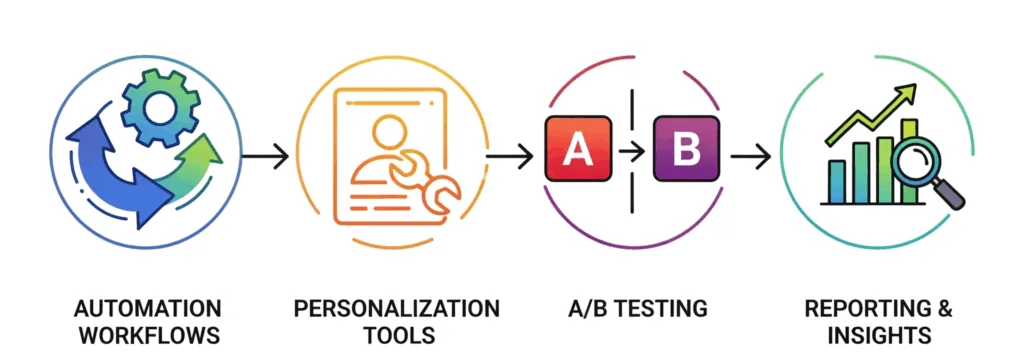
1. Automation Workflows
These allow you to create predefined triggers that send emails based on customer actions, such as signing up or making a purchase. This removes the need for manual follow-ups, ensuring timely communication without constant oversight.
2. Personalization Tools
With dynamic content blocks and automated data integration, you can craft personalized emails quickly. This saves time on manual segmentation and enhances engagement by making your messages more relevant.
3. A/B Testing
Testing multiple versions of your emails becomes effortless with built-in tools. You can experiment with subject lines, layouts, and content to find the most effective combination without extra time spent on analysis.
4. Reporting and Insights
Automated reports track your campaign’s performance in real time. Instead of gathering data from multiple sources and building spreadsheets, you can review trends, adjust strategies, and act on insights with just a few clicks.
Together, these features transform email marketing from a laborious task into a smart, automated process. By reducing manual work and improving targeting, email marketing SaaS helps you save hours each week while ensuring your campaigns run smoothly and effectively.
How to Implement Email Marketing SaaS in Your Workflow (Step-by-Step)?
Integrating email marketing SaaS into your daily operations is easier than it sounds—and once set up, it can save you hours of manual work each week. Here’s a simple step-by-step process to get started:
- Choose the Right Platform
Start by selecting a tool that fits your business goals and budget. Popular options like Mailchimp, Sendinblue, and ActiveCampaign offer different features, so compare automation capabilities, template options, and reporting tools before making a choice.
- Import and Segment Contacts
Upload your existing contact list to the platform and organize it into segments based on factors like location, purchase behavior, or engagement levels. This ensures your emails are targeted, relevant, and effective without spending hours managing lists manually.
- Create Email Templates
Set up templates for recurring campaigns such as newsletters, product announcements, promotions, or event invitations. Templates help you maintain brand consistency and quickly roll out campaigns without starting from scratch each time.
- Set Up Automation Workflows
Create workflows that send emails based on triggers such as sign-ups, purchases, or abandoned carts. Automated follow-ups, welcome emails, and reminders keep your audience engaged while reducing the need for constant supervision.
- Schedule Reports and Track Performance
Use built-in reporting tools to schedule weekly or monthly reports. Regularly reviewing metrics like open rates and click-throughs helps you fine-tune your campaigns and stay on top of your goals without manually compiling data.
Once you’ve implemented these steps, your email marketing efforts will run more smoothly and efficiently. Automation allows you to focus on creativity, customer experience, and strategy—while the platform handles the repetitive tasks.
FAQS
Beyond just sending emails, how does a SaaS platform actually save me time?
Modern Email Marketing SaaS automates the most time-consuming tasks. This includes segmenting your audience based on behavior automatically, setting up multi-step drip campaigns that run for months without manual intervention, and using AI to suggest the best send times. You set it up once, and it saves you hours of repetitive work every week.
I’m already using a basic email tool. What specific features should I look for to maximize time savings?
Focus on features that handle manual work for you. Key time-savers include: Advanced Automation (welcome series, abandoned cart flows), Drag-and-Drop Builders (no coding required for templates), Dynamic Content (emails that change based on who’s reading them), and Robust Analytics & A/B Testing (all in one place, so you’re not juggling spreadsheets).
Is there a learning curve that might cost me time initially?
While there is an initial setup and learning investment, the long-term time savings are significant. Most platforms are designed for user-friendliness with intuitive interfaces, extensive knowledge bases, and onboarding tutorials. The few hours spent learning will pay for itself many times over in the weeks and months that follow.

