


Create a sales funnel with Systeme.io and you can turn visitors into leads and customers without relying on several different marketing platforms. Systeme.io provides tools for building landing pages, collecting leads, sending automated emails, presenting offers, and processing sales from one platform.
Whether you are selling an online course, digital product, coaching service, or physical product, a well-designed funnel can help guide potential customers through each stage of the buying process. The good news is that you do not need advanced coding or web-development skills to get started.
In this guide, you will learn how to create a sales funnel with Systeme.io, from choosing your funnel goal to publishing your pages and setting up automation.
Table of Contents
What Is a Sales Funnel?
A sales funnel is a series of steps designed to guide potential customers from their first interaction with your business to a purchase.
A typical funnel may include:
- A landing page that attracts visitors
- An opt-in form that collects contact information
- An email sequence that builds interest
- A sales page that presents an offer
- A checkout page where the customer completes the purchase
- A thank-you page that confirms the transaction
The exact structure depends on your business and marketing objective. For example, a course creator might offer a free guide before promoting a paid course, while an ecommerce business may send visitors directly to a product page.
Why Use Systeme.io for Sales Funnels?
Systeme.io is designed as an all-in-one marketing platform. It combines sales funnels with email marketing, automation, online courses, affiliate management, websites, and other business tools.
One major benefit is that you do not have to connect multiple platforms just to build a basic funnel. You can create your pages, manage contacts, configure automated emails, and sell products from the same dashboard.
The platform also provides templates and a visual page editor, making it accessible to beginners.
How to Create a Sales Funnel with Systeme.io?
Now that you understand the basics, let’s look at the process step by step.
Step 1: Define Your Funnel Goal
Before building anything, decide what you want your funnel to accomplish.
Your goal could be to:
- Generate email subscribers
- Sell a digital product
- Promote an online course
- Book coaching calls
- Sell a physical product
- Generate leads for a service
Having one clear objective will make the rest of your funnel easier to design.
For example, if you sell an online course, your funnel might be:
Free guide → Email sequence → Sales page → Checkout → Course access
If you offer consulting services, the funnel could be:
Lead magnet → Email nurturing → Booking page → Consultation
Step 2: Create a Systeme.io Account
To begin building your funnel, create an account on Systeme.io.
After logging in, you will see your dashboard, where you can access features such as sales funnels, contacts, email campaigns, automation, products, and other tools.
If you are new to the platform, starting with the free plan can be a convenient way to familiarize yourself with the interface before upgrading.
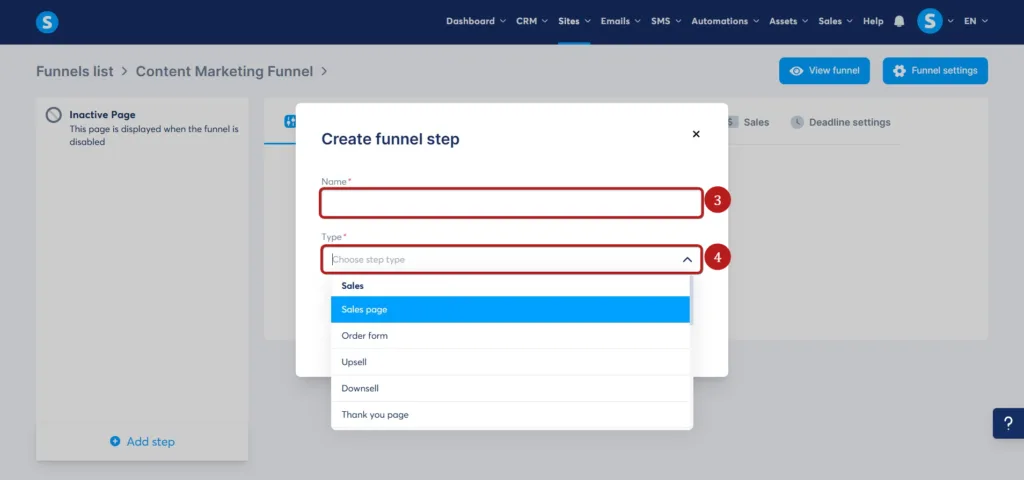
Step 3: Create a New Funnel
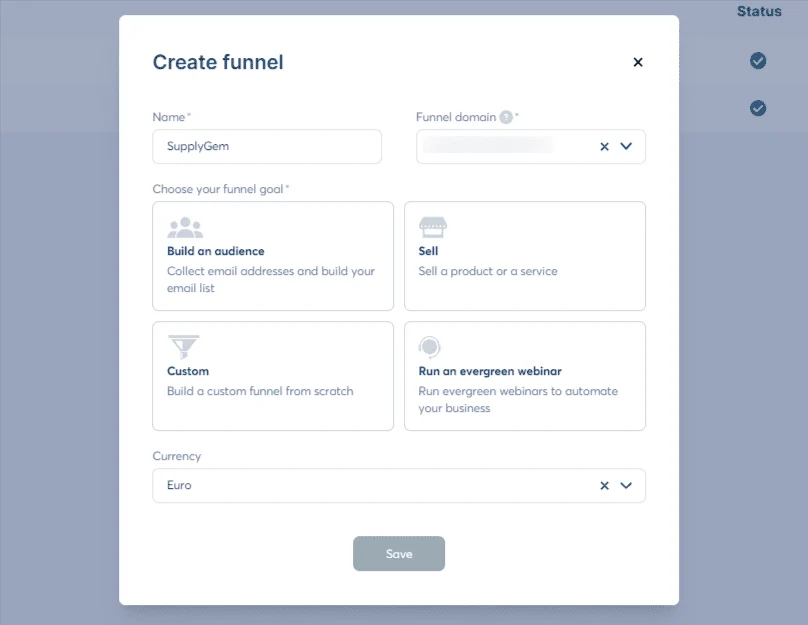
Navigate to the sales funnel section and choose the option to create a new funnel.
You will generally need to select the objective of your funnel. Depending on your campaign, you may want to collect email addresses, sell a product, or create another type of customer journey.
Give your funnel a clear name so you can easily identify it later, particularly if you plan to create multiple campaigns.
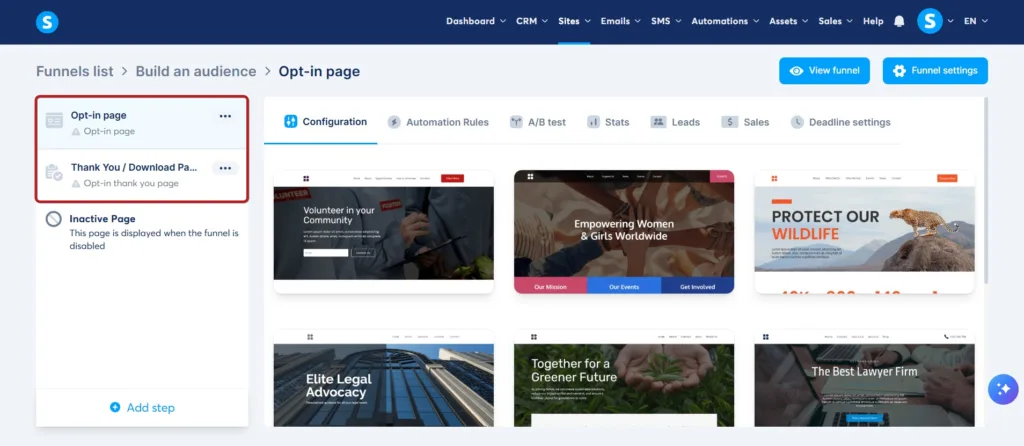
Step 4: Build Your Landing Page
Your landing page is often the first major interaction visitors have with your funnel.
Choose a template or create your page using the visual editor. Keep the design simple and focus on one primary action.
A good landing page usually contains:
- A clear headline
- A short explanation of the offer
- Benefits of taking action
- A relevant image or visual
- An email form or call-to-action button
- Trust elements when appropriate
Avoid adding unnecessary navigation links or competing calls to action. The goal is to make it obvious what the visitor should do next.
Step 5: Add a Lead Magnet
If your objective is lead generation, offer something valuable in exchange for the visitor’s email address.
A lead magnet could be:
- An ebook
- Checklist
- Free course
- Template
- Webinar
- Discount
- Free consultation
For example, a marketing consultant could offer a free “30-Day Social Media Content Calendar.”
The lead magnet should be closely related to the product or service you eventually want to sell. This makes it easier to transition from lead generation to sales.
Step 6: Set Up Your Email Campaign
After collecting leads, you need to maintain communication with them.
Systeme.io allows you to create email campaigns and automated sequences. You can use these emails to educate subscribers, demonstrate your expertise, address common problems, and introduce your offer.
A simple sequence might look like this:
Email 1: Deliver the free resource
Email 2: Explain a common problem
Email 3: Provide useful advice
Email 4: Introduce your product
Email 5: Share benefits and address objections
Email 6: Encourage the subscriber to take action
The exact number of emails depends on your audience and product.
Step 7: Create Your Sales Page
Your sales page should explain why the visitor should purchase your product or service.
Start with the problem your customer wants to solve. Then explain your solution and clearly communicate the benefits.
A strong sales page can include:
- Attention-grabbing headline
- Product benefits
- Features
- Customer testimonials
- Frequently asked questions
- Pricing
- Guarantee information, when applicable
- Strong call to action
Avoid focusing only on features. Explain how your product can help the customer achieve a specific outcome.
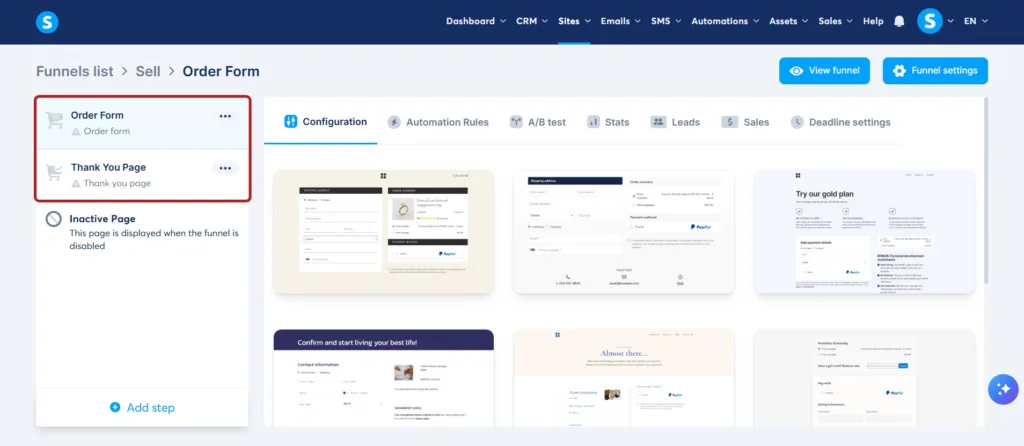
Step 8: Configure the Checkout Page
After creating your sales page, set up the checkout process.
Add the relevant product, price, payment options, and customer information fields. Keep the checkout experience straightforward because unnecessary complexity can cause potential customers to abandon their purchase.
Before launching, test the entire checkout process yourself.
Step 9: Create a Thank-You Page
After completing a purchase or submitting a form, visitors should be directed to a relevant thank-you page.
For buyers, this page can confirm their order and explain what happens next.
For leads, it can provide instructions for accessing the free resource or encourage them to take another appropriate action.
A thank-you page can also introduce a related offer, invite visitors to join a community, or direct them to useful content.
Step 10: Connect Automation
Automation is one of the most useful parts of building a funnel with Systeme.io.
You can create rules that perform actions when visitors or customers take specific steps.
For example:
Visitor submits form → Add contact → Send email → Apply tag → Start campaign
Another workflow could be:
Customer purchases course → Confirm purchase → Enroll student → Send welcome email
Automation allows your funnel to continue working even when you are not manually managing every customer.
How to Optimize Your Systeme.io Sales Funnel?
Creating the funnel is only the beginning. You should monitor its performance and make improvements over time.
Improve Your Headlines
Your headline should immediately communicate what the visitor can gain. Test different approaches to find which message generates better engagement.
Make Your CTA Clear
Use one obvious call to action. Instead of vague buttons such as “Click Here,” consider action-focused language such as “Get the Free Guide” or “Start the Course.”
Test Your Funnel
Go through the funnel as if you were a customer. Check forms, links, emails, checkout, payment processing, and product delivery.
A broken link or confusing step can cost potential sales.
Track Conversion Rates
Pay attention to metrics such as landing-page conversion rate, email engagement, sales conversion rate, and checkout completion.
If many visitors reach your sales page but few purchase, your offer, messaging, pricing, or sales page may need improvement.
Common Mistakes to Avoid
When you create a sales funnel with Systeme.io, avoid making the process unnecessarily complicated.
One common mistake is adding too many steps. Every additional step can create another opportunity for visitors to leave.
Another mistake is focusing entirely on selling. Your funnel should provide value and build trust before asking for a purchase.
Poor mobile optimization is another issue. Many visitors browse websites on smartphones, so check that your pages and forms work properly on smaller screens.
Finally, avoid launching a funnel without testing it. Always complete the entire customer journey before sending real traffic.
Final Thoughts
Learning how to create a sales funnel with Systeme.io can be relatively straightforward because the platform combines many of the tools required for an online marketing campaign.
You can create landing pages, collect leads, send automated emails, present products, process purchases, and deliver digital products within one system. The key is not simply building a funnel but creating a customer journey that provides value and moves people naturally toward your offer.
Start with one clear goal, keep the funnel simple, test every step, and use performance data to improve it over time. With consistent optimization, your Systeme.io funnel can become an important part of your online marketing strategy.
Frequently Asked Questions
1. Can beginners create a sales funnel with Systeme.io?
Yes. Systeme.io is designed to be accessible to beginners and provides visual editors, templates, and integrated marketing tools. You do not need advanced coding knowledge to build a basic funnel.
2. What should a Systeme.io sales funnel include?
A basic funnel can include a landing page, lead form, email sequence, sales page, checkout page, and thank-you page. The exact structure depends on your marketing goal and product.
3. Can I automate emails in Systeme.io?
Yes. Systeme.io provides email campaigns and automation tools that can send messages based on actions taken by subscribers or customers.
4. How can I improve my Systeme.io funnel?
Test different headlines, calls to action, offers, email messages, and page layouts. Monitor conversion rates and identify where visitors leave the funnel. Then make changes based on the data.
