


If you’ve spent any time online in the past year, you’ve likely seen the stunning, surreal visuals that seem to appear from nowhere—photorealistic portraits, futuristic landscapes, and hyper‑detailed logos all created by artificial intelligence.
The explosion of AI image generators has given creators, marketers, and hobbyists the power to turn text prompts into professional‑grade visuals in seconds. But with so many options available, which one actually delivers on its promises?
I’ve spent months testing the leading platforms—pushing each to its limits with the same prompts, comparing quality, speed, pricing, and ease of use. In this honest review of the top 5 AI image generators, I’ll cut through the hype and help you choose the best tool for your needs, whether you’re a graphic designer, a content creator, or just someone who loves creating art.
Table of Contents
What Makes a Great AI Image Generator?
Before we dive into the rankings, let’s establish the criteria I used to evaluate each tool:
- Image quality: Realism, detail, composition, and consistency across generations.
- Prompt adherence: How well the tool understands and executes complex prompts.
- Ease of use: Is the interface intuitive, especially for beginners?
- Speed & pricing: Value for money and how quickly images render.
- Customization: Control over aspect ratio, editing features, and output formats.
The Top 5 AI Image Generators Compared
Below is my honest breakdown of the five best AI image generators available today. I’ve included pricing, standout features, and the type of user each tool suits best.
1. MidJourney – The Artist’s Choice
Verdict: Unmatched artistic quality, but a steep learning curve.
MidJourney consistently produces images with the most artistic flair. Its latest version (v6) delivers incredible realism, lighting, and texture. If you’re looking for images that feel like they belong in a gallery or a high‑end ad campaign, this is the best AI image generator for quality.
Pros:
- Stunning aesthetic quality; excels at concept art, portraits, and cinematic scenes.
- Fine control with parameters like –stylize, –chaos, and –ar for aspect ratio.
- Active Discord community with constant updates.
Cons:
- Requires Discord; no standalone web app (though a web interface is in beta).
- Steeper learning curve for beginners.
- No free tier; pricing starts at $10/month.
Best for: Artists, designers, and anyone who prioritizes artistic excellence over ease of use.
2. DALL·E 3 (via ChatGPT Plus) – The All‑Rounder
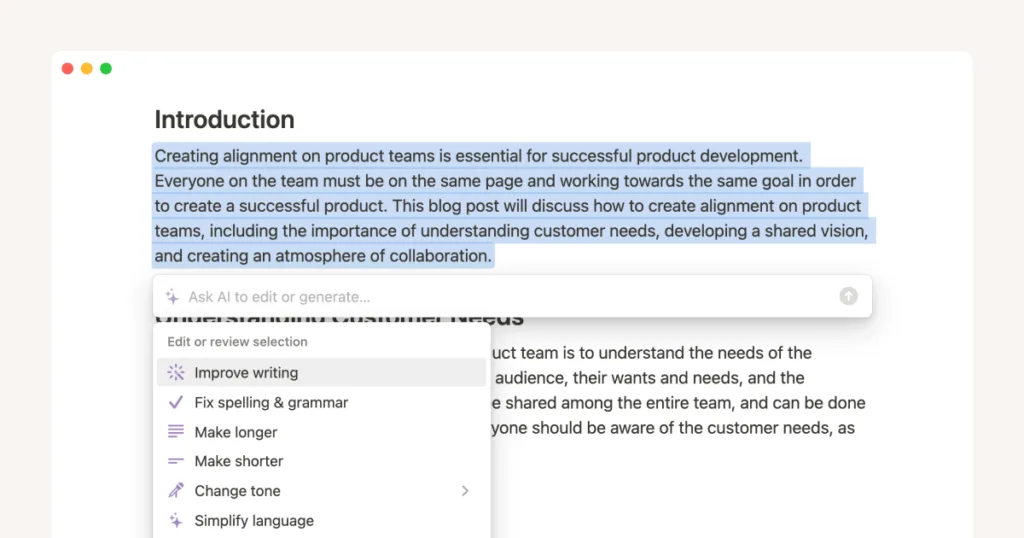
Verdict: Incredible prompt understanding, great for everyday creators.
OpenAI’s DALL·E 3, accessible through ChatGPT Plus, is the most user‑friendly option. It excels at understanding natural language prompts, so you don’t need to learn complex commands. It also handles text rendering (like signs or book covers) better than most competitors.
Pros:
- Exceptional prompt comprehension; works with conversational language.
- Integrated with ChatGPT—you can refine images through dialogue.
- Safe for commercial use with clear content policies.
Cons:
- Requires a ChatGPT Plus subscription ($20/month), which may be overkill if you only need images.
- Less stylistic variety compared to MidJourney; tends toward a polished, “clean” look.
- Limited editing features (no in‑painting or out‑painting within the same interface).
Best for: Bloggers, social media managers, and beginners who want simplicity and reliability.
3. Stable Diffusion – The Power User’s Playground
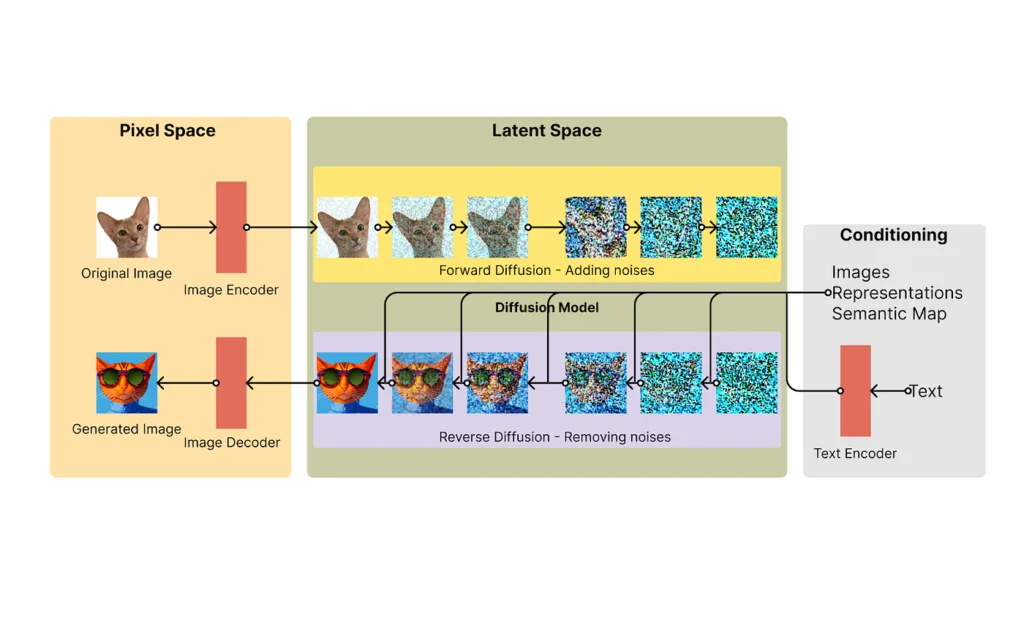
Verdict: Unmatched control and free to use, but requires technical comfort.
Stable Diffusion is open‑source, meaning you can run it locally on your own computer (if you have a decent GPU) or use it via various online platforms like Playground AI or Stability AI’s own tools. It offers the most flexibility, including custom models, in‑painting, and fine‑tuning.
Pros:
- Free and open‑source; no subscription required if run locally.
- Endless customization—you can train your own models or use community‑made ones.
- Available on multiple interfaces (Automatic1111, ComfyUI, etc.).
Cons:
- Steepest learning curve; not beginner‑friendly.
- Quality varies depending on the interface and model you use.
- Local installation requires technical know‑how and a powerful computer.
Best for: Developers, AI enthusiasts, and anyone who wants full control without ongoing costs.
4. Leonardo AI – The Best Free Tier
Verdict: Generous free plan with impressive quality; perfect for testing.
Leonardo AI has quickly become a favorite among beginners and pros alike. It offers a beautiful web interface, a wide range of pre‑trained models (including anime, 3D render, and photorealism), and one of the most generous free tiers—150 image generations per day.
Pros:
- Excellent free tier; you can use it for weeks without paying.
- User‑friendly web app with built‑in editing tools (background removal, upscaling).
- Active community and regular model updates.
Cons:
- Paid plans can be pricey if you exceed the free limits regularly.
- Sometimes slower during peak hours.
- Less artistic polish than MidJourney on complex prompts.
Best for: Hobbyists, small businesses, and anyone wanting to test AI image generation without financial commitment.
5. Canva Magic Media – The Convenience King
Verdict: Seamless integration for non‑designers.
Canva’s Magic Media (formerly “Text to Image”) is part of the Canva Magic Studio. It’s not the most powerful standalone generator, but for anyone already using Canva for design, it’s incredibly convenient. You can generate and edit images without leaving your design workspace.
Pros:
- Built into Canva—no need to switch apps.
- Easy to use; ideal for social media graphics, presentations, and quick visuals.
- Part of Canva Pro ($12.99/month) which includes a huge library of other design tools.
Cons:
- Less advanced than dedicated generators; limited control over style and composition.
- Quality is good but not exceptional for professional art prints.
- Requires a Canva Pro subscription to remove watermarks.
Best for: Social media managers, small business owners, and anyone already using Canva for design.
AI Image Generator Comparison Table
| Tool | Pricing | Best Feature | Ease of Use |
|---|---|---|---|
| MidJourney | $10–$60/mo | Artistic quality, fine‑tuned parameters | Moderate (Discord) |
| DALL·E 3 | $20/mo (ChatGPT Plus) | Natural language understanding | Easy |
| Stable Diffusion | Free (open‑source) | Full customization, local control | Difficult |
| Leonardo AI | Free tier; paid from $10/mo | Generous free plan, built‑in tools | Easy |
| Canva Magic Media | $12.99/mo (Canva Pro) | Seamless integration with design | Very Easy |
Which AI Image Generator Should You Choose?
The answer depends entirely on your use case:
- If you want the highest artistic quality and don’t mind a learning curve, MidJourney remains the best AI image generator for creatives.
- If you value simplicity and natural language, DALL·E 3 via ChatGPT Plus is the most beginner‑friendly option.
- If you’re a tinkerer or developer who wants unlimited free generations (with some effort), Stable Diffusion is unmatched.
- If you’re on a budget but want a polished experience, start with Leonardo AI—its free tier is generous enough for most hobbyists.
- If you already live in Canva, Magic Media will save you time and money by keeping everything in one tool.
Honest Thoughts on Limitations
No AI image generator is perfect. All of them struggle with:
- Consistent character rendering (the same person across multiple images).
- Complex text (though DALL·E 3 does best).
- Anatomical details (hands and fingers still trip up even the best models).
Also, remember that most platforms have content policies that restrict explicit, violent, or copyrighted material. Always check commercial usage rights—some tools (like MidJourney’s free tier) limit commercial use, while paid plans usually grant full rights.
FAQs
1. Which AI image generator is completely free?
Stable Diffusion is the only truly free option if you run it locally on your own computer. Leonardo AI offers a very generous free tier (150 images per day) that doesn’t require a credit card, making it the best choice for casual users who don’t want to pay.
2. Can I use AI‑generated images for commercial projects?
Yes, but you must check each platform’s terms. MidJourney’s paid plans give you full commercial rights. DALL·E 3 images can be used commercially as per OpenAI’s policy. Stable Diffusion’s open‑source outputs are generally free for commercial use. Always verify before selling or using in products.
3. Which AI image generator is best for realistic photos?
For photorealism, MidJourney v6 and DALL·E 3 are currently the best. MidJourney excels at lighting and texture, while DALL·E 3 often nails complex scenes with natural lighting. Leonardo AI’s “Cinematic” model is also strong for realistic portraits.
4. Do these tools require a powerful computer?
Only Stable Diffusion (when run locally) needs a good GPU (6GB+ VRAM recommended). All the other AI image generators mentioned run entirely in the cloud, so you can use them on any device with an internet connection—even a smartphone.
